
Downloader for Instagram - MassLoader
Extension Actions
Download Instagram Reels, Stories, Posts, Highlights & Videos. Mass download with sequence, date range or manual selection
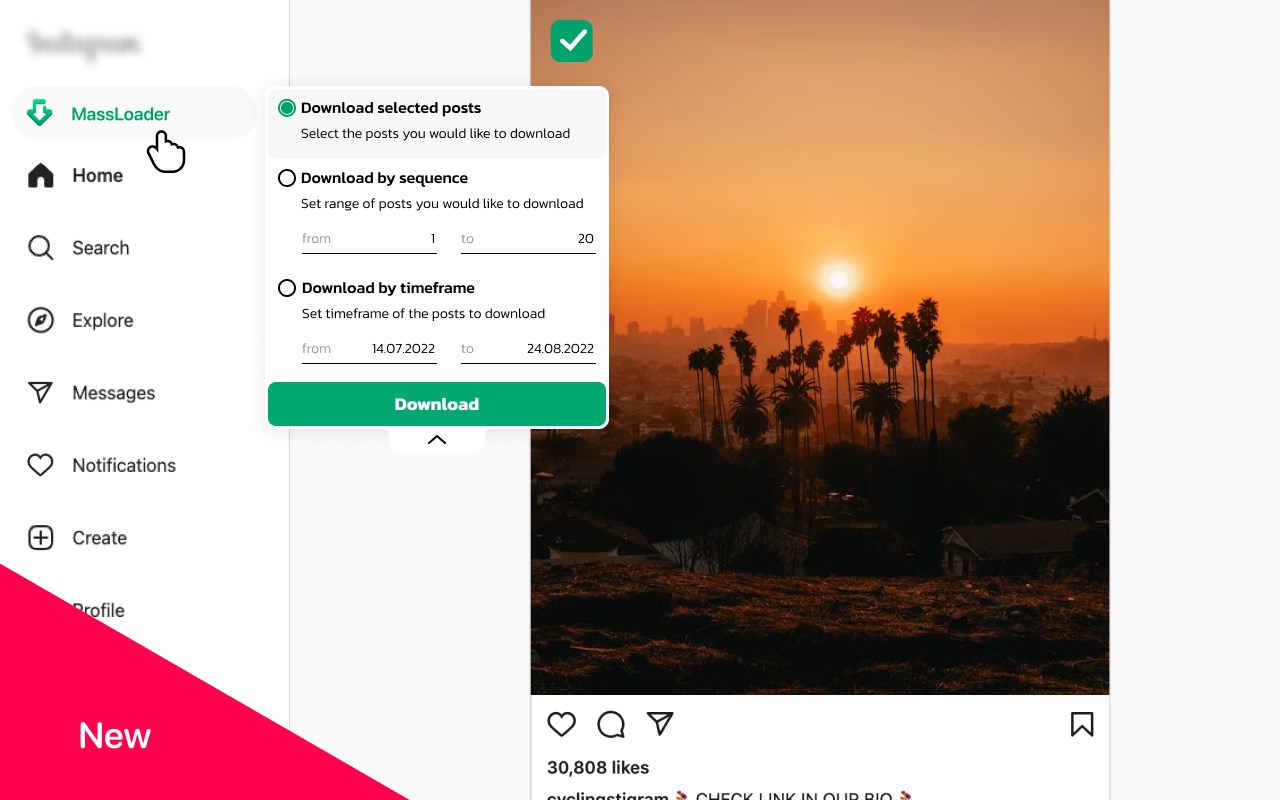
📥 Instagram Video Downloader for Reels, Stories, Posts & Highlights – Fast & Easy
MassLoader is an Instagram downloader Edge extension that lets you download Instagram videos, Reels, Stories, photo posts, and Highlights directly to your PC. Whether you need to save a single video or mass download multiple files, it’s all done inside your browser — no redirects, no login, no external services.
🔹 Download Instagram Content in One Click:
• Instagram Reels downloader – Grab short videos quickly from any profile
• Download Instagram Stories – Save story content before it disappears
• Instagram photo downloader – Download images from any post or gallery
• Download Instagram Highlights – Save curated stories collections
• Instagram video downloader – Works with standard and multi-post videos
• Download Instagram posts – Single or multiple, with full content structure
🧰 Multiple Download Options:
Choose how you want to collect Instagram content:
• By post range – Select posts 10 to 150 and download in sequence
• By date range – Save all content posted within a specific timeframe
• Manual selection – Pick individual posts with checkboxes
• By hashtag or location – Download content by topics or geotags
Each download is organized into folders and packed as ZIP files, sorted by creator.
⚙️ Key Features:
• Works as an Instagram downloader for PC — directly from Edge
• No need to switch tabs or use external tools
• Mass download Instagram Reels, Stories, or Posts at once
• Saves content with original resolution and structure
• Supports both classic and updated Instagram interface layouts
• Downloads simulate standard user behavior — safe and smooth
👥 Built For:
• Users looking to download Instagram videos to desktop
• SMM managers downloading client Stories and posts
• Creators collecting Reels and Highlights
• Anyone who needs a reliable Instagram video downloader Edge extension
💡 Why Use MassLoader?
• Download Instagram content with sequence control or by time
• Save Reels, Stories, and posts directly from Instagram
• Skip fake sites — everything happens in your browser
• Select, filter, and bulk-download Instagram content fast
🔽 Install MassLoader and start saving Instagram videos, images, Stories, Reels, and more — the way you want.
☝🏻Advertising and Monetization
To keep Massloader free for everyone, the extension may show limited promotional content related to partner services.
This helps support the project at no cost to users and doesn't affect browsing or collect personal data.
You can turn these promotions on or off anytime in the extension settings.
Latest reviews
- Jimmy
- I stops at 10% on highlights and never moves further than that.
- Peter
- Seems to do everything I want it to do, and with surprising ease. It's probably stealing my credit card details as we speak (I'm joking....)!
- 현호
- 2025.11.19 There's a big problem here. When you download a profile, only one image of each post will be downloaded. If you have 100 posts with 2 photos, only 100 photos will be downloaded not 200 photos. 2025.12.24 The error is fixed and works fine, but in the stories it starts at 10% and stops as it is.
- 현호
- There's a big problem here. When you download a profile, only one image of each post will be downloaded. If you have 100 posts with 2 photos, only 100 photos will be downloaded not 200 photos.
- Roberto
- Hace lo que debe hacer muy buen addon
- ArqSan
- Cumple, muy bien sirve mucho, muy buen extension
- 欣元
- 能用
- ryan
- works as it should
- Davincii
- rapida y util
- Jesus
- It works, but it has bugs. When downloading using the "download by sequence" option: If you try to download another profile after downloading one before, it downloads the previous profile again (the zip file is created with the same name as the current page, but the content belongs to the previous one). If you try to download another profile with more posts than the previous one, it downloads the same amount as the previously downloaded profile (for example, if you try to download a profile with 80 posts, but the previous one only had 26, it only downloads 26 posts, even though there are more).
- Марк
- Отлично!