
ChatGPT Elegant Exporter - Save ChatGPT to PDF, HTML, Markdown, or Text
Extension Actions
- Live on Store
Export ChatGPT conversations as beautifully styled PDF, HTML, Markdown, or Text files with code highlighting and dark mode support.
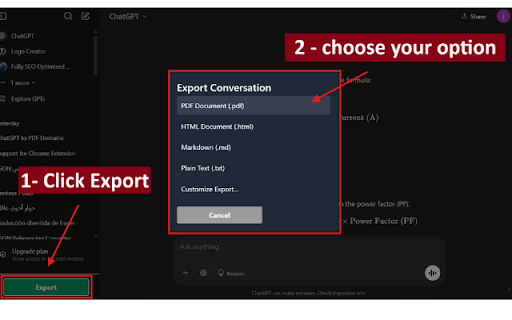
ChatGPT Elegance Export transforms your ChatGPT conversations into professionally formatted documents with just a few clicks. Save your valuable AI interactions in multiple formats with clean, elegant styling that makes your exports presentation-ready.
🌟 Key Features
Multiple Export Formats
PDF with customizable page size and orientation
HTML with proper styling and code highlighting
Markdown for easy integration with documentation
Plain Text for maximum compatibility
Professional Styling
Clean, modern design that's easy to read
Proper formatting for code blocks with syntax highlighting
Special handling of mathematical formulas
Clear visual distinction between user and assistant messages
Advanced Customization
Light and dark themes (with automatic system detection)
Optional timestamps
Custom document titles
Various page sizes for PDF export
Specialized Processing
Proper handling of conversation.json files
Support for multimodal conversations with attachments
Mathematical formula formatting
Code block syntax highlighting
Privacy First
All processing happens locally in your browser
No data is sent to any servers
No analytics or tracking
Minimal required permissions
💻 How to Use
Quick Export
Click the "Export" button in the top-right corner of any ChatGPT conversation
Select your desired format
Your file will be downloaded automatically
Customized Export
Click "Customize Export" for additional options
Configure document title, format, page size, theme, and more
Click "Export Now" to generate your personalized file
Default Settings
Right-click the extension icon and select "Options"
Configure your preferred default settings
All future quick exports will use these preferences
📋 Perfect For
Students saving AI-generated learning materials
Developers archiving coding solutions
Researchers documenting AI assistance
Professionals creating client-ready documentation
Anyone who wants to save their ChatGPT conversations in a beautiful format
🛡️ Privacy & Security
No account creation needed
No data leaves your browser
No analytics or tracking
Only processes data on chat.openai.com
View our complete privacy policy on our website
🆕 Updates & Support
We're constantly improving ChatGPT Elegance Export based on user feedback. If you have any questions, feature requests, or encounter any issues, please contact us at [Your Contact Email].
Download ChatGPT Elegance Export today and transform your AI conversations into elegantly formatted documents you'll be proud to share!
Latest reviews
- Abhinav Sharma
- doesnt work , there are no export options in the chatgpt page
- ius iyb
- it works thanks.