
Inject JS - Run JavaScript code
Extension Actions
- Live on Store
Inject js on any website Run JavaScript code
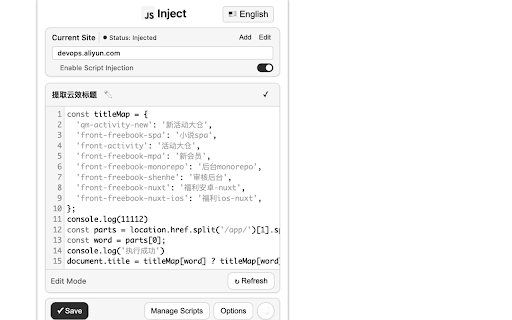
A powerful browser extension that allows you to instantly inject and execute JavaScript code on any website. Perfect for web developers, testers, and power users who need to customize web page behavior on the fly.
Key features:
Execute custom JavaScript code on any website with a single click
Save and manage multiple scripts for different websites
Automatic script injection based on domain rules
Multiple injection methods to bypass various CSP restrictions
Dark mode support for comfortable coding at night
Import/export functionality for backing up your scripts
Works across all websites with proper permissions
Whether you need to test new features, automate repetitive tasks, modify website behavior, or enhance your browsing experience, this extension gives you the power to run custom JavaScript directly in any web page
---------------------------------------------------------------------------------------------------------------------------------------------
一款强大的浏览器扩展程序,让您能够即时注入并执行任意网站的JavaScript代码。专为需要实时定制网页行为的开发者、测试人员和高级用户打造。
核心功能亮点:
✔ 一键执行自定义JavaScript代码于任意网页
✔ 支持按网站分类保存管理多组脚本
✔ 基于域名规则的自动脚本注入机制
✔ 多途径注入方案突破CSP内容安全策略限制
✔ 护眼深色模式助力夜间编码
✔ 脚本导入/导出功能保障数据安全
✔ 全面兼容所有授权网站
无论是功能测试、自动化流程开发、网页行为调试,还是个性化浏览体验定制,本扩展都能让您直接在网页环境中运行定制化JavaScript脚本,赋予您对网页的深度控制权。
author:Todd
e-mail:[email protected]
Latest reviews
- nU8K
- Does it support to test js in the fly without having refresh page to apply the code?
- Peter Luxus
- Works perfectly! Thanks Todd Yee!!!
- Robin Denis
- works
- joe landos
- use this before try anything else
- Marsha Tiara
- Best extension working for javascript
- Sergei Shenderovich
- Please add a timing functionality. As it stands, the scripts are executed on page load by default, which is problematic because a lot of the time an extension like this is actually most useful for executing scripts first thing when the page starts loading which cannot be achieved manually via the console. A manifest V2 discontinued extension that did this best had this as a checkbox option for each script you created. To summarize, it would be amazing if you could add the following functionality: 1. Run on Page Load (checkbox. Script runs first thing when the page loads if not checked). 2. iFrame support - check whether you want the script to run only in the parent frame or also inside iFrames on the page. (checkbox. unchecked by default) 3. Support regex for URL whitelisting instead of only explicit domain or URL definitions. Thank you for your consideration. I realize that this is a free extension so I'm in no position to demand anything, but I really think these extra features will go a long way in making this the best JS injector extension out there. Cheers.
- Triệu Vũ
- Great thanks very much <3
- Inno Pu
- This plugin is fantastic! It's incredibly useful and works really well for me. Highly recommended.
- small shell
- This extension is a game-changer for web development! Incredibly intuitive interface with powerful script injection capabilities. Love the smart domain rules and CSP bypass features. Dark mode makes late-night coding sessions easier. Essential tool for developers needing instant JS execution. Perfectly bridges debugging needs with production-like environment testing. Highly recommended!
- 刘三三
- Super useful for quick JS tests! Saves time, no fluff. Wish it had dark mode though. 👍