
Axure Cloud Extension
Extension Actions
CRX ID
fiidicpfcmmoobdpadllfjklbdegfjaf
Description from extension meta
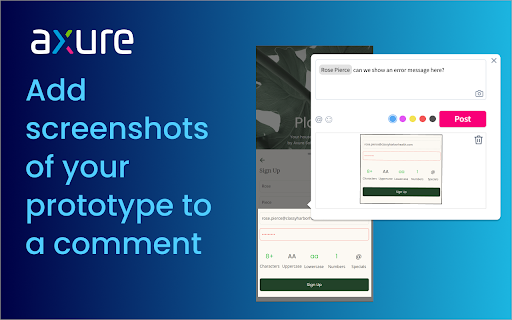
Capture screenshots of your prototype to attach to Axure Cloud comments. When commenting, click the camera icon to add a screenshot.
Image from store
Description from store
Easily add context to your Axure Cloud discussions by attaching screenshots of your prototype to a comment. After installing the extension, refresh your browser, and then click the camera icon when adding a comment.
Please note: This is only for use for screenshotting in Axure Cloud and attaching to comments within Axure Cloud discussions and is not a general screenshot tool.
If you have any issues or questions, please email [email protected] To download the latest version of Axure RP or a free 30-day trial, visit axure.com/download.
Latest reviews
- Roger Hand
- I wanted to include a small screenshot of an external web page to illustrate my point. But apparently this can only capture what you already have in Axure?? Not sure I see the point ... Far more useful would be the ability to paste a screenshot you've already taken (yes, I have already have my own screen capture tool, thank you) or upload a picture.
- Roger Hand
- I wanted to include a small screenshot of an external web page to illustrate my point. But apparently this can only capture what you already have in Axure?? Not sure I see the point ... Far more useful would be the ability to paste a screenshot you've already taken (yes, I have already have my own screen capture tool, thank you) or upload a picture.
- clill wan
- where is the camera?
- clill wan
- where is the camera?
- Steve Malone
- it says click on the camera? what camera?????
- Steve Malone
- it says click on the camera? what camera?????
- caue “a levix cauema cregox” rego
- self-note: why have i ever added this? no idea, but now it's removed.
- caue “a levix cauema cregox” rego
- self-note: why have i ever added this? no idea, but now it's removed.
- Talita Gandara
- Not very user friendly.
- Talita Gandara
- Not very user friendly.
- Toby Skyring
- Zooms layout and then doesn't let you pan, useless.
- Toby Skyring
- Zooms layout and then doesn't let you pan, useless.
- Alex Pham Jensen
- Makes it so much easier to communicate your thoughts on Axure prototypes when you can show what you mean with a screenshot!
- Alex Pham Jensen
- Makes it so much easier to communicate your thoughts on Axure prototypes when you can show what you mean with a screenshot!