
QuickAccess Sidebar
Extension Actions
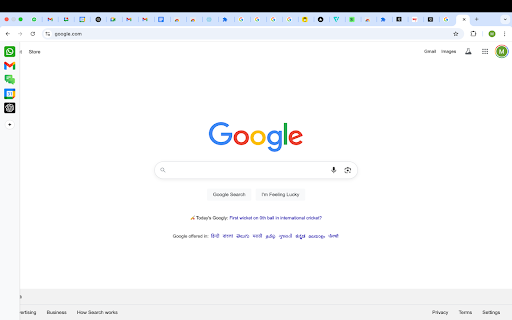
Customizable sidebar to open Gmail, ChatGPT, WhatsApp and any custom URL. Add icons, set shortcuts, and stay focused.
🚀 QuickAccess Sidebar v1.3 - Major Update
New Features:
🌙 Dark Mode: Toggle between light and dark themes
📍 Position Control: Move sidebar to left or right side
⏰ Auto-Hide Toggle: Keep sidebar always visible or auto-hide
⚙️ Settings Panel: Easy access to all customization options
*Please restart the browser once so the sidebar loads on all tabs*
*You will see the sidebar only when you take the cursor to the left edge of the screen or if you use any shortcut*
*To edit shortcuts, go to chrome://extensions/shortcuts*
QuickAccess Sidebar is a lightweight, customizable sidebar for quick access to your most-used web tools.
Add shortcuts to:
- Gmail
- WhatsApp Web
- Google Calendar
- ChatGPT
- Any other URL
Features:
- Up to 10 configurable shortcuts
- Custom icons
- Keyboard shortcut support
- Persistent across sessions
- Auto-collapses after opening - designed to stay out of your way
📌 Notes:
- All shortcuts are opened as pinned tabs within the browser. There is no option within chrome for opened tabs to not show up as a tab
- To edit shortcuts, go to: `chrome://extensions/shortcuts`
- The sidebar collapses automatically after use.
This is intentional - loading websites inside the extension frame causes compatibility issues.
We’ve optimized for a smooth, unobtrusive experience.
No ads. No tracking. No clutter.
Latest reviews
- Edi Bianco
- This extension is very promising! I'm loving it. Small improvements I'd like to see if possible: 1. quick access to bookmarks tree 2. slightly wider active area to make the sidebar visible 3. quick option to switch on/off auto-hide 4. minor (aesthetics): vertically centered alignment of icons
- Quentin Ruben
- Hey love the idea and the app, would it be possible tho to add a function to have it shown permanently (and possibly a dark mode, tho less important)?
- Farid Rabahallah
- It's great, needed this features: 1- Ability to chose Left or Right. 2- Ability to make it fixed and fits the chrome winodiws as a small bar showing just the icons. 3- A button (add this to side bar)
- Yash Gori
- Works Great, Amazing work