
Selection Copilot
Extension Actions
- Live on Store
Copilot for multi select, and copy content as text/markdown/html(with Tex equations)
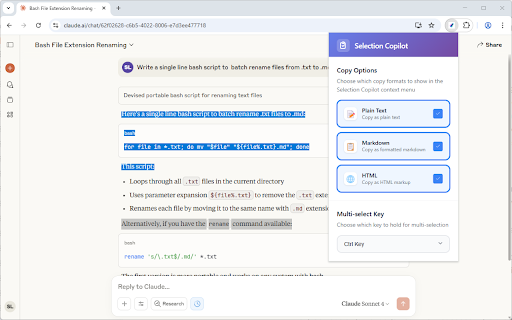
Selection Copilot supercharges your text selection experience with powerful multi-selection and smart copying capabilities.
Multi-Selection
- Hold Ctrl or Alt to select multiple text ranges across any webpage
- Visual highlights show all your selections at once
- Perfect for gathering information from different parts of a page
Smart Copy Options
- Plain Text - Clean, formatted text without markup
- Markdown - Perfect for documentation, notes, GitHub, and messages generated by ChatGPT or Gemini
- HTML - Preserve original formatting, structure, and HTML tags
- Ctrl+C Override - Can overwrite Ctrl+C with one of 3 options above
Quick Selection
- Select <main> - Instantly select the main content area of any webpage
- Select <article> - Quickly select article content with one click
Intelligent Features
- Table Support - Automatically converts HTML tables to markdown format
- Visual Highlights - See all your selections with system-matched colors
- LaTex Support - When Copy as Markdown, support convert rendered maths equations back to LaTex when using ChatGPT or Gemini.
Basic Operations
1. Select text normally on any webpage
2. Hold your chosen key (Ctrl/Alt) for additional selections
3. Right-click and choose your copy format
4. Paste anywhere with perfect formatting
Customizable Settings
- Choose between Ctrl or Alt for multi-selection
- Enable/disable copy formats in context menu
- Choose what operation to do for Ctrl+C
- Choose your preferred language
- Clean, modern settings interface
Privacy & Security
- No data collection - everything stays on your device
- No internet permissions - works completely offline
Transform your browsing experience with smarter text selection and copying!
Latest reviews
- C. Li (Metaphor Projects)
- pretty good when copying the output of web versions of LLMs(like gemini or claude) to markdown notes