
Easy Soap
Extension Actions
一个简单的SOAP接口测试工具,支持跨域请求
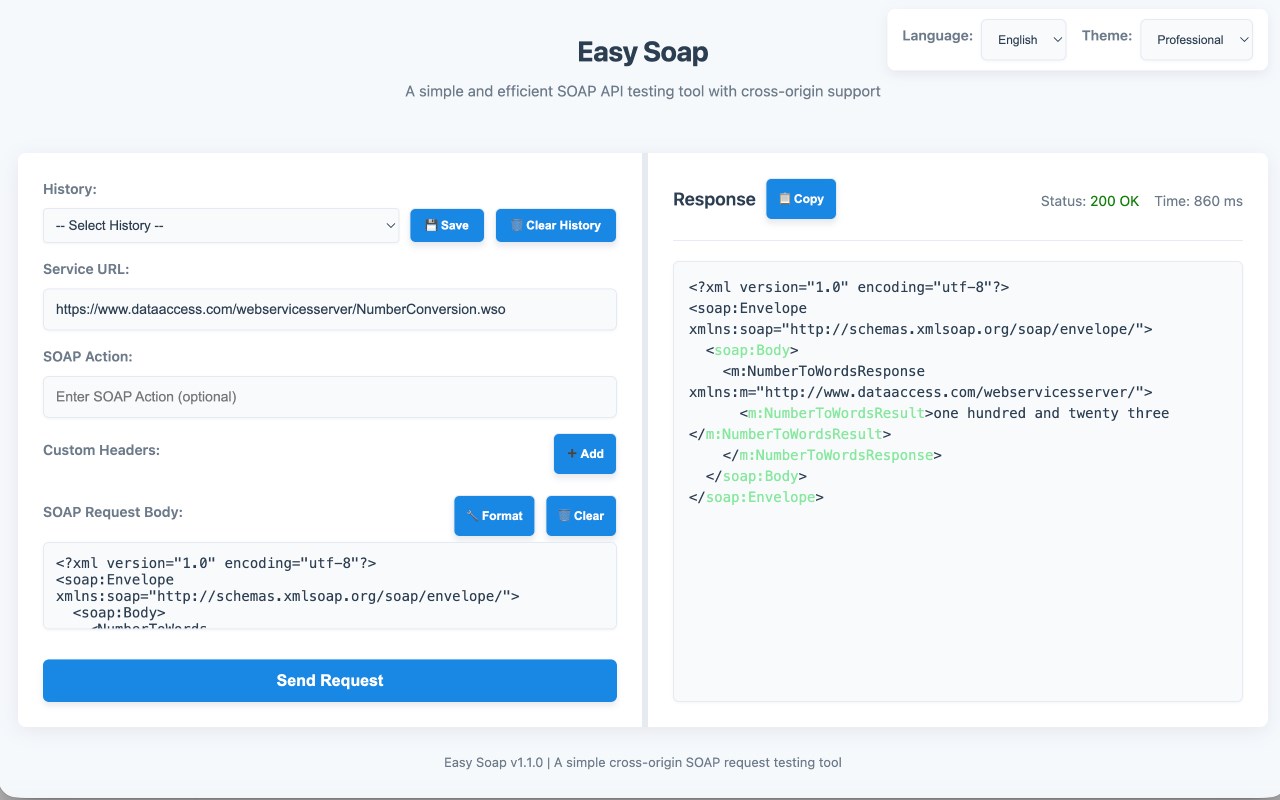
Easy Soap is a simple, efficient, and lightweight SOAP API testing tool designed specifically for browser environments. It helps developers bypass browser Same-Origin Policy (CORS) restrictions, allowing you to test any SOAP web service directly from your Edge browser without relying on heavy desktop clients.
Whether you are debugging legacy enterprise systems, integrating WSDL services, or simply sending quick XML payloads, Easy Soap provides a clean and modern workspace to get the job done.
### 🌟 Key Features
- No CORS Restrictions : Send HTTP POST requests to any SOAP endpoint directly from your browser. The extension's background service worker seamlessly handles cross-origin requests.
- Flexible Headers Configuration : Easily configure the SOAPAction header and add unlimited custom HTTP Headers (e.g., Authorization , Cookie , X-Custom-Header ) to meet complex authentication requirements.
- Split-Pane Workspace : Enjoy a full-screen tab mode with a draggable split-pane layout. You can freely adjust the width between the request editor and the response viewer.
- Smart Formatting & Highlighting :
- One-click XML formatting to beautify messy request bodies.
- Automatic syntax highlighting for XML responses, making it easy to read tags, attributes, and values.
- Powerful History Management :
- Automatically saves up to 20 recent requests.
- Supports custom naming for history records (e.g., "Production Login Request").
- Logs HTTP response status codes automatically.
- One-click restore of URL, Headers, and Body from the history dropdown.
- Modern & Non-blocking UI : Features elegant Toast notifications and Modal dialogs, eliminating annoying native browser alerts.
- Personalization : Supports English/Chinese bilingual switching and three built-in themes (Light, Dark, Professional) to protect your eyes during late-night coding.
### 🚀 How to Use
1. Click the Easy Soap icon in your Edge toolbar to open the testing interface in a new tab.
2. Enter the target SOAP service URL.
3. (Optional) Add your SOAPAction and any required custom Headers.
4. Write or paste your XML request body (click "Format" if needed).
5. Click "Send Request" and view the syntax-highlighted response on the right.
6. Click "Save" to keep the current configuration in your local history for future use.
### 🔒 Privacy First
Your data is yours. Easy Soap does NOT collect, track, or transmit any of your personal data, URLs, Headers, or request payloads to any external servers. All your history and settings are stored strictly locally within your browser using the standard storage API to improve your user experience.