
Link Selector
Extension Actions
Select and open multiple links by drawing a selection box.
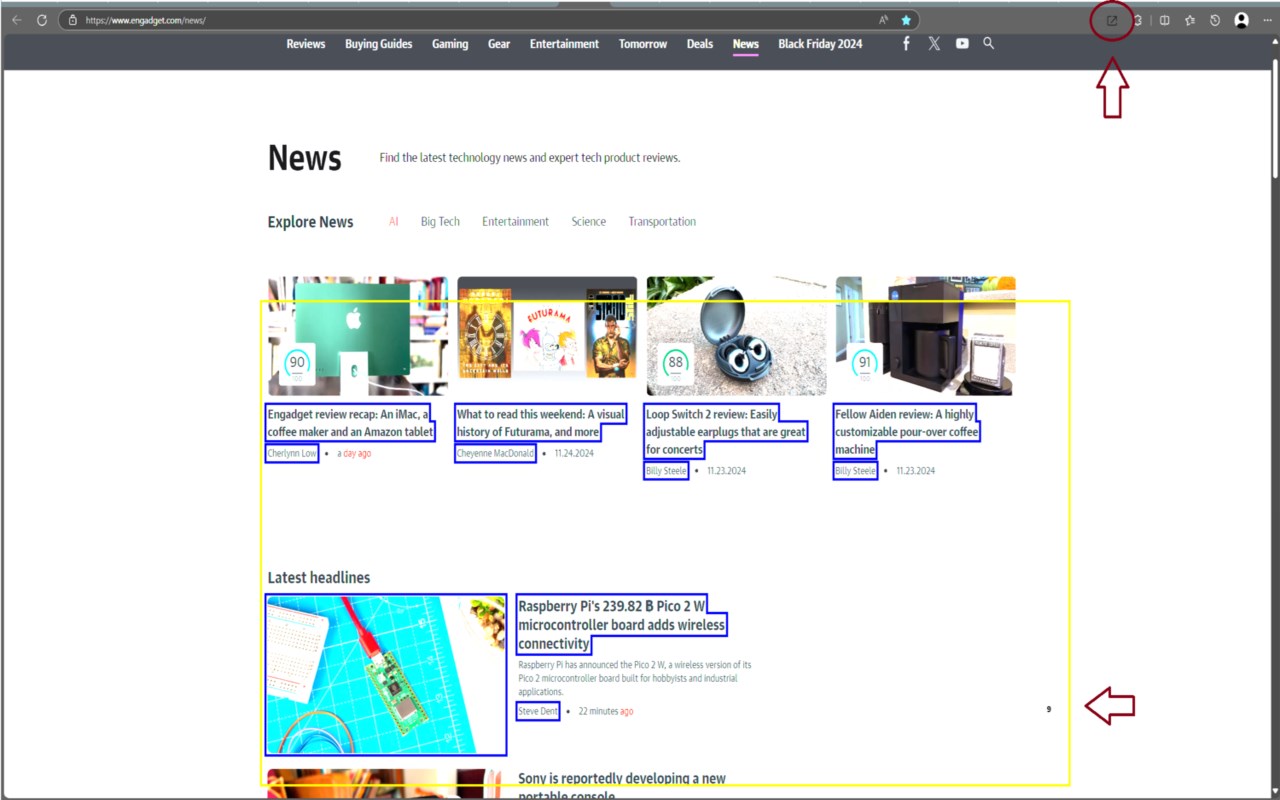
What It Does: ____________________________
This browser extension helps you easily select and open multiple links on a webpage. It works on all sites, including Shopee.
How to Use: ____________________________
1. Select Links: Hold Ctrl and hold left-click, then drag to create a yellow rectangle. The number of links covered will appear in the bottom right corner.
2. Scroll and Count: Drag down to scroll. The link count updates as you cover more links.
3. Open Links: Release the left mouse button (while still holding Ctrl) to open the selected links in new tabs. Releasing Ctrl first will cancel the selection.
Customization: ____________________________
Settings: Left mouse Click the extension icon to change key combinations, outline colors, and border sizes. modified key and mouse key and then click save.
When open link more then 20 link will show confirm windows click ok to open.