
Right-click AI Summary
Extension Actions
After selecting text, right-click to invoke large models such as ERNIE Bot, Qwen, DeepSeek, Kimi, ChatGPT, ChatGLM, Gemini, and Grok for content summarization.
🤔 Still struggling with reading long articles?
“Right-click AI Summary” is here to help! Simply select any text on a webpage, right-click, and choose “Right-click AI Summary” → [Specific Model] (supports Gemini, Grok, ChatGPT, ERNIE Bot, Kimi, Zhipu, Qwen, DeepSeek) to instantly get an AI-generated summary.
🚀 Why should you install it?
- **Save Time:** Quickly grasp the key points of news, reports, and papers without spending hours on full-text reading.
- **Improve Efficiency:** Capture critical information faster.
- **Clean & Unobtrusive:** The tool only appears in your right-click menu, with no extra interfaces to disturb your browsing experience.
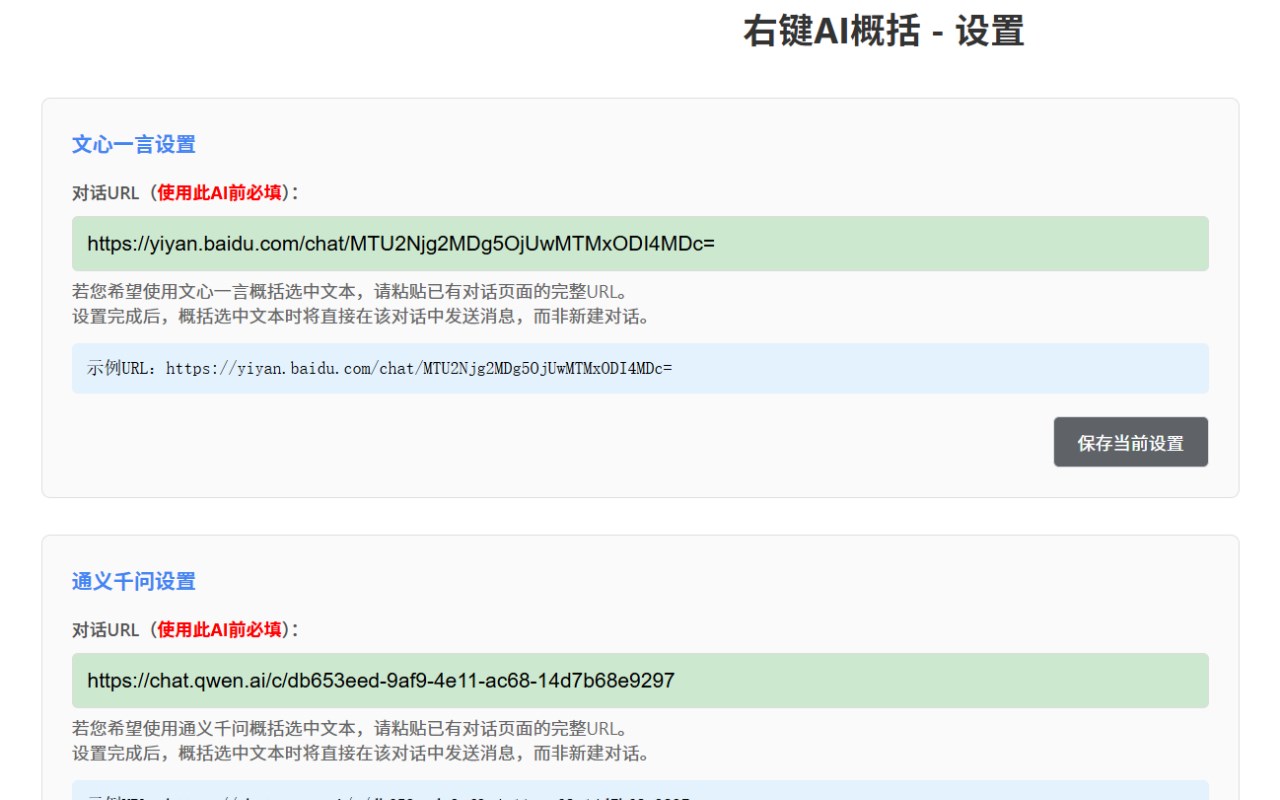
⚠️ 【Important: Please set up before use!】
To make the extension work, a one-time setup is required:
1. Go to the extension's "Settings" page.
2. Enter your own AI conversation URL (e.g., the link to your commonly used ERNIE Bot conversation page).
3. Save the settings.
👇 Recommended for:
- **Students and researchers** who need to read a large amount of literature.
- **Professionals** who need to quickly process reports and emails.
- **All readers** who want to acquire information efficiently.