
Arclet Copier - Smart URL Copy & Share
Extension Actions
URL copying with batch support, parameter filtering, Markdown, short URLs and QR codes. Keyboard shortcuts and dark theme.
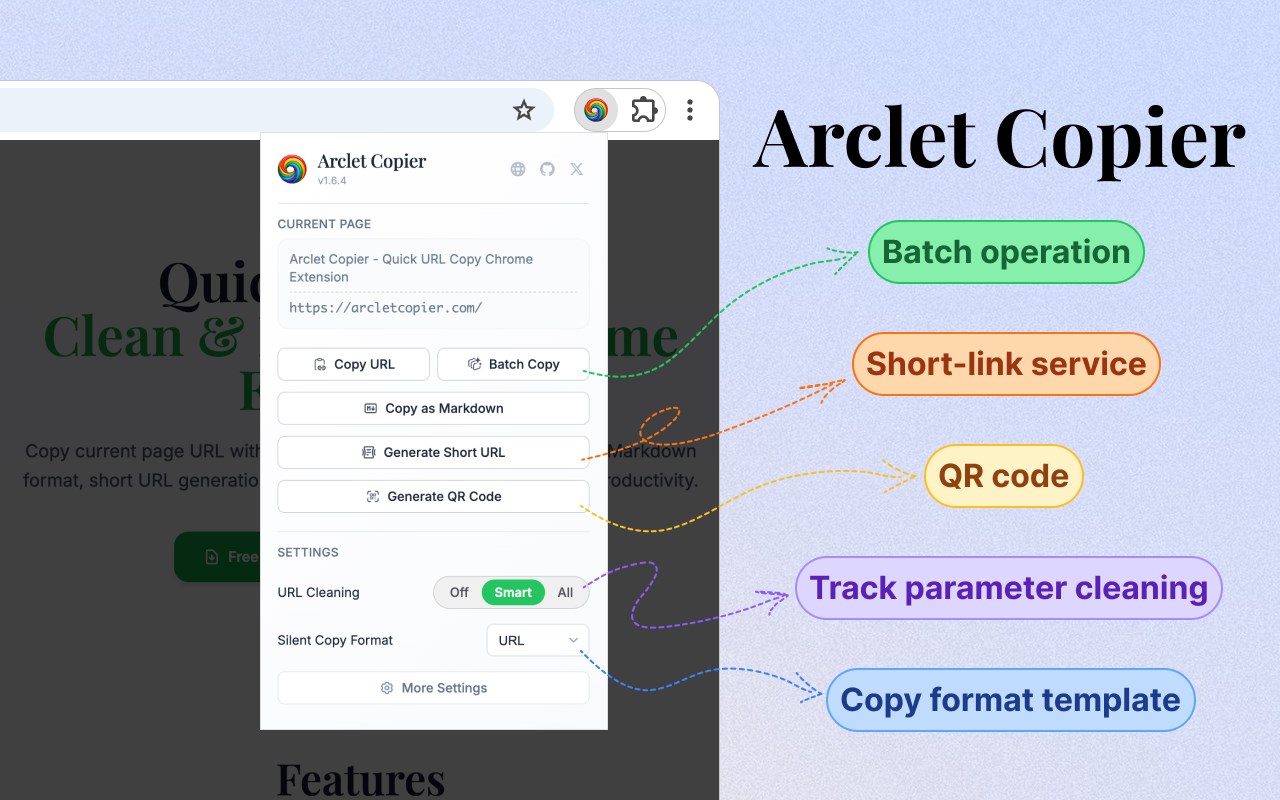
🚀Say goodbye to complex link copying! Get clean, formatted URLs with one click, supporting Markdown, short links, QR codes, and multiple formats. Make link sharing unprecedentedly simple and efficient!
## ✨Why Choose Arclet Copier?
🎯One-click multiple formats - Plain links, Markdown, custom templates, whatever format you want
🧹Smart cleaning - Automatically removes tracking parameters, giving you the cleanest URLs
⚡Lightning fast operations - Shortcuts, right-click menu, batch processing, however convenient
🔗Short link generation - Built-in is.gd and TinyURL, long links become short links instantly
📱QR codes - Generate QR codes with one click, scan with phone for instant access
## 🛠️Core Features
📋Multiple copy formats
- Plain URL - Original link or cleaned URL
- Markdown format - [Page Title](URL) format, perfect for documentation
- Custom templates - Create exclusive format templates using variables
- Short link service - Supports is.gd and TinyURL, smart caching to avoid duplicate requests
- QR codes - Copy directly as images, more convenient sharing
⚡Flexible operation methods
- Extension popup - Click icon to open full feature interface
- Shortcuts - Customizable
- Right-click menu - Right-click to quickly copy current page URL
- Batch processing - Copy multiple tab links at once
🧠 Smart URL cleaning
- Disable cleaning - Keep complete original links
- Smart mode - Remove tracking parameters (utm_*, fbclid, etc.), keep functional parameters
- Aggressive mode - Remove all parameters, get the purest URL
- Custom rules - Customize tracking parameters and functional parameter lists
🎨Thoughtful design
- Dark/light themes - Support automatic switching following system
- Multi-language support - Complete support for 9 language interfaces
- Real-time preview - Preview final effect before copying
- Innovative notifications - Elegant operation feedback
## 🎯Perfect for
👨💻Developers - Quickly insert formatted links in documentation and bug reports
✍️Content creators - Build reference materials and link lists
🔬Researchers - Manage and organize web resources
📱Social media operators - Share clean, professional links
📚Students and teachers - Organize study materials and reference links
## 🔒Privacy First
✅Local processing - All operations completed locally in your browser
✅Zero data collection - No collection or storage of any personal information
✅Open source transparency - Code is completely open source, subject to community oversight
✅Minimal permissions - Only request necessary browser permissions
---
## 🚀 Get Started Now
Free installation and use, 30 seconds to get started, say goodbye to tedious link copying!
📥 Click "Add to Edge" and join the ranks of many satisfied users
🎉 After installation, right-click any page and select "Silent Copy" to experience
Make every link share professional and efficient! ⭐