
Move tabs and groups
Extension Actions
Move tabs and tab groups around using keyboard shortcuts. Also pin/unpin/ungroup tabs or create a new tab in the current group.
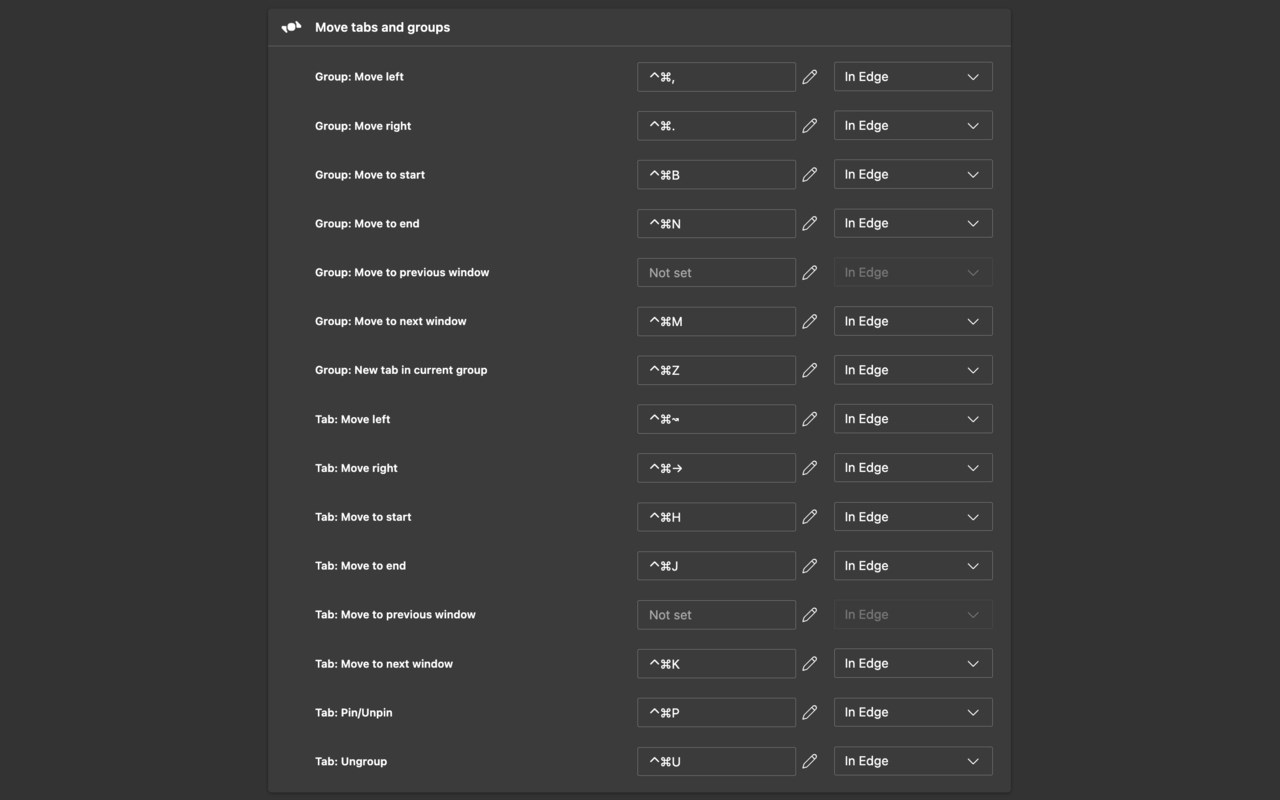
Shortcuts:
Tab: Move left - Alt + Shift + Left
Tab: Move right - Alt + Shift + Right
Group: Move left - Alt + Shift + ,
Group: Move right - Alt + Shift + .
Mac shortcuts:
Tab: Move left - Cmd + Control + Left
Tab: Move right - Cmd + Control + Right
Group: Move left - Cmd + Control + ,
Group: Move right - Cmd + Control + .
The following shortcuts also exist but don't have a default keybinding:
- Tab: Pin/Unpin
- Tab: Ungroup
- Tab: Move to the start
- Tab: Move to the end
- Tab: Move to the next window
- Tab: Move to the previous window
- Group: Move to the start
- Group: Move to the end
- Group: Move to the next window
- Group: Move to the previous window
- Group: New tab in current group
All shortcuts can be assigned/reassigned at edge://extensions/shortcuts in Edge.
Notes:
If a tab runs off the edge of the screen, it wraps back around to the start.
Pinned tabs are fully supported.
If an ungrouped tab is moved around:
- with the single tab shortcuts, it will naturally join and unjoin tab groups as it runs into them
- with the tab group shortcuts, it will skip around any existing tab groups