
LinkedIn Formatter
Extension Actions
Format your LinkedIn posts with bold, italic, lists and more
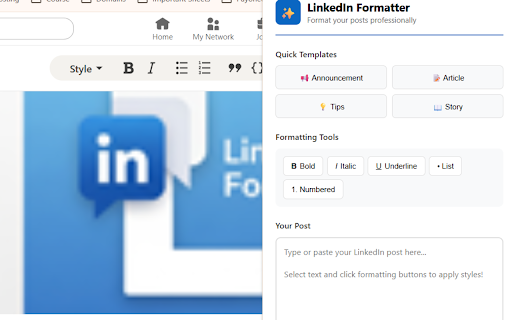
LinkedIn Formatter - Professional Text Formatting Extension for LinkedIn
LinkedIn Formatter is a powerful Chrome extension designed specifically for LinkedIn content creators, professionals, marketers, recruiters, job seekers, entrepreneurs, and business owners who want to create visually appealing, professional LinkedIn posts that stand out in crowded feeds and drive meaningful engagement with their target audience.
Why LinkedIn Formatter is Essential for Your Professional Branding
In today's competitive LinkedIn landscape, where professionals and brands compete for attention in busy newsfeeds, the visual presentation of your content matters more than ever. LinkedIn Formatter empowers you to create eye-catching, well-structured posts that capture attention, improve readability, and significantly boost engagement rates. Research shows that formatted posts with bold text can increase post views by up to 50% and improve content scanning efficiency by 3x, making your message more impactful and memorable.
Comprehensive Text Formatting Features for LinkedIn Posts
Advanced Unicode Text Styling
Bold Text Formatting: Transform regular text into attention-grabbing bold characters using Unicode symbols that highlight key messages, important announcements, critical insights, and call-to-action statements
Italic Text Styling: Add elegant emphasis to quotes, testimonials, thoughts, reflections, and conversational elements that give your posts a more personal, authentic touch
Underline Text: Draw immediate focus to crucial information, statistics, deadlines, and actionable items that require special attention from your LinkedIn audience
Combined Formatting: Mix multiple formatting styles to create sophisticated, professional-looking posts with visual hierarchy
Professional Content Organization Tools
Bullet Point Lists: Create clean, scannable bullet points that organize ideas, benefits, features, key takeaways, and action steps for maximum readability
Numbered Lists: Present sequential information, step-by-step processes, rankings, tutorials, and structured content in an easy-to-follow format
Custom List Markers: Use various symbols and emojis as list markers to add personality and visual interest to your LinkedIn content
Time-Saving Template Library
LinkedIn Formatter includes professionally crafted templates that eliminate writer's block and accelerate your content creation workflow:
Announcement Template: Perfect for sharing company news, product launches, career milestones, achievements, awards, partnerships, and major updates with your professional network
Article Template: Structured format for thought leadership content, industry insights, educational posts, tutorials, and long-form LinkedIn articles that establish your expertise
Tips & Tricks Template: Ideal for sharing actionable advice, best practices, quick wins, professional development tips, and valuable insights your audience can implement immediately
Success Story Template: Share testimonials, case studies, client success stories, personal achievements, and inspirational narratives that resonate with your audience
User-Friendly Interface & Workflow
Simple Text Editor: Intuitive textarea where you type, paste, or compose your LinkedIn post content
Select-and-Format Functionality: Highlight any text and click formatting buttons to instantly apply styling
Real-Time Preview: See exactly how your formatted text will appear on LinkedIn before posting
Character Counter: Monitor post length to optimize for LinkedIn's character limits and engagement sweet spots
One-Click Copy: Copy your fully formatted post to clipboard and paste directly into LinkedIn's post composer
Clear Function: Quickly reset and start fresh with new content
Perfect for Every LinkedIn User Type
Content Creators & Influencers
Build your personal brand with consistently formatted, professional posts that reflect your unique voice and style. Stand out in the LinkedIn feed, increase your follower engagement, and establish thought leadership in your industry.
Marketing Professionals & Social Media Managers
Create compelling, on-brand LinkedIn content for multiple clients or company pages. Save time with templates while maintaining formatting consistency across all posts. Improve campaign performance with better-structured content.
Recruiters & Talent Acquisition Specialists
Make job postings, candidate spotlights, and recruitment content more attractive and readable. Highlight key requirements, benefits, and company culture elements to attract top talent.
Business Owners & Entrepreneurs
Share company updates, promote services, announce new offerings, and engage with your professional network using polished, professional formatting that reflects your brand quality.
Job Seekers & Career Professionals
Enhance your LinkedIn presence with well-formatted posts about your job search, professional journey, career transitions, and networking efforts that get noticed by recruiters and hiring managers.
Sales Professionals & Business Development
Create persuasive posts that highlight value propositions, share success stories, and engage prospects with clear, compelling formatting that improves message retention.
Consultants & Coaches
Share expertise, insights, and advice in formatted posts that are easy to read, memorable, and shareable, positioning you as a trusted authority in your field.
How LinkedIn Text Formatting Improves Engagement
LinkedIn's native editor doesn't support rich text formatting like bold, italic, or advanced styling options. LinkedIn Formatter solves this limitation by using Unicode characters that display correctly across all devices and platforms. This innovative approach allows you to:
Increase Visibility: Formatted posts stand out visually in scrolling feeds, catching the eye before users scroll past
Enhance Readability: Proper formatting with headers, lists, and emphasis makes long posts easier to digest and understand
Improve Information Retention: Strategic use of bold and italic helps readers remember your key points and takeaways
Boost Professional Image: Well-formatted content signals attention to detail and professionalism
Drive Higher Engagement: Clear, structured content encourages more likes, comments, shares, and meaningful conversations
Support Accessibility: While using Unicode formatting, the tool encourages clean, structured content that's easier for all audiences
Technical Advantages & Browser Compatibility
Lightweight Extension: Minimal system resources, fast loading, no performance impact on your browser
Privacy-Focused: All formatting happens locally in your browser - no data collection, no tracking, no external servers
Cross-Platform Unicode: Formatted text displays correctly on desktop computers, mobile devices, iOS, Android, tablets, and all modern browsers
No LinkedIn Login Required: Extension works entirely within Chrome without requiring access to your LinkedIn account
Regular Updates**: Continuously improved with new features, templates, and formatting options based on user feedback
Manifest V3 Compliant: Built with the latest Chrome extension standards for security and performance
Best Practices for LinkedIn Formatting
Strategic Formatting Guidelines
- Use bold text sparingly to emphasize truly important points - typically headlines, key statistics, or calls-to-action
- Apply italic formatting to quotes, personal reflections, or to create conversational tone
- Break long paragraphs into shorter, digestible chunks with white space between ideas
- Combine formatting with emojis strategically to add visual appeal without overwhelming readers
- Maintain consistent formatting style across your posts to build recognizable brand identity
- Test different formatting combinations to discover what resonates best with your specific audience