
Visual Bookmarks - Privacy Screenshots & Tags
Extension Actions
- Extension status: In-App Purchases
- Live on Store
2025 Upgrade! Features screenshots, AES-encrypted private folders, and multi-tag management. Transform your Chrome bookmarks into a…
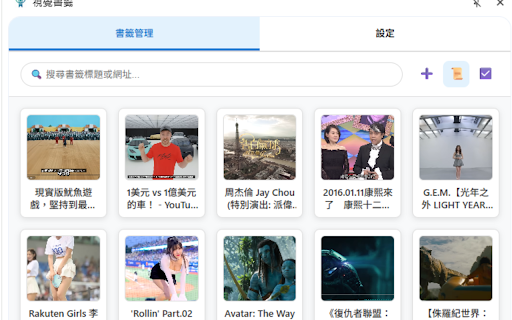
Visual Bookmarks: The Ultimate Chrome Bookmark Manager
Tired of endless text lists? Visual Bookmarks transforms your browser bookmarks into a stunning thumbnail wall. Find websites visually in seconds and say goodbye to the text labyrinth! Whether you are a designer, developer, or a privacy-conscious user, this is the essential tool to boost your productivity.
🚀 Update 2025/11/20: A Leap in Intelligence & Performance
🧠 Smart Meta Search (AI-Like Search) Can't find a bookmark because the title lacks keywords? Search is no longer limited to titles!
Enhanced Full-Text Search: When adding bookmarks, the system automatically scrapes Descriptions, Keywords, Authors, and JSON-LD structured data.
No Dead Ends: Even if the title is just "Google," searching for "AI" will find it instantly.
Hit Highlights: Search results display a helpful "🔍 Matched content:..." snippet, highlighting the keywords so you know exactly why a bookmark was found.
⚡ WebP High-Efficiency Compression Worried about thumbnails taking up too much space? We've upgraded our underlying image engine.
Smaller Size, Same Quality: Adopting the next-gen WebP format reduces file size by over 30%, allowing you to save more stunning captures without hitting storage limits.
🛠️ Workflow & Detail Optimization
Smarter Context Menu: Simplified logic with a new one-stop "Capture & Bookmark" feature, fully supporting multiple languages.
Smart Validation: Optimized URL matching logic during capture to ensure the image is always linked to the correct bookmark, preventing mismatches.
🚀 Update 2025/11/19: Privacy & Management Evolution
🔒 Private Space & Secure Lock Don't want specific sites appearing in your browser's bookmark bar? We've built a secure vault for you.
Isolated Privacy Space: Create "Internal Folders" visible only within the extension, completely isolated from native Chrome bookmarks.
AES/SHA Encryption: Secured with SHA-256 encryption hashing. Your password is stored locally; no one can unlock it but you.
One-Click Lock: Toggle privacy mode instantly via the lock icon to protect sensitive content.
🏷️ Advanced Tagging System
Multi-Tag Management: Break free from folder limits. Add multiple custom tags to bookmarks for flexible searching.
Visual Colors: Tags are automatically color-coded for at-a-glance categorization.
Tag Management Center: Manage, rename, or clean up tags centrally in settings.
📸 Smart Element Capture
DOM Element Selection: Designed for power users. Use "Capture Element" in the context menu to precisely grab specific DOM elements (like video thumbnails or specific images) using CSS Selectors.
🌟 Core Highlights
📸 Professional Capture Modes
Auto Capture: Instantly snap the visible area of the current page.
Custom Area Capture: Drag to crop the exact part of the page you want.
Manual Upload: Support for custom images (Logos, Posters).
📂 Powerful Visual Interface
Dual View Modes: Switch between efficient "List View" and beautiful "Grid View".
Drag & Drop: Intuitively organize folders and bookmark order.
Full Folder Support: Create, edit, and delete folders with native bookmark syncing.
Instant Search: Real-time search by title, URL, and tags.
Bulk Actions: Batch select, delete, update, or clear thumbnails to save time.
⚡ Fast Access & Shortcuts
Side Panel: Always accessible on the side without interrupting your browsing.
Context Menu: Right-click anywhere to capture or bookmark instantly.
Keyboard Shortcuts: Custom hotkeys to double your efficiency.