
AI Workspace Pro - ChatGPT Prompt Manager, Sidebar & Productivity Tools
Extension Actions
ChatGPT prompt manager and sidebar workspace to organize prompts, chats, notes, and workflows for faster AI productivity.
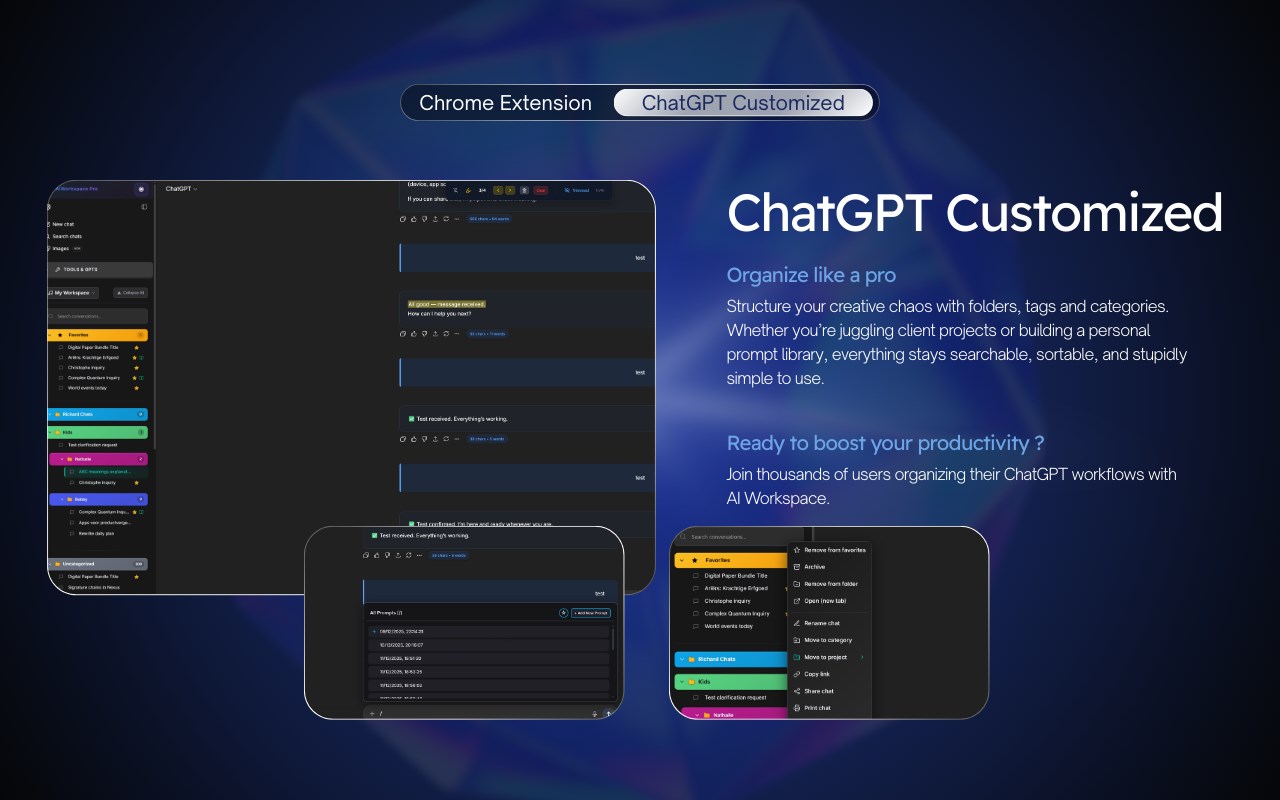
🚀 ChatGPT Manager with Text Highlighting, Thread Trimming & Premium Organization Tools
The Ultimate ChatGPT Productivity Extension - Privacy-First, Lightning Fast, Feature-Packed
⭐️⭐️⭐️⭐️⭐️
NEW Pro Features:
✨ Text Highlighting System: Highlight important text in AI responses with persistent storage and navigation toolbar
🚀 Smart Thread Trimming: Auto-hide older messages for blazing fast performance in 200+ message conversations
📂 Unlimited Folders & Categories: Organize prompts and chats with nested folders, custom icons, and color coding
🖼️ Image Gallery: Search, filter, and download all ChatGPT images with prompt tracking and bulk operations
📝 Smart Notes System: Add notes to any conversation, synced across devices with full-text search
🔗 Reference Conversations: Link previous chats into new conversations for continuous context
🎯 Prompt Optimizer: AI-powered prompt enhancement with one-click optimization
🏷️ Colorful Tag System: Organize with custom colored tags across prompts and chats
📊 Advanced Chat Manager: Filter by CustomGPT, Projects, tags, dates with real-time search
💾 Secure Vault System: Encrypted storage for sensitive prompts with multi-vault support
⭐️⭐️⭐️⭐️⭐️
★ Text Highlighting & Performance (NEW in v0.0.29):
• 🖍️ Text Highlighting: Select and highlight important text in ChatGPT, Claude, and Grok conversations
• 🧭 Highlight Navigation: Floating toolbar with Previous/Next buttons, position counter, and clear all
• 💾 Persistent Highlights: Survive page reloads, DOM updates, and streaming messages with IndexedDB storage
• 🔵 Smart Active Indicator: Professional blue accent for current highlight with smooth scrolling
• 🚀 Thread Trimming: Auto-hide older messages (configurable 10-100 limit) for 80% faster scrolling
• 🧠 Smart Preservation: Automatically preserves highlighted messages, system prompts, and tool messages
• 🎚️ Performance Controls: Toggle trimming via toolbar, context menu, or keyboard shortcut
• 📊 Visual Feedback: Glassmorphism indicator showing "Trimmed: X/Y messages" with bidirectional toggle
• ⚡ Real-time Updates: MutationObserver applies trimming as new messages stream in
• 💾 73% Memory Reduction: Dramatically lower RAM usage in 250+ message threads
★ Chat Organization & Management for ChatGPT:
• 📁 Folders & Subfolders: Unlimited nested folders with drag-and-drop, custom colors, and icons
• 🗂️ Category System: Organize chats and prompts with visual categories and subcategories
• 🎨 CustomGPT Filtering: Filter conversations by specific GPTs with avatar display on chat cards
• 📋 Project Filtering: Separate filter for ChatGPT Projects with dual filter system
• 🔎 Universal Search: Lightning-fast search across all conversations with real-time filtering
• 🏷️ Tag System: Create colorful tags with custom colors for advanced organization
• 📊 Chat Manager: Premium interface with sort by date, title, tokens, with bulk operations
• 📌 Pin Conversations: Keep important chats at the top with visual pin indicators
• 🗑️ Bulk Actions: Select multiple chats for deletion, archiving, or category assignment
• 📥 Export Chats: Export to PDF, JSON, Markdown, or plain text with formatting preserved
• 🕐 Auto Delete & Archive: Automatically manage old conversations after X days
• 📅 Timestamps: Full timestamp tracking for chats and individual messages
★ Advanced Prompt Management:
• 💾 Prompt Library: Save unlimited prompts (no limit for Pro) with categories and tags
• ⚡ Quick Access: Type / in ChatGPT to open auto-complete menu with all your prompts
• ⛓️ Prompt Chains: Create and run multi-step prompt sequences automatically
• 📜 Prompt History: Every prompt saved locally with search, favorites, and filtering
• 🎯 Prompt Optimizer: AI-powered optimization suggestions with one-click improvement
• 📄 Prompt Templates: Use {{variables}} for reusable prompt templates with dynamic inputs
• 🔼🔽 Arrow Navigation: Use Up/Down arrows to scroll through prompt history
• ⭐ Favorite Prompts: Mark and filter your best prompts for instant access
• 🔍 Advanced Search: Search across 10,000+ prompts by title, content, tags, or categories
• 📊 Bulk Operations: Assign multiple prompts to categories or tags simultaneously
• 🎨 Rich Formatting: Markdown support with preview mode for complex prompts
★ Image Gallery & Media Management:
• 🖼️ Image Gallery: View all ChatGPT-generated images in one beautiful interface
• 🔍 Image Search: Filter by prompt text, date, conversation, or image properties
• 📥 Bulk Download: Download all images or filtered selections with one click
• 🎨 Grid View: Responsive masonry layout with hover previews and quick actions
• 📊 Metadata Tracking: See full prompt, model, conversation ID for each image
• 🔗 Quick Navigation: Jump from image to source conversation instantly
• 💾 Organized Storage: Images categorized by conversation with IndexedDB persistence
★ Notes & Documentation:
• 📝 Conversation Notes: Add rich notes to any chat with full markdown support
• 🔍 Notes Search: Find conversations by note content with full-text search
• 💾 Auto-Sync: Notes synced across devices via secure vault system
• 📋 Quick Access: Notes icon in chat footer shows note presence at a glance
• 🎨 Rich Editor: Markdown preview, code blocks, lists, and formatting
• 🔗 Cross-Reference: Link notes to related conversations or prompts
★ Context Menu & Quick Actions:
• 🖱️ Right-Click Menu: Access all features from AI Workspace context menu
• 🖍️ Highlight Selection: Highlight text with Ctrl+Shift+H or context menu
• 🚀 Toggle Thread Trimming: Quick performance controls from right-click
• 📸 Screenshot to ChatGPT: Send webpage screenshots directly to ChatGPT
• ⚡ Run Custom Prompts: Execute saved prompts on any website
• 🔗 Share Conversations: One-click sharing to X (Twitter), LinkedIn, Reddit
• 👁️ Preview Chat: Quick preview dialog without opening full conversation
★ Customization & Themes:
• 🎨 Premium Themes: Dark, light, and accent color customization
• 🌈 Category Colors: Assign custom colors and icons to folders/categories
• 🏷️ Tag Colors: Custom background colors for visual tag organization
• 💎 Glassmorphism UI: Modern transparent blur effects and premium shadows
• 📐 Custom Layouts: Adjust sidebar width, toolbar positions, and spacing
• 🎯 Icon Selection: Emoji or custom image icons for categories
• ⚡ Smooth Animations: Polished transitions and hover effects throughout
★ Multi-Platform Support:
• 🤖 ChatGPT: Full feature support including GPTs, Projects, and Advanced Voice
• 🧠 Claude.ai: Prompt management, highlighting, and conversation organization
• 🚀 Grok: Text highlighting and prompt library integration
• 🔄 Cross-Platform Sync: Vaults sync across all supported platforms
• 📱 Responsive Design: Works on all screen sizes and resolutions
★ Privacy & Security:
• 🔒 100% Local-First: All data stored in your browser, never on our servers
• 🔐 Encrypted Vaults: AES encryption for sensitive prompts and data
• 🛡️ Zero Tracking: No analytics, no data collection, no hidden telemetry
• 💾 IndexedDB Storage: Fast, secure local storage with automatic backups
• 🔓 Open Source Ready: Transparent codebase with security-first architecture
• 🌍 GDPR Compliant: Privacy-first design respects all data regulations
★ Productivity Features:
• ⌨️ Keyboard Shortcuts: Ctrl+Shift+H (highlight), Ctrl+Shift+T (trim), and more
• 🔄 Smart Replace: Auto-replace predefined phrases as you type
• ✂️ Auto Splitter: Split long inputs into chunks for better processing
• 📊 Token Counter: Real-time word and character count in input and responses
• 🎛️ Model Switcher: Change GPT models mid-conversation with hover detection
• 📋 Smart Copy: Copy messages with formatting (plain text, markdown, HTML)
• ⏫⏬ Quick Scroll: Jump to top/bottom or navigate message by message
• 🔄 Auto-Click: Automatically click default buttons after responses
★ Language & Localization:
• 🌍 Multi-Language: Full support for English, Dutch (Nederlands), French, German, Spanish
• 🗣️ Response Language: Change ChatGPT response language with one click (190+ languages)
• 🎭 Tone Selection: Adjust writing style and tone for responses
• 📝 Localized UI: Complete interface translation for all features
• 🔄 i18next Integration: Professional translation management system
★ Subscription & Pro Features:
• 💎 Free Forever: Core features available to all users with reasonable limits
• 🚀 Pro Plan: Unlimited prompts, categories, folders, notes, and image gallery
• 🎯 Priority Support: Direct access to support team with faster response times
• 🔓 Early Access: Get new features before public release
• 💰 Affordable Pricing: One-time payment or subscription options available
• 🔄 Stripe Integration: Secure billing with invoice management and portal access
★ Release Notes & Updates:
• 📋 Built-in Release Notes: Beautiful viewer with version history and feature details
• 🔔 Update Notifications: See what's new with each extension update
• 🎯 Feature Labels: Clear indicators for New, Improved, Fixed, and Beta features
• 📊 Version Timeline: Browse all past releases with sidebar navigation
• ⌨️ Keyboard Navigation: Arrow keys to navigate between versions
____________________________________________________________
🎥 Watch Tutorials & Tips on YouTube:
https://www.youtube.com/@ai-workspace-pro
🌐 Visit Our Website:
https://www.getaiworkspace.com/
🐦 Follow Us on X (Twitter):
https://x.com/Strikeh82
💰 Upgrade to Pro:
Unlock unlimited features and support development
___________________________________________________________
🔒 Privacy Promise:
Unlike other extensions, AI Workspace never sends your data to external servers. Everything stays local in your browser. No hidden tracking, no data mining, no privacy invasion.
Keywords: ChatGPT, Claude, AI assistant, prompt manager, chat organizer, conversation folders, text highlighting, performance optimization, thread trimming, prompt library, image gallery, notes system, productivity tool, AI workspace,
Latest reviews
- Christophe
- Exactly what I was looking for !