Break Reminder
Extension Actions
Get reminded to take regular breaks - choose 10, 20, or 30 minute intervals
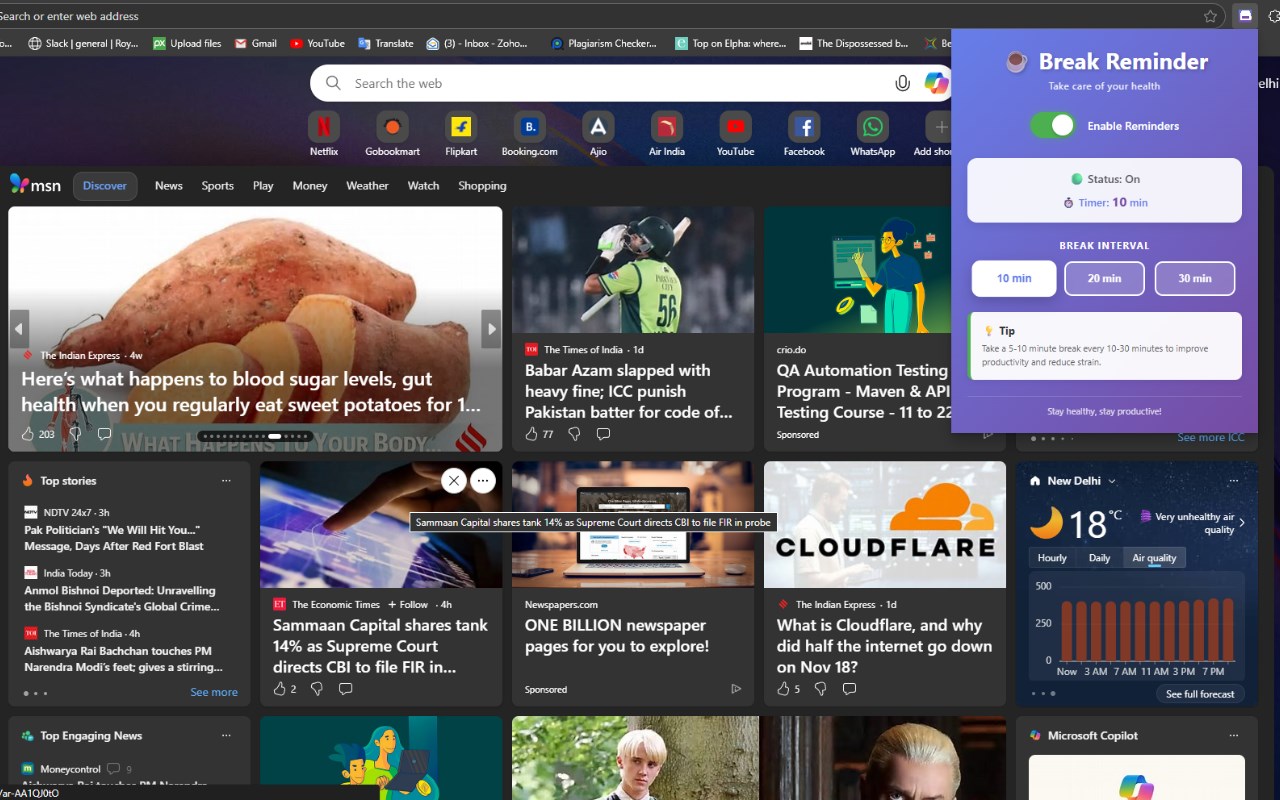
Break Reminder is a clean, privacy-focused Microsoft Edge extension designed to promote digital wellness by sending you timely reminders to take healthy breaks during long work sessions. With its elegant interface, flexible scheduling options, and zero-data-collection policy, it’s the perfect companion for anyone who spends hours working on their computer.
Product Overview
What is Break Reminder for Edge?
Break Reminder is a lightweight Microsoft Edge add-on that gently notifies you to step away from your screen at regular intervals you choose. Whether you’re coding, writing, designing, or handling work tasks, this extension helps you maintain a productive and healthy work-break routine — proven to reduce fatigue and improve long-term focus.
Core Purpose
Many users lose track of time while working, leading to eye strain, physical fatigue, and decreased productivity.
Break Reminder solves this workplace challenge by providing soft, customizable break alerts that encourage a balanced workflow and contribute to better health and improved efficiency throughout the day.
Key Features
1. Choose From Three Break Intervals
Pick from three well-researched work-break intervals, depending on your workflow:
10-Minute Interval – Perfect for high-focus tasks like coding, designing, or deep problem-solving where frequent breaks help reduce cognitive strain.
20-Minute Interval (Recommended) – The balanced, research-supported default option that suits most Edge users and office professionals.
30-Minute Interval – Ideal for deep-work sessions, long meetings, or tasks where shorter breaks may interrupt your flow.
2. Easy On/Off Toggle
Activate or pause break reminders with a single click:
Green toggle = Break reminders ON
Gray toggle = Reminders OFF
Smooth animations give a professional and intuitive control experience within the Edge extension popup.
3. Real-Time Status Panel
The status box provides immediate clarity:
Current reminder status (ON/OFF with color cues)
The selected interval duration
A subtle pulse animation when reminders are active
This ensures you always know whether a timer is running.
4. Polished & Modern User Interface
Designed to feel native within Microsoft Edge:
Sleek purple gradient background
Clean white content panels for readability
Smooth transitions (0.3–0.4 sec)
Professional system font usage
Optimized for Edge’s 380px popup width
Every interaction feels smooth, refined, and visually appealing.
5. Desktop Notifications on Edge
When your selected interval ends, Microsoft Edge sends a clear reminder:
Title: “☕ Time for a Break!”
Message: Indicates how long you've been working
Icon: A high-quality 128×128px coffee cup
High priority to ensure visibility
Click to dismiss
This helps ensure your break routine stays consistent without interrupting your work.
6. Persistent Settings & Local Storage
Your preferences remain saved within Microsoft Edge:
ON/OFF status is stored
Chosen interval remains intact
Works across browser restarts
No external servers, no tracking, no analytics
Everything is stored securely using Edge’s local extension storage system.