
MailTwig – Export Emails, AI Data Parsing & Mail Merge
Extension Actions
- Live on Store
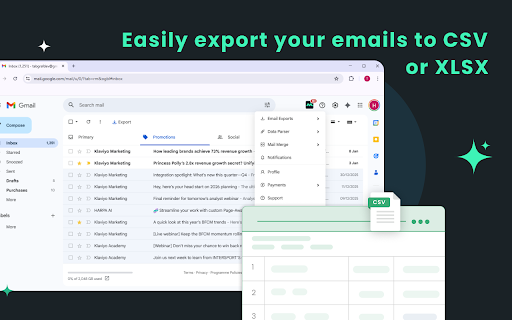
Export emails, parse emails, and Mail merge — all inside Gmail.
✨ Key Features
✔ Email Export
Export essential email data—recipients, subject lines, timestamps, message bodies—directly from Gmail in CSV or Excel format.
Perfect for reporting, CRM updates, analytics, or backups.
✔ AI-Powered Data Extraction
◦ Automatically extract:
◦ Phone numbers
◦ Email addresses
◦ Names
◦ Mailing addresses
◦ Important entities and keywords
◦ Anything else your workflow needs
◦ Works on long email threads, forms, confirmations, inquiries, and orders.
✔ Advanced Email Parsing
Accurately parse:
◦ Signatures
◦ Replies
◦ Forwarded content
◦ Nested email threads
◦ HTML-heavy emails
◦ Cleaner results → better automation.
✔ Mail Merge Support
Send personalized emails at scale.
Merge your exported Gmail data with templates to send custom bulk emails directly from Gmail.
Use cases:
Sales outreach, recruiting, follow-ups, newsletters, updates, confirmations.
🚀 Why MailTwig?
◦ AI-powered accuracy
◦ Works entirely inside Gmail
◦ Clean, fast, and lightweight
◦ Zero coding needed
◦ Free plan available
🔒 Privacy First
MailTwig only processes email data to perform the features you choose.
No data is stored, sold, or shared with third parties.
Latest reviews
- Hruday Ranjan
- I always see if my recipient opens my mail. I’d recommend it, you’ll love it. A Mail Builder feature would be a great addition.
- Clash shis
- This extension is a total time-saver for my daily workflow. It makes exporting email data into a sheet so simple and stress-free
- soumesh kumar
- Mailtwig made it really easy for me to create campaigns and export emails—it’s super simple to use!
- Biswajita Panda
- I don't know why I discovered this add-on so late. Life saver for me. Can I schedule an auto-export ?
- Debasish panda
- Really useful and well designed. does exactly what it says. definitely saves time
- Dibyashankar Jena
- Really impressed, saves a lot of time 😊 It makes mail merge and email export super easy.