
Gemini Chat Navigator
Extension Actions
Adds a navigation sidebar to Gemini chats for easy scrolling.
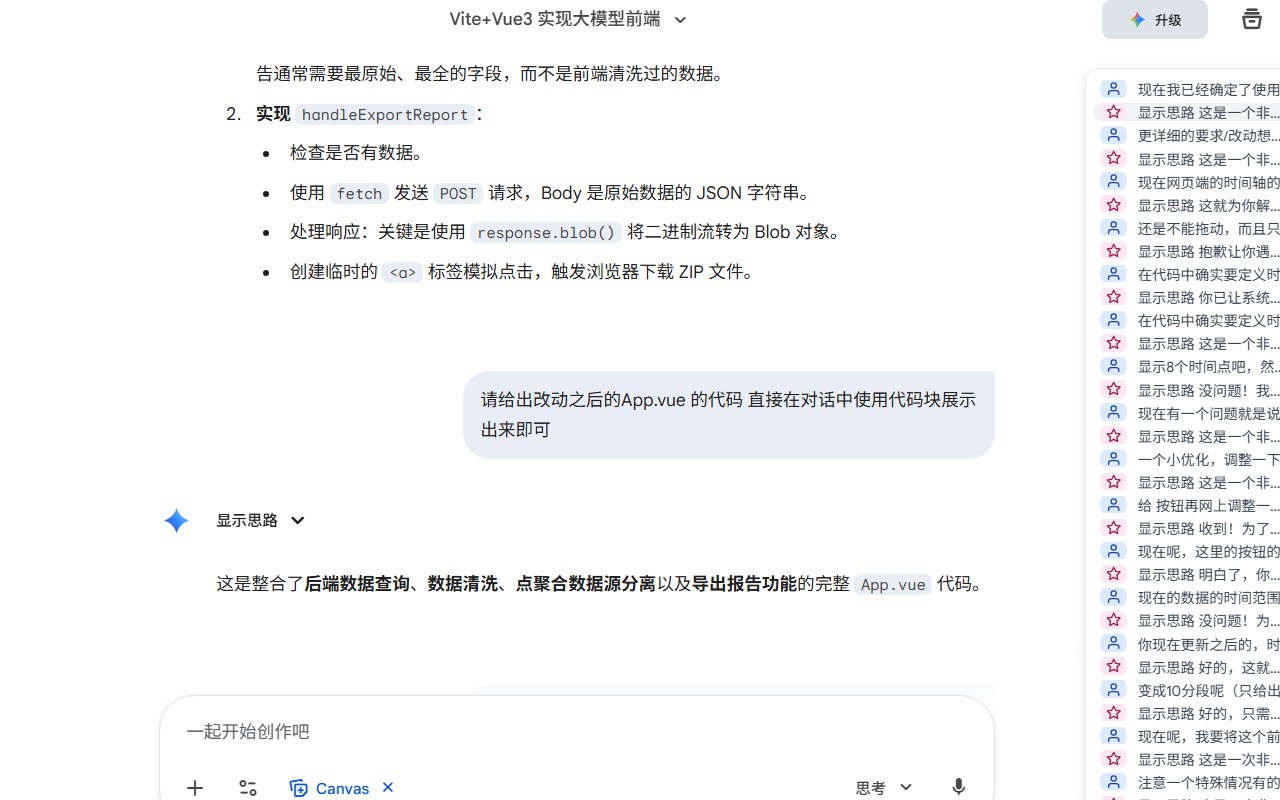
Gemini Chat Navigator is a sophisticated browser extension designed to significantly improve your interaction with the Gemini chat platform at gemini.google.com. By integrating a sleek, interactive sidebar directly into the chat interface, this extension transforms how you navigate lengthy and complex AI-driven conversations. Whether you are engaged in in-depth dialogues, extensive Q&A sessions, or revisiting previous multi-turn exchanges, Gemini Chat Navigator streamlines the browsing experience, allowing you to jump between specific chat turns quickly and effortlessly. It brings structure and clarity to conversations that can often feel overwhelming due to their length or complexity.
Upon installation, Gemini Chat Navigator embeds a fixed sidebar alongside your Gemini chat window. This sidebar automatically detects and organizes every message turn—both from the user and the Gemini AI model—using robust strategies that ensure seamless compatibility with Gemini’s constantly evolving web interface. The extension smartly distinguishes user inputs and AI responses via easily recognizable SVG icons, making it simple to identify at a glance who authored each message in the conversation. This visual differentiation aids in better understanding the dialogue flow without needing to read every message sequentially.
One of the core strengths of the extension is its dynamic real-time updates. As conversations unfold and new messages appear, the sidebar refreshes automatically to stay perfectly synchronized with the main chat window. Users can click on any message entry in the sidebar to instantly scroll the chat viewport to that specific point, with the selected message elegantly positioned for optimal readability. The extension calculates the appropriate scroll offset to ensure that messages are comfortably visible, enhancing the overall user experience when reviewing long threads. Additionally, the currently active message is highlighted within the sidebar to maintain context and orientation, empowering users to track their position within sprawling conversations intuitively.
The interface is designed to be unobtrusive and context-aware. It appears only on relevant Gemini chat pages, preserving your workspace when you are on other sites or sections. No manual activation or configuration is needed, making the installation and usage process effortless and streamlined. By providing an intuitive navigation mechanism, Gemini Chat Navigator caters especially to users who demand efficient, clear, and controlled access to their AI chat interactions, effectively turning sprawling dialog histories into manageable and navigable resources.
Key Features:
- Intuitive sidebar navigation visually organizes Gemini chat conversations for rapid selection of specific turns.
- Automatic detection of both user queries and Gemini AI responses, preserving message order and clarity.
- Distinctive SVG icons clearly differentiate user messages from AI-generated replies at a glance.
- Robust scanning logic offers high compatibility with Gemini’s frequently changing front-end, adeptly handling custom tags and dynamic UI structures.
- Real-time DOM observation triggers automatic sidebar refresh as new messages arrive.
- One-click smooth scrolling brings selected chat messages into focus with optimal viewport positioning.
- Active message highlighting keeps track of your current place in long multi-turn chats, enhancing orientation and ease of use.
How It Works:
1. Add Gemini Chat Navigator to your browser via your extension store.
2. Navigate to gemini.google.com and open a chat conversation.
3. The extension automatically injects a sidebar into the chat page without any manual setup.
4. The sidebar scans the chat, detecting all message turns and visually distinguishing user and AI messages.
5. Click on any sidebar entry to smoothly scroll the main chat window to the relevant message, positioned for easy reading.
6. As you and the Gemini AI continue chatting, the sidebar dynamically updates to include new messages in real time.
7. The active message is highlighted within the sidebar, helping you effortlessly maintain your place as you browse through extended conversations.
Privacy: - No personal data collected.
Latest reviews
- J.M.
- Very Good!!
- 富豪
- 方便好用!