
languas — AI Language Learning Assistant
Extension Actions
Apply custom LLM prompts to selected text with page context - translate, summarize, rewrite, or explain in one click.
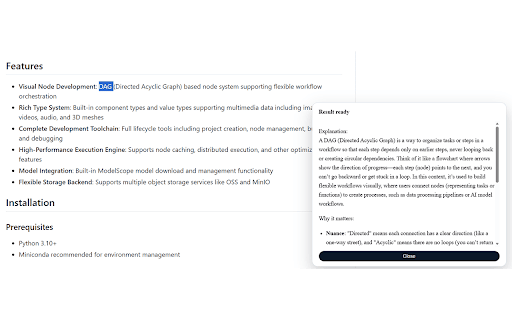
Highlight text to translate, explain, and learn with context-aware AI prompts—plus summarize, rewrite, and read aloud.
languas is a context-aware AI assistant for language learners. Highlight any text on a webpage and run your custom
prompt templates to translate, explain meaning, learn vocabulary, and understand content in context. It also works
great for general reading and writing productivity.
How it works
- Highlight → Run prompt: a floating button appears next to your selection
- Uses page context to improve accuracy: page title, URL, nearby/paragraph text, and language hint
- Shows results in an on-page panel with streaming output
- Listen (read aloud) for selected text (Web Speech, with optional remote TTS)
Made for language learning
- Fast context-aware translation (defaults can be edited to any target language)
- “Explain like I’m learning” style prompts for idioms, tone, and tricky grammar
- Turn real-world web content into study material (definitions, examples, usage notes)
- Read aloud to practice comprehension and pronunciation
Also useful for productivity
- Summarize long articles into bullets
- Rewrite text to be clearer or more natural
- Explain technical paragraphs in simpler language
- Create your own “Ask anything about this page/section” prompts
Prompts & customization
- Built-in prompts: Translate, Summarize, Explain, Rewrite (editable)
- Manage a prompt library and set your active prompt in the popup
- Prompt generator: draft new prompts from your intent (tone/audience optional)
Providers & privacy
- Works with your configured provider (OpenAI, Anthropic, Google, Azure OpenAI, or OpenAI-compatible endpoints).
- API keys, prompts, and history are stored locally in your browser.
- Only the selected text plus limited context is sent to the provider you choose.