
Chrome Password Manager
Extension Actions
- Live on Store
Use Chrome Password Manager — secure access to my passwords and a faster, smarter way to use your google password manager.
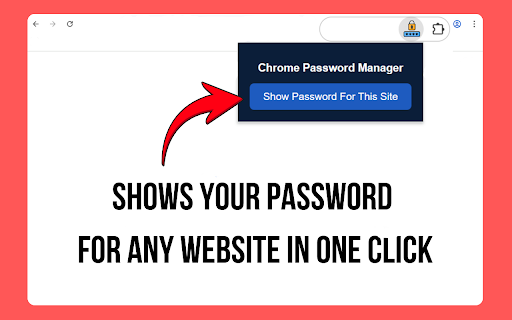
Quick Start Guide
Install the extension
Open any website where you need fast login help
Tap the main button
Instantly access the login details stored for this site 🔐
Enjoy smooth, one-click access to all user profiles
🔟 Reasons Users Choose This Tool
1️⃣ One-click retrieval of entries linked to the built-in browser credential vault
2️⃣ Integrated support for all cloud-based user vaults
3️⃣ Works smoothly with systems connected to password manager google chrome
4️⃣ Immediate access to the vault maintained through a trusted secure service
5️⃣ Instant viewing of entries pulled directly from chrome passwords manager for the current site
6️⃣ Keeps personal data private and never stores information locally
7️⃣ Clear interface suitable for personal and business use
8️⃣ Compatible with productivity tools including keeper password manager chrome extension
9️⃣ Streamlines profile review through browser-based vaults
🔟 Convenient access to all login entries with minimal clicks
🚀 Why This Extension Stands Out
➤ Opens credentials stored in the trusted cloud-based vault instantly
➤ Provides immediate access to items synced across devices
➤ Lets you quickly access your saved credentials without navigating through menus
➤ Designed for individuals and teams using google passwords manager
➤ Displays profile entries arranged in the same structure used by google password manager chrome 🔎
➤ Works seamlessly in chrome environments for improved performance
➤ Supports google passkeys for faster authentication
➤ Integrates with your preferred passwordmanager for streamlined workflow
🔐 One-Tap Access to Your Accounts
Need fast login assistance?
This tool pulls your information immediately, including items accessible via chrome manage passwords.
It’s especially helpful for users who rely on a centralized digital manager for daily tasks.
➤ Quickly manage all your account login credentials in one place
➤ Access your accounts quickly using googlepasswords
➤ Manage credentials more efficiently with google passowrds
🛡️ Privacy Comes First
All credentials remain inside Google’s secure ecosystem.
The extension never stores:
• login details
• synced data
• device information
• browsing history
It only reveals entries handled through manage passwords chrome, without keeping local copies.
📁 Organize Your Digital Life
• Browse all items synchronized through account vaults
• Easily open entries stored inside manage saved passwords chrome for quick viewing
• Review stored credentials kept in the browser-based access hub
• Quickly find login information without digging into settings
• Access all important account entries in a single click
• Enjoy a more structured environment with a unified access manager
• Works seamlessly with google pasword manager to keep everything organized
📌 Daily Productivity Boost
Retrieve work profiles without extra effort
Keep online workflow efficient and consistent
Skip browsing system menus
Ideal for anyone who frequently checks google manage passwords
Perfect for users who prefer a simplified workspace guided by a personalized digital manager
🧠 For Teams and Professionals
➤ Streamlines cross-account access
➤ Simplifies shared workflows
➤ Efficient for managing both personal and corporate accounts
➤ Quick switching between profiles and synced devices 🧩
🌍 Works Across Your Workspace
Whether organizing profiles or switching devices, the extension provides smooth access across all connected ecosystems.
Perfect for users who appreciate clarity and straightforward control in their digital manager setup.
⭐ Frequently Asked Questions
📌 What does the extension do?
💡 Reveals all credentials stored in Google’s system
📌 Does it store any data locally?
💡 No. It only displays what already exists in the secure cloud.
📌 Can I see everything quickly?
💡 Yes — data is displayed instantly
📌 How does this extension help you find the right information?
💡 The tool doesn’t modify any browser settings — it simply opens the password page for the current site with one click. At the same time, it makes it easier for users to navigate manage passwords google chrome.
💡 It also helps you quickly locate saved data inside google chrome manage passwords without manually searching through menus.
💡 Designed to integrate seamlessly with your account login workflow using google passkeys and googlepasswords
🚀 Start Using It Today
Enjoy instant access, clear navigation, and stress-free account management.
One click, immediate visibility, total control ✨
Latest reviews
- Ivan Pivovarov
- It’s easy to use, works fine, and saves me time when I need quick access to my password on any site. The interface is clean and not cluttered
- Виктория Юшкова
- Thanks for the extension. It is simple, convenient, and easy to use