
SOOPtalking - SOOP Streamer Alert
Extension Actions
- Live on Store
Automatically detects when your favorite streamers go live, opens their streams in a new tab, and allows direct HLS stream…
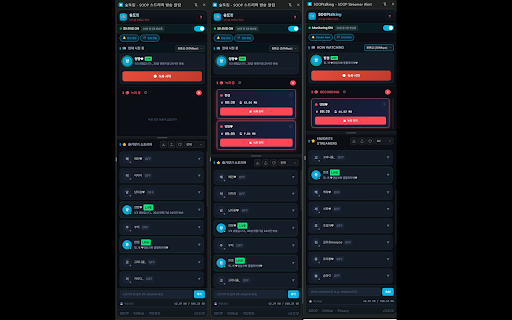
🎯 SOOPtalking - SOOP Streamer Auto Alert & Recording & Chat Collection
Never miss your favorite streamer's broadcast!
SOOPtalking automatically detects when your favorite streamers go live, notifies you, records broadcasts, and collects chat messages.
✨ Key Features
🔔 Auto Notifications
- Browser notifications when streamers go live
- End-of-broadcast notifications (optional)
- Customizable notification duration (3-60 seconds)
🚀 Auto-Join
- Auto-join settings for specific streamers
- Automatically opens tabs when broadcasts start
- Fast detection every 5 seconds
- Auto-join active broadcasts on browser restart
🎬 Broadcast Recording
- One-click record start/stop
- H.264 hardware-accelerated high-quality recording
- Auto-recording (starts when broadcast begins)
- Auto file splitting (500MB/1GB/2GB)
- Recording continues even with side panel closed
- Auto-save on broadcast end (prevents recording loss)
💬 Chat Collection (NEW!)
- Real-time automatic chat collection
- SQLite-based large-scale storage
- Search by streamer/nickname/message
- Export to CSV/JSON format
- Collection mode selection (All chats / Selected streamers only / Off)
- Auto backup feature
📊 Smart Tab Management
- Active broadcast tab status display
- Auto-close offline streamer tabs (per-streamer setting)
- Auto-close VOD autoplay tabs
- Duplicate tab prevention
📁 Streamer List Management
- Import/Export streamer list (JSON)
- Drag and drop to reorder
- Click avatar to visit station page
- Auto nickname updates
🌐 Multi-language Support
- 한국어, English, 日本語, 简体中文, 繁體中文
- Automatically changes based on browser language
⚡ SOOP Policy Compliance
- Automatic handling of 4-tab simultaneous viewing limit
- Shows notification only when already watching 4 streams
🔒 Privacy Protection
- No personal information collected
- All data stored locally in browser only
- Uses only official SOOP API
💻 Supported Environments
- Windows, macOS, Linux
- Chrome, Edge, Brave browsers
📌 How to Use
1. Click extension icon → Open side panel
2. Enter streamer ID to register
3. Configure auto-join/auto-recording settings
4. Turn Monitoring ON!
5. Click record button while watching to start recording
6. Set collection mode and search chats in Chat tab
Contact:
https://github.com/musickiss/soop-streamer-alert
https://www.sooplive.co.kr/station/teamilh