
Highlight & Save Text
Extension Actions
- Live on Store
Save web highlights and export them as a text file.
Highlight & Save Text: Your Simple Web Researcher
Tired of losing track of important quotes, facts, and snippets while browsing? Highlight & Save Text is a lightweight, privacy-focused tool designed for students, researchers, and readers who need a friction-free way to collect information. No accounts, no subscriptions, and no complicated tagging systems—just highlight, save, and export.
CORE FEATURES:
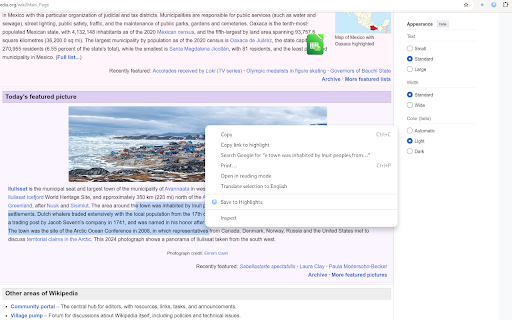
- One-Click Saving: Simply highlight any text on a webpage, right-click, and select "Save Highlight."
- Automatic Metadata: Every highlight is saved with the page title, URL, and a timestamp so you never lose your source.
- Clean List View: View all your saved snippets in a minimal, easy-to-read popup.
- Instant Export: Download your entire collection as a clean .txt file with one click. Perfect for moving your research into Notion, Obsidian, or Word.
- Local Privacy: Your data never leaves your computer. We don't use cloud syncing or tracking, ensuring your research stays yours.
HOW TO USE:
- Select any text on a website.
- Right-click and choose "Save Highlight."
- Click the extension icon in your toolbar to view your list.
- Click "Export .txt" to download your findings.
PERFECT FOR:
- Students: Gathering quotes for essays and citations.
- Developers: Saving code snippets or documentation notes.
- Writers: Collecting inspiration and references from the web.
Minimalists: A tool that does one thing perfectly without the bloat.
PRIVACY GUARANTEE:
- No Accounts: No sign-up required.
- No Tracking: We do not track your browsing history or collect personal data.
- 100% Local: All highlights are stored on your device only.
Keep your research organized and your browser light. Install Highlight & Save Text today!