
Theme Switcher - Dark/Light Theme Toggle
Extension Actions
Toggle dark/light theme on any website immediately (SPA friendly).
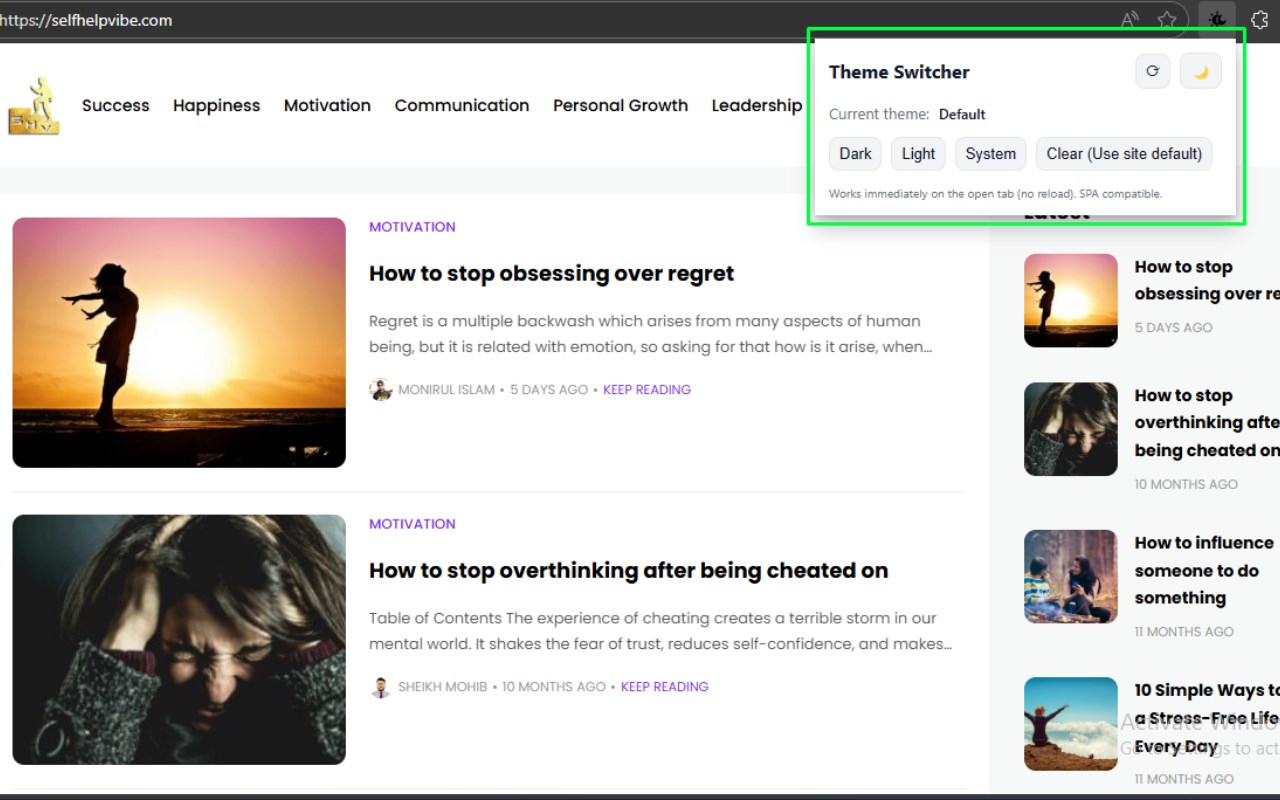
Theme Switcher is a highly versatile and user-friendly browser extension designed to instantly toggle between dark and light themes on any website you visit. Many websites lack a built-in dark mode, which can cause discomfort or eye strain, especially during nighttime browsing. Theme Switcher addresses this by empowering you to customize your web experience with your preferred color scheme—whether you want the calming, eye-friendly dark mode or a classic light theme—universally applied to all sites, including single-page applications (SPAs) and sites with dynamically loaded content.
This extension works by injecting carefully crafted custom CSS into webpages, intelligently restyling backgrounds, text, input fields, and other elements to align with the chosen theme. It smartly excludes key visual elements such as images, videos, and code blocks so that functionality and readability remain uncompromised. With a simple, intuitive popup user interface, toggling themes requires just one click. The interface also provides quick-access buttons to refresh the styling (useful after SPA navigation or content updates), enforce a specific mode, or reset customization for a clean slate.
One of Theme Switcher’s standout features is persistent site-specific settings, which remember your preferred theme for every website you visit and automatically apply it on subsequent sessions without requiring manual adjustments. This ensures a seamless and personalized browsing experience custom-tailored to your visual comfort preferences. Its lightweight design and optimized CSS injection guarantee fast performance without slowing down page loads or interfering with website functionality.
Additionally, the extension is built with modern web security standards such as Manifest V3, ensuring it runs efficiently and safely. It fully supports SPAs and content-heavy websites like dashboards, webmail services, or social media platforms by instantly adapting to content or navigation changes without needing page reloads. Importantly, Theme Switcher respects user privacy: it operates purely locally, does not collect or transmit any personal or browsing data, and maintains strict adherence to privacy best practices.
By using Theme Switcher, your web browsing becomes more comfortable, visually consistent, and easily adjustable to meet your unique lighting preferences at any time of day or night. Whether you’re working late hours, watching videos, or browsing casually, the extension offers you granular control with rapid theme switching to reduce eye strain, save battery on OLED devices, and enhance overall usability.
Key Features:
1. Universal theme switching: Instantly toggle dark or light mode on any website, including single-page applications and dynamically loaded content.
2. Persistent settings: Saves your theme preferences on a per-site basis and applies them automatically on future visits.
3. Custom CSS injection: Restyles backgrounds, text, inputs, and other page elements, while excluding images, media, and code blocks for optimal readability.
4. Simple, intuitive popup UI: Provides quick controls for switching themes, refreshing styling, applying specific modes, and clearing saved preferences.
5. SPA-friendly architecture: Seamlessly responds to dynamic content and navigation changes without requiring page reloads.
6. Fast performance: Lightweight scripts and optimized CSS ensure smooth and rapid theme transitions without affecting browsing speed.
7. Privacy-focused: Operates entirely locally without collecting or transmitting any personal or browsing data.
How It Works:
1. Install Theme Switcher from your browser’s extension store and pin the extension icon for easy access.
2. Visit any website where you want to toggle the theme.
3. Click the extension icon to open the popup UI containing theme controls.
4. Use the main toggle switch to instantly switch between dark and light themes and see the site restyle immediately.
5. For precise control, press “Apply Dark” or “Apply Light” buttons to force a specific theme on the current site.
6. If the website uses dynamic content or SPA navigation, click “Refresh” to reprocess and apply the theme correctly to new content.
7. Your theme preference is saved per website and automatically reapplied on future visits, delivering a smooth, persistent experience.
8. To remove custom styling and revert to the website’s default theme, simply use the “Clear Theme” button—this deletes your saved preferences for that site.
Privacy: - No personal data collected.