
CyberGuard Password Checker
Extension Actions
Dark cyber-themed password strength checker with real-time strength feedback and secure suggestions.
CyberGuard Password Checker: Advanced Password Strength Advisor
CyberGuard Password Checker is a cyber-themed browser extension crafted to help users create stronger and safer passwords directly on websites where password inputs occur. Designed with an intuitive dark, cyber-style interface, CyberGuard empowers users by providing real-time analysis of password strength and actionable feedback to enhance online security. Whether you are signing up for new accounts or updating existing credentials, this extension delivers clear guidance without compromising your privacy.
Unlike simple password checkers that rely only on length or basic complexity, CyberGuard employs a sophisticated algorithm assessing several factors such as length, variety of characters, and the presence of common weak patterns or passwords frequently used. As you type or paste a password into any supported site, CyberGuard instantly categorizes it into one of three strength levels: weak, moderate, or strong. Based on the evaluation, it then offers relevant suggestions to improve your password or generates secure alternatives to help you build more resilient credentials.
The built-in secure password generator creates robust, random passwords with a single click, avoiding predictable patterns or repeated sequences that hackers often exploit. The extension displays strength badges visually on relevant password fields, providing ongoing feedback as you type. This ensures you are always aware of the password security level during sensitive entry points. All password processing happens entirely within your browser, meaning no data leaves your device. CyberGuard imposes no tracking, storing, or sharing of your passwords or any personal information, aligning with its strict privacy-first philosophy.
CyberGuard’s lightweight design ensures it operates smoothly without slowing down your browsing or interfering with site functionality. Its modern visual theme combines clarity with striking cyber aesthetics, making the experience both appealing and straightforward. Suitable for students, professionals, and everyday users alike, CyberGuard allows effortless improvements to password hygiene, boosting your defense against cyber threats while maintaining full control over your data.
Key Features:
- Real-time password strength analysis with instant feedback shown in popup and directly on password input fields.
- Cyber-themed floating button and easy-access popup for quick password checks on login and signup pages.
- Smart strength scoring based on industry-standard guidelines, considering length, character diversity, and weak pattern detection.
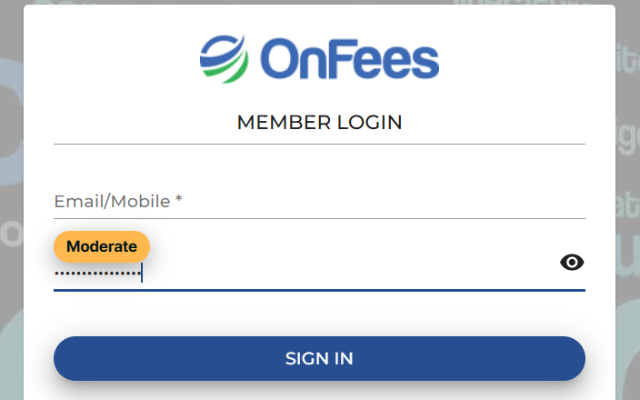
- Visual strength badges appearing discreetly on password fields to provide ongoing security status updates as you type.
- 100% privacy-focused operation: all analysis takes place locally with no data collection, storage, or transmission.
How It Works:
1. Click the CyberGuard floating button or extension icon to open the popup interface.
2. Enter or paste your password into the provided input field for immediate strength evaluation.
3. Observe a real-time strength score—categorized as weak, moderate, or strong—with color-coded visual cues.
4. Benefit from inline strength badges visible on supported password inputs, which update dynamically as you type.
Privacy: - No personal data collected. All password analysis and generation are performed locally within the browser without any transmission or external storage of data. Your privacy and security remain fully protected at all times. See our privacy policy for complete details.