
IBM Security Rapport
Extension Actions
CRX ID
bbjllphbppobebmjpjcijfbakobcheof
Status
- Extension status: Unlisted
- Live on Store
Description from extension meta
IBM Security Rapport
Image from store
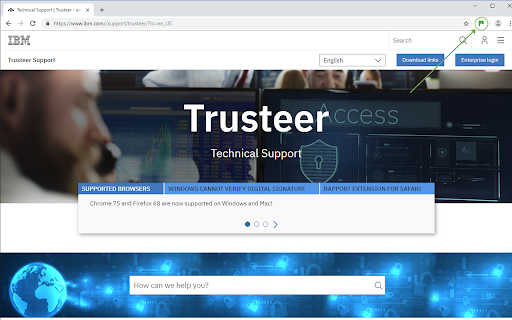
Description from store
IBM Security Trusteer Rapport Endpoint Protection Icon Indicator Extension.
The Rapport icon extension works in conjunction with the IBM Security Trusteer Rapport Endpoint Protection client.
The Rapport icon appears on the right side of your browser's address bar. The icon is green when the website you are visiting in your active tab is protected by Rapport and gray when the website is not protected by Rapport.
Latest reviews
- Peter Wickes
- Keeps asking to reboot even after you have just rebooted!!!!!!!
- Martin Č
- It is easy to use and provides added security. I have used IBM Trusteer Rapport Endpoint Protection for many years.
- Greg B
- I like using the product when I am doing my online banking IBM is trustworthy
- Richard Skokowski
- This seems to work for me when I browse to my bank's Web site. Some people report "the icon is always gray". That is true for Web sites that don't use the IBM suite. Try browsing to "ibm.com" to see it turn green.
- Jennefer Clayton
- I installed Rapport a long time ago, and I find it extremely effective, I love the extra security this software provides.
- Edmond Leung
- Not working. It keeps asking you to enable it. I did but the icon never turns green, which means it doesn't work properly.
- Vicki R
- Used Rapport with Chrome Browser for years with very few issues. Any glitches are usually ironed out quite quickly. Easy to add to any page you feel security is needed.
- driccon1
- It may be worthwhile security to have it but, it is annoying to be told to enable it every time the browser opens. It is enabled yet the stupid app apparently doesn't recognize it. They need to fix it!
- Terry
- We have used Rapport for years with no problems and would not do on line banking without it. Feel really protected when this is running. We also have AVG security and can report that there are no conflicts with the software. Excellent product and can highly recommend it. Why its only got such a low score is strange. I can only assume that the people who rubbish are a bit dim.
- lesley spencer
- Rubbish, no option for zero stars, get message when I log in to say enable, when I click enable it takes me to website there there is no option to enable on the web page, waste of time.
- J Nicholson
- Works well for me!
- Dexter Smith
- Pretty hopeless really. No indication from either Chrome or Firefox menu bar that it's installed and active, although it appears on the list of extensions. More disconcerting is the fact that I still keep getting prompts to install it!
- Katherine Hevezi
- Slightly improved from the previous iteration - no longer crashes my laptop - IF it is installed. I do not know if it is installed and enabled as I keep on getting the message to enable it.
- Dave C
- Constant messages to install app which is already installed, if I follow link just brings me to this website which is fullof Rapport products with no instruction and direction as to whether need to update installed software o take some action.
- Peter Davis
- What a load of rubbish this extension is, keeps asking me to enable but then I can't enable it...........very frustrating!!!!!! Why on earth don't they do something about it, are they proud or care about their 1.8 score or their clients?????
- iamcamposI
- Works for me, I feel a lot safer when doing online banking and other sensitive transactions online. I installed it long time ago when one of the banks I do business with promoted its installation to improve security. Not the most user friendly but after many years using it is not thet difficult.
- Peter O
- Published by IBM Israel? Time for a boycott, I think
- Noel Jones
- You may have a brilliant product here but for an end user not experienced with you it is totally unclear what the instalation process is and whether the user has installed correctly. You need to provide a clearer step by step guide and give confirmation that the software is up and running correctly. It may seem obvious to you but to those not familiar with your product or not regular users of tech it is confusing and creates uncertainty. Right now I have installed but I have no indictation that I did it correctly or that the product is working. Test your product with inexperienced none tech people when they get it right you will be right. Thank you.
- neil hayes
- Seems to be good for me and no issues using / running it.
- Patricia Hunt
- Why ask for me to enable and then not let me. I have this because my bank required it. Now I wonder if it is working properly.
- Dawie Erasmus
- Can you please explain why this extension simply disappear after a day or two.
- Bernard Bettez
- Nice
- David Winter
- So, does it actually do anything useful? As far as I can tell it just collects data. It's a real nuisance, especially after asking about Edge which is not even my preferred browser. Maybe time to get rid of it?
- Allan Huff
- Every time I switch my lap top on. You ask me to re-new rapport. It never works!... Sort it out so it does re-new. Windows 10 user
- Carelyn Steele Sheppard
- Phishing app which should NOT be used or trusted. It wants more, newer information every time the computer is turned on.
- Jeff H
- This is a great tool. I've been using it for years since I worked in a Financial institution and directly saw how end-users can protect themselves from fraud abuse on the web, even if their comuters are infected in other areas. Also, installing this should work in all your browsers, not just Chrome. I suggest using "Protect This Site" button for any website you enter sensitive information or credit cards into. It is not enabled for all sites for default. It covers certain financial institutions out of the box, but you need to tell it to protect the sites you want protected.
- James Gardiner
- One of the best. Recommended to me by RBS, then Santander and then BoS. I keep it updated and it works. It is better than paying £'ssssss for Norton, MacAfee etc and all the other security cons.
- Steve Hedge
- Recommended to me by Santander bank several years ago. I "assume" it actually DOES something...? I get no reports etc from it & more recently it always asks for the Extension to be Enabled at PC boot up which is annoying because IT IS. Seriously thinking of removing it as I doubt Santander Customer Services will be able to advise.
- Mark Teague
- Terrible user experience. Pop up instructs go to Chrome extensions then click "enable" and there is no enable option of button. This is the clunkiest software I have encountered in a long time. I would think IBM had the resources to improve usability.
- Thingy Do-Da
- An excellent financial tool which I have had in use for over 10 years now. Apart from its use directly in online banking any area involving monetary transactions can be covered to ensure a high level of Security merely by converting 'this site is unprotected' (grey icon) to 'Protected' by clicking the grey icon. I would not do without it. Goodbye unwanted interference with Trusteer Rapport in place.
- Eric Stamp
- Keeps asking me to enable it, even though chrome seems to think it is already enabled. I dont even know what it does, how to use it or how it works even though the bank ask for it. If its something that runs in the background surely users should be given some info about it.
- D S
- I've had this for a few years now, running in the back ground, no issues. recommeded by by bank.
- Anay Makan
- recommended by Santander and seems to do the job well without ruining my computer.
- John Beetwell
- Simply the best protection where money is involved. I believe that Banks now insist on Trusteer being available and engaged when connected.
- Joan PARNELL
- Best on the market. Stronly recommended by my bank: The Scotia Bank.
- Don Walker
- Works fine, strongly recommended by my bank
- Jake Horrocks
- Its a must. Banks swear by it!
- Robert Netherton
- Like to keep a useful security measure. It sometimes interrupts or snaps an incoming page.
- Kim Lorene
- Works on my firefox and edge. Has been working on Chrome as well. -- So what's up with Google??
- Daphne Sandham
- always works for me, my bank tells me to use it
- janis Boone
- it always works for me i think ill be moving to duckduck.co if we lose it on chrome
- brian pali
- i will be moving to firefox if we lose it on chrome
- L Paquette
- Has always worked well for me. My bank(s) say I ***Must*** use it so I do. No issues ever with my banks just limited support for some browsers. Will have to shift to FireFox for my browsing if it is not available on this platform anymore.
- Tom Crowell
- I dose not work for me. I have installed it. IBM say all looks good and B of A locked me out 4 times. IBM say it's an issue and call B of A and B of A says it is an IBM issue and to call IBM. I calling BS
- John Marshall
- can not enable it ?
- Leopold
- Some banks want their customers to use it; I have no issues
- Paul W
- No use if you use Mozilla Firefox, as it installs the extension on Chrome. And Chrome says "This extension may soon no longer be supported because it doesn't follow best practices for Chrome extensions."
- john Jarman
- Its fundamental design flaws are totally obscured by its superficial design flaws; its superficial design flaws are totally obscured by its useless documentation.
- Di Zietsman
- Go to Chrome Extensions - find IBM Trusteer Rapport - click on it and the Enable button should come up.
- Hal McD
- It works fine. Read the instructions to enable it. See the grey box on right side, click it....