
JoinNow MultiOS
Extension Actions
CRX ID
makojehmiedfbnephoffkknopflhddbc
Status
- Extension status: Unlisted
Description from extension meta
JoinNow MultiOS Extension for Chromebook
Image from store
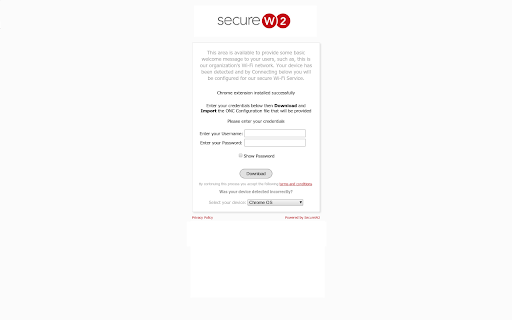
Description from store
SecureW2 JoinNow configures and connects your devices to secure/encrypted wireless networks within your institution. JoinNow is an automated, self-service WPA2-Enterprise onboarding system that quickly and securely configures users for wired and wireless 802.1X networks. JoinNow supports all major operating systems and supports the most commonly used Wireless authentication services and EAP methods, including EAP-TLS, PEAP-MSCHAPv2, EAP-TTLS, PEAP-GTC.
For more information, please visit https://www.securew2.com
To view our Privacy Policy, please visit https://cloud.securew2.com/public/general/privacy-policy.html
Latest reviews
- charlotte popson
- I wish Penn State would make this easier. Terrible service, makes no sense and from what it seems, institutions don't give enough info.
- Agbor
- Awful service, very confusing.
- Jackie Wagner
- Over complicates connecting to internet which has no good reason to have security this tight, merely being on the same internet is no longer a security risk, completely unnecessary
- Kimberly Kulkovit
- I tried logging in to Cal Poly Pamona campus with ChromeOS and importing the ONC file, it doesn't retain the file and I'm not able to log in at all. I've rebooted my Chrome OS several times and still I'm not able to do it. This is the worst app not because it doesn't work but because this has been an issue since 2019 and at this point it's almost as if the developers don't care. It redirects me to chrome://net-internals/ only to be taken to the same page where the import ONC file does not work. The chomebook is actually a great machine and the fact that it isn't taken seriously is very unfortunate.
- Bass Man
- if you shut down or log out of an account you will get caut in a catch 22, not being able to sing in to download the required data as the network is not secure enough to sing on, at least at DVC.
- Tanner Travers
- I was kind of "forced" to get a laptop when we swapped back to in person classes. So i went with a Chromebook because it was affordable for my current budget. Its been over a week and the extension still does not accept the ONC file upload. Still cant do my schoolwork at school. AVOID CHROMEBOOKS IF YOU ATTEND RUTGERS THERE SEEMS TO BE A HUGE OS OVERLAP.
- Guy Farting
- Doesn't work. When you try to connect to the network, it just redirects you back to the chrome web store page. Completely useless.
- Ajax
- Here's how to connect using the chromebook. 1. Download this extension, then you'll be prompted to sign in 2. Try signing in, if that works then go to step () if not, then restart your chromebook 3. After your chromebook is restarted you should now be able to login and download the file you need 4. Once the file is installed you can now select the WIFI debug 5. After this you have to import the file, dont just double click, you HAVE TO click on the file, then click open in order to import. 6. Hopefully it works for you all!
- Singpizza
- I can't even use the thing
- Sam Greenwell
- It does not work: not only are the instructions incorrect (had to search ChromeOS forums to find answers for the install) it is buggy and not reliable. I will not trust student data on this platform.
- Michelle Pigott
- Like other reviews, I had an exceptionally difficult time with the ONC file. The instructions don't note it anywhere, but Chromeos does not confirm that the ONC file has been uploaded. So just go on and assume that the ONC file was uploaded and try to connect to Eduroam. It's not really this extension's fault for the irritating feature, however the instructions are infuriatingly vague. After the third attempt, right before giving in to using my hotspot, I was able to connect to Eduroam. I assume it was black magic.
- Drew Gillies
- Didn't work, uploaded file, said no file chosen I tried rebooting my chromey but didn't work tried this a few times pretty bad.
- Ben Davis
- Same issue here as everyone else. Always says no file selected. I can only connect to eduroam about 30% of the time. I'm so frustrated I just want to do my homework.
- Jean Gillon
- Rubbish, cannot get it to work on my chrome!! Rutgers U. Oct.2019
- Tom Mike
- Why does my school use this? Why does life have to be so hard?
- Elise Bauer
- This is so stupid! I'm an upper division classman taking 18 credits and don't have very many times I can have wifi, and it doesn't even work.
- Yukun Zheng
- Wish I can give 0 star. Tried uploading the ONC file and says no file chosen. Can't connect to eduroam at all.
- Glenn Sims
- This extension works though it may seem unusual. Upload your ONC file. It may not update, and that is fine. Shut down your chromebook and turn it back on. As soon as it booted up I was connected to our authenticated network. Written @ Polk State College on 7/9/19.
- Linh Nguyen
- I'll echo the file upload doesn't happen for me (Pixelbook). It pops a 'no file chosen' notification where the cursor happens to be. edit: it seems there is 0 indication there's an upload. It did, in fact, upload and function. This is seemingly a limitation on the ChromeOS side of things?
- Anonymous
- Doesn't work
- Nick Ramos
- Can't configure with my network on my chromebook or PC. What a joke since this is the only connection method my school uses. I wonder how they feel about running a scam.
- Alan
- Non-functional. The instructions are outdated and no longer work. Tells me to go to chrome://net-internals/ to upload the file, but I'm simply given a message stating the functionality has been removed.
- Matthew Rivera (CMO)
- It doesn't work at all, doesn't let me upload the ONC file
- Anonymous
- It simply doesn't work.
- Victor Shollenberger
- it wont let you connect a chromebook at depaul
- Anmol Eswarapu
- actual nonsense. doesn't work at all on my chromebook at Rutgers. once i download the extension there is no prompt to do anything else. it shouldn't be this hard to connect to wifi
- The_Matad0r
- It may be my school, but it won't work on my chromebook. I download the file it tells me to, put in the file, try to switch, and it tells me it won't accept it. Worked a few times before it started this, but I can't work on some things if I can't connect.
- Gerhard Burger
- Works fine on my chromebook using eduroam at Leiden University, though you should remember which page you need to access for the extension to work
- Gary Bishop
- Works fine at UNC with our eduroam network. I wish the page where you upload the .onc file gave a more positive indication of success. It is easy to miss the tiny flash when uploading a file and think it must have failed.