
Rename Tabs
Extension Actions
CRX ID
lcgkkkecglanepabndjndlgecjgoanei
Description from extension meta
Used for changing tab names
Image from store
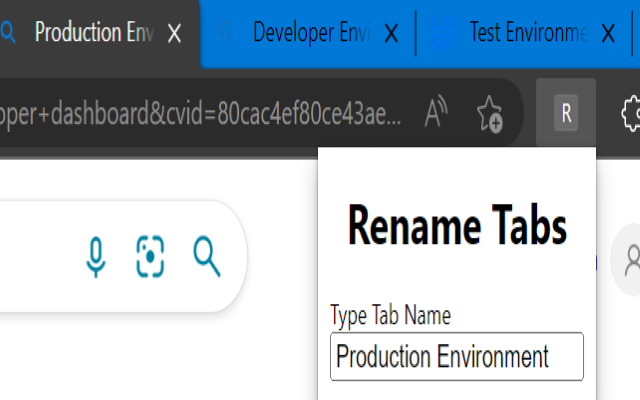
Description from store
Often while working with multiple browser tabs of the same domain, it becomes difficult to remember what information is present on which tab. With this extension you can easily rename tabs. Just open any website, click on the extension and start typing a name, it will automatically change the name of the tab.
***Notes***
Any tabs opened before installation of the extension need to be refreshed.
Latest reviews
- James
- Tested in Microsoft Edge version 146.0.3856.84 and it does not work. As Gavin mentioned, the input box comes up, you put the text in, I assume you're supposed to hit enter? Uninstalling.
- Manuel
- It does not work at all.
- Daniel
- Renames tab. Works as intended (you must click on the extension to rename the current tab). Thank you.
- Gavin
- Honestly trash, just an input box that does nothing after you put in the name you want... I could make the exact same thing in google sheets :) Once you put in words, they disappear. Wow. Not exactly what "Rename Tabs" means.
- Vassili
- Works in Edge (v.128) as of September 17, 2024. Works with both horizontal and vertical tabs. The name changes are preserved after browser restart. Make sure to read the instructions in the Description section above (particularly, the "any tabs opened before installation of the extension need to be refreshed" part). All in all, just as Julie stated here in the reviews on November 5, 2023, make sure you use this extension as expected and you should be good.
- Mark
- Does nothing. Wd rate zero stars if it were an option.
- .
- You type the new name in the box, press enter, the box is emptied, the tab is not renamed.
- Steele,
- would not apply the new name
- Julie
- Works perfectly as of November 2023 on Windows 11. Tried it on all the bigshot websites; Canvas, Google Docs, Youtube, you name it. And now you literally can. Not sure why it's only 3 stars with very few reviews. I think y'all just need to learn how to use extensions; click on the extension icon (puzzle shape) at the top, make THIS extension visible by clicking on the crossed-out eyeball icon next to it, and boom. It's visible now. Crazy. Now just reload whatever tabs you have open, click on the extension icon, type in what you want to name the tab you're currently on, push the enter button...bam. The tab is now named what you typed in. It does what it says it does?! Incredible, who would have guessed. Many thanks to the creators of this! The names go away if the renamed tab is reloaded, but that doesn't really matter (at least to me). Counted the name limit to be 40 characters using sequences of #s, which is more than enough because the tab preview can't even fit all 40 characters.
- Ondrej
- Literally does not work
- Oleksandr
- Great idea, but the extension doesn't work
- Brent
- Need instructions. The R rename option does not show and there is no right-click option that i see.