
Tab Unify
Extension Actions
Merge & sort into current window or into it own windows by same site (domain hostname), auto-remove duplicates
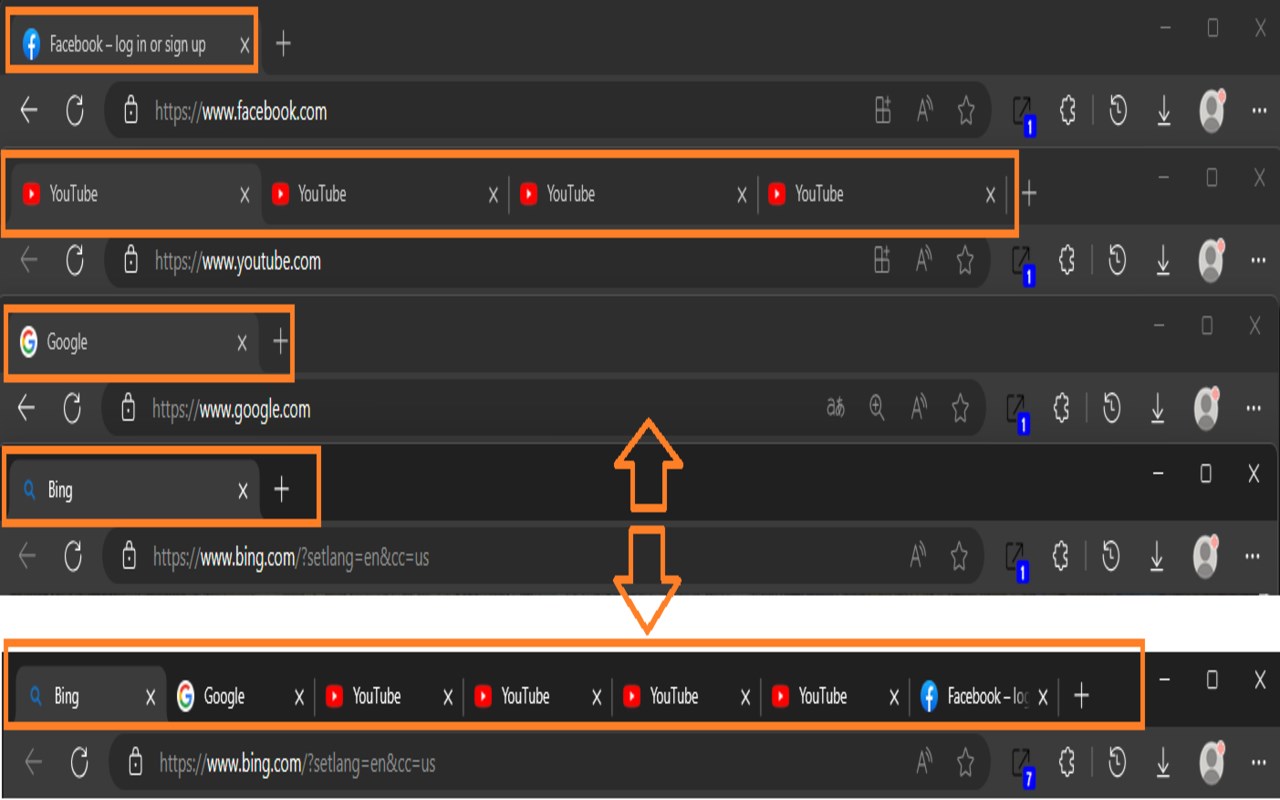
Remove duplicate tabs, merge sessions, organize and move tabs.
Tab Unify: Master Your Tabs
What it does
_____________________
1.Prevent Duplicate: Remove duplicate tabs in your current window, helping manage your browsing efficiently.
2.Merge and Sort Tabs: Seamlessly merge tabs from different windows into one, creating a unified view of your sessions.
3.Sort Tabs: Organize the tabs in your current window for smoother navigation.
4.Sort and Move to Its Own Window: Move all tabs from all windows into it own new windows.
Exclusion List: Specify URLs or patterns to prevent specific tabs from auto remove duplicate functions.
Domain Tab Prioritization
How to use
_____________________
1.Click the Extension Icon: Move all tabs from all windows into it own new windows based on their URL.
2.Right-Click the Extension Icon: Display a context menu to select other options.
Context Menu:
Right-click anywhere on the page you want to exclude.
Select "Add to Exclude List." The URL will be automatically added to your exclusion list.
Shortcuts:
Alt+X: Merge all tabs.
Alt+C: Sort current tabs.
Use Case
_____________________
1.Have a lot of same tabs, why view the same thing over & over: Automatically close duplicate tabs within 5 seconds.
2.Can't find a tab, there are a lot of windows: Merge and sort tabs from multiple windows into one.
3.Hard to organize tabs: Sort tabs for easier navigation or move them to dedicated windows.
4.Group all tabs from the same site into their own separate window, making it easier to switch between windows and find specific tabs.