
Awesome Grok & Grokipedia
Extension Actions
Best tool for Grok, Grokipedia & X/Twitter users: Powerfull context menu. Wikipedia/Google quick access & 'grok' address bar search!
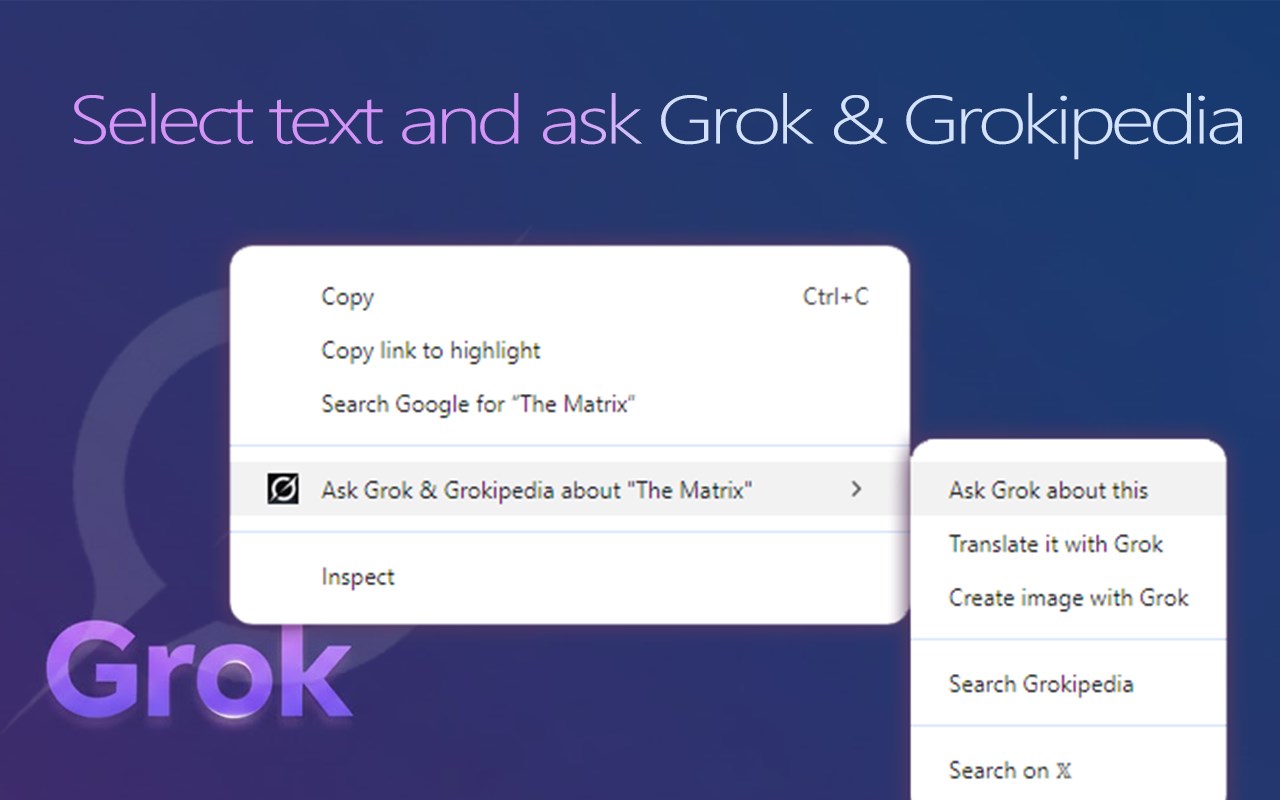
The best tool for power users of Grok, Grokipedia and X (Twitter). Intuitive context menu, Google Search and Wikipedia features that let you use Grokipedia faster. Powerfull address bar "grok" alias search.
This is the best extension for smarter, and more intuitive experience using context menu and address bar search. There are over 25 unique features for Grok, Grokipedia and X (Twitter).
🔍 grok SEARCH ALIAS
Write "grok" in address bar and ask about anything.
You can quickly: ask Grok, open Grokipedia definition, search on 𝕏, translate it with Grok or create image using Grok Imagine.
・enter: grok + word => check Grokipedia definition
・enter: grok + sentence => ask Grok to explain, translate or fact-check
・enter: grok + sentence => make Grok Imagine to generate image
・enter: grok + page link => ask Grok to analyse or translate the page share it on 𝕏
・enter: grok + image URL => ask Grok to analyse or translate the image
💙 RIGHT CLICK CONTEXT MENU
The most powerfull context menu in the extension store
Context-aware menu you can use for fast actions!
Right click and open "Awesome Grok & Grokipedia" for:
💙 Selected text:
- Grokipedia ・ open Grokipedia article
- Grok ・ask for explanation
- Grok ・get precise translations to any language
- Grok ・fact-check it
- Grok ・summarize
- Grok ・create 2 images with Grok Imagine
- 𝕏 ・search on 𝕏
- 𝕏 ・find user on 𝕏
- 𝕏 ・create new post with selected text
💙 Image context menu:
- Grok ・deep and detailed image analysis of clicked image
- Grok ・translate any text on the image
💙 Page / link context menu:
- Grok ・Summarize page with Grok
- Grok ・Translate page with Grok
- 𝕏・create new post with link to that page
💙 YouTube Video
- Grok ・ Summarize YouTube video
- Grok ・ Analyse YouTube comments
- Grok ・ Create video transcript
⚡ GROK LANGUAGE
By default Grok will give you answers in English but you can change it in Awesome Grok & Grokipedia settings. Click extension icon, open sidebar and choose any of 170 languages available.
⚡ GROKIPEDIA links in Google Search results:
- everytime you find Wikipedia article in Google Search there will be equivalent Grokipedia link added just above
⚡ REDIRECT WIKIPEDIA links:
- turn this feature on and every link to Wikipedia on any page will redirect you to Grokipedia article
(this feature is disabled by default)
⚡ OPEN GROKIPEDIA button on every Wikipedia page
Wikipedia article has a button to quickly open exact Grokipedia article.
- some articles will show number of visits so you can see how popular that article is on Grokipedia
- there might be a list of 4 other similar Grokipedia articles
⚡ OPEN WIKIPEDIA button on every Grokipedia page
Every Grokipedia article will have button that opens the same article in Wikipedia.
⚡ COMPARE ARTICLES button
"Compare" button opens Grokipedia/Wikipedia article side-by-side in sidebar panel.
See what differences are between articles in both encyclopedias.
⚡ GROKIPEDIA "page-not-found" redirect
If you will ever find non existing Grokipedia article, you will be automatically redirected to Grokipedia search results.
⚡ QUICK OPEN
Right click extension icon to quickly open:
- grok.com
- grokipedia.com
- x.com
⚡ HOTKEYS (KEYBOARD SHORTUCTS)
Fast hotkeys to quickly execute actions
(ALT + G) ・ Open Grok
(ALT + Q) ・ Open Grokipedia
(ALT + X) ・ Open x.com
(ALT + S) ・ Summarize current page with Grok
Available hotkeys:
・ Fact-check current page with Grok
・ Translate current page with Grok
・ Share current page on X
You can change and reassign hotkeys in Edge Shortcuts settings:
edge://extensions/shortcuts
🟢 GROK.COM CUSTOMIZATIONS
・ Hide "Sign up for SuperGrok" banner
If you don't have Grok subscription and use daily limit, Grok will show a banner to buy SuperGrok access. You can hide that banner as it blocks quite big part of the chat
🟢 X.COM CUSTOMIZATIONS
・ Dim ads
Make ads in feed semi-transparent and dimmed
・ Show 'Advertisement' marker
To make ads clearly distinguishable from normal posts show 'Advertisement' marker on each ad in feed
Latest reviews
- My
- I use Grok almost everyday and this addon is the best, so many features for using Grok. the context menu is so handy. looks like I've found my favorite addon for AI. thanks and keep the good work!