
Vimeo Downloader - HD Video, Audio & Clips
Extension Actions
Vimeo video downloader for Browser with HD downloads, audio and subtitle export, clip saving, smart queue, and custom file naming.
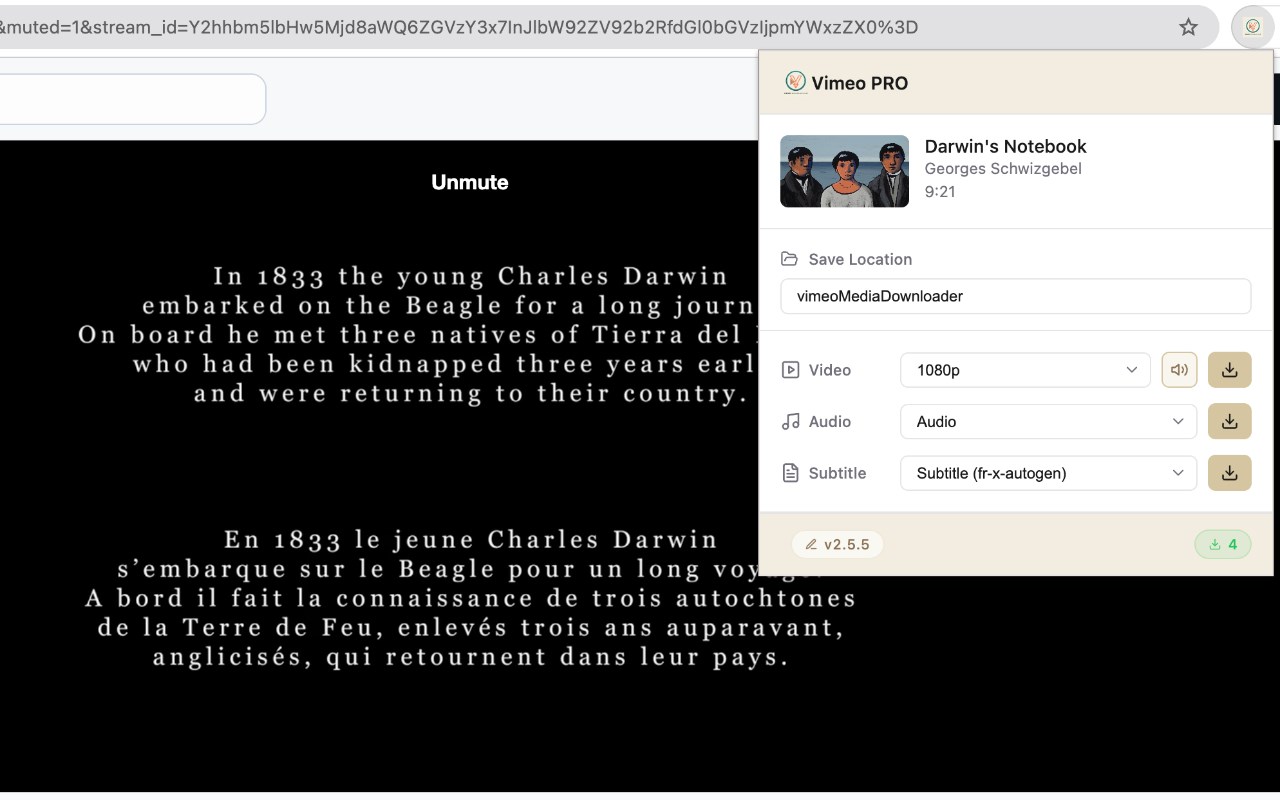
🎬 Vimeo Downloader Queue System – Download HD Videos with Audio in One Click (Background Queue Supported!)
The most powerful and user-friendly Vimeo video downloader for Edge.
Download full videos or selected clips, manage your download history, and queue downloads in the background even after closing the Vimeo page.
━━━━━━━━━━━━━━━━━━━━━━━━━━━━━━━━━━━
✨ Key Features
━━━━━━━━━━━━━━━━━━━━━━━━━━━━━━━━━━━
🎥 Full HD Video + Audio Download
• Download complete Vimeo videos with crystal-clear audio
• Supports all resolutions: 360p, 480p, 720p, 1080p, 2K, 4K
• Professional-grade quality preservation
• Zero quality loss during download
✂️ Clip / Partial Video Download
• Select start and end time to download only the portion you need
• Perfect for highlights, tutorials, or segments
• Save time, bandwidth, and storage
• Most Vimeo downloaders only allow full video downloads
⚡ True Background Queue Download
• Advanced queue system for batch downloads
• Downloads continue even after closing Vimeo tabs
• Saves browser resources, no need to keep pages open
• Real-time progress tracking
📜 Download History & Export
• View all downloads anytime
• Export as CSV / JSON / XLSX
• Ideal for creators, editors, and professional workflows
🎵 Flexible Download Options
• Video + Audio – full experience
• Video only – save space
• Audio only – extract music or podcasts as MP3
• Subtitles – download in multiple languages
📁 Smart File Management
• Custom download directory supported
• Auto naming by video title and quality
• Clean, organized downloads
🔒 Safe & Private
• No account required
• No data collection
• Works offline after installation
• Files stay on your device
━━━━━━━━━━━━━━━━━━━━━━━━━━━━━━━━━━━
🚀 How to Use
━━━━━━━━━━━━━━━━━━━━━━━━━━━━━━━━━━━
1. Visit any Vimeo video page
2. Click the extension icon
3. Select quality, format, or clip download
4. Add to download queue
5. Done! Downloads continue in the background
━━━━━━━━━━━━━━━━━━━━━━━━━━━━━━━━━━━
💡 Why Choose Vimeo Downloader Pro?
━━━━━━━━━━━━━━━━━━━━━━━━━━━━━━━━━━━
✅ True Background Downloads
Unlike other extensions, your downloads continue even after closing the page.
✅ Exclusive Clip Download
Download only the segment you need—no need to download the full video.
✅ Batch Queue System
Add multiple videos to the queue; the extension handles everything automatically.
✅ Zero Quality Loss
Direct-stream technology ensures original video quality without re-encoding.
✅ Embedded Vimeo Video Support
Works with Vimeo videos embedded on blogs, courses, portfolios, etc.
✅ Regular Updates
Our team ensures compatibility with the latest Vimeo changes.
━━━━━━━━━━━━━━━━━━━━━━━━━━━━━━━━━━━
📋 Supported Formats
━━━━━━━━━━━━━━━━━━━━━━━━━━━━━━━━━━━
• Video: MP4 (H.264)
• Audio: MP3 / AAC
• Subtitles: VTT / SRT
━━━━━━━━━━━━━━━━━━━━━━━━━━━━━━━━━━━
⚠️ Notes
━━━━━━━━━━━━━━━━━━━━━━━━━━━━━━━━━━━
• For personal use only
• Respect copyright and creator rights
• Only download videos you have permission to save
• Private / DRM-protected videos may not be supported
━━━━━━━━━━━━━━━━━━━━━━━━━━━━━━━━━━━
📧 Support
━━━━━━━━━━━━━━━━━━━━━━━━━━━━━━━━━━━
Questions? Contact us: [email protected]
If you like it, please leave ⭐⭐⭐⭐⭐!
Latest reviews
- Thomas
- It's actually possible to download high-definition videos!! Thanks!!!