
HuntPDF - PDF Batch Downloader
Extension Actions
One-click download of all PDF files on web pages, supports batch download, smart scanning, floating button, etc.
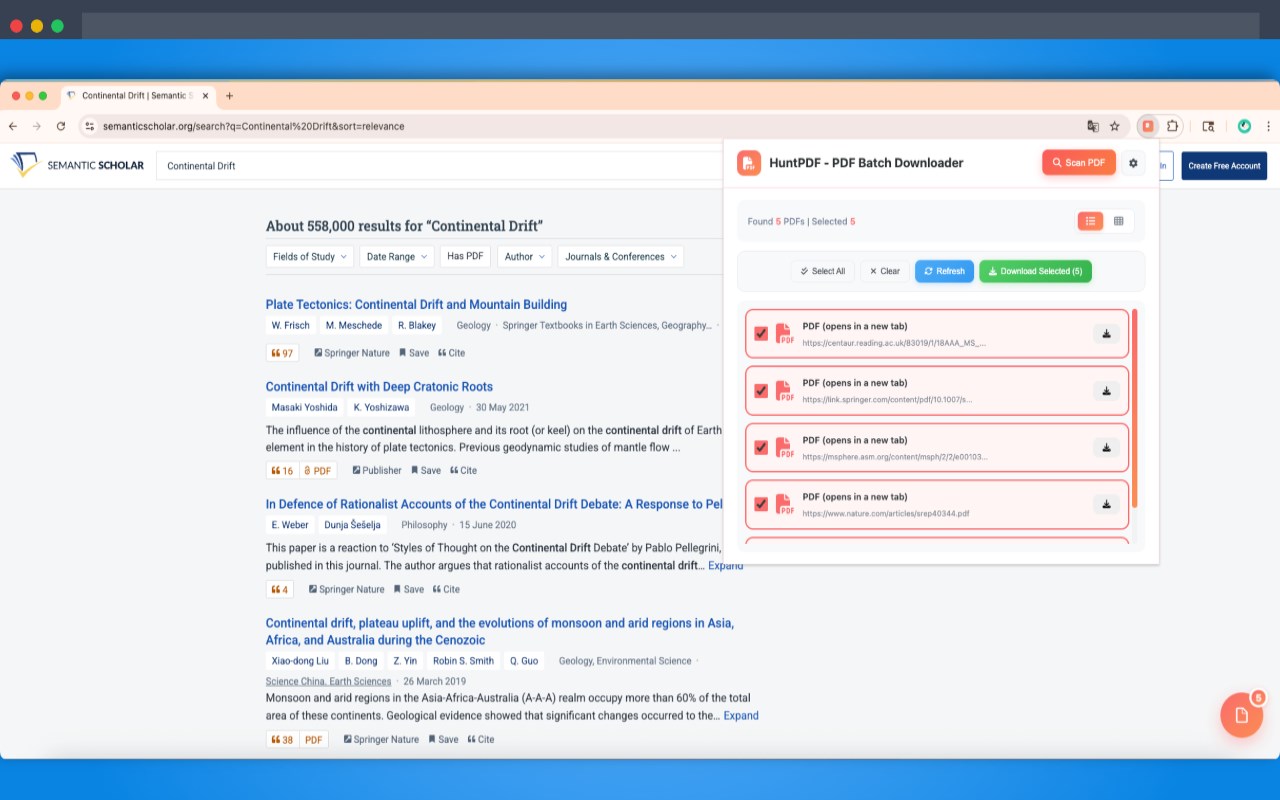
HuntPDF - PDF Batch Downloader
Download all PDF files from web pages with one click. Supports batch downloading, intelligent scanning, floating ball shortcuts, download speed control, and smart caching.
✨ Key Features
Intelligent Scanning: Automatically detects all PDF links on web pages (supports a tags, embed, object, iframe)
One-Click Download: Batch download selected PDF files with real-time progress display
Dual View Modes: Switch freely between list view and grid view
Selective Download: Choose PDFs as needed, not all selected by default
Floating Ball Shortcut: Lightweight floating ball showing PDF count, draggable, doesn't affect page performance
Download Speed Control: Supports fast / normal / slow modes
Smart Caching: 5-minute caching mechanism to avoid repeated scanning
Auto Scanning: Optional automatic PDF scanning when page loads
🧭 Basic Usage
Visit a webpage containing PDFs
Click the HuntPDF icon in the browser toolbar
Click "Scan PDFs"
Select the PDFs you want to download
Click "Download Selected" to start batch downloading
⚙️ Settings Options
Download Speed
Fast: 100ms
Normal: 500ms
Slow: 1000ms
Auto Scan: Automatically scan PDFs when page loads
Show Float Ball: Control whether to display the floating ball
Default View: List view or grid view
🐛 Common Issues
Can't scan PDFs? Some websites use JavaScript to dynamically load content. Try scrolling the page and scanning again.
Download speed too fast and getting limited? Please adjust the download speed to "Slow" in settings.
License verification failed? Please confirm that your email and license key are correct, and check your network connection.
Float ball not showing? Please confirm that "Show Float Ball" is enabled in settings.
🤝 Support
📧 Email: [email protected]
🌐 Website: https://huntpdf.toolooz.com