
公众号阅读增强器
Extension Actions
为微信公众号文章提供结构化目录导航和图片查看增强,全面提升阅读体验
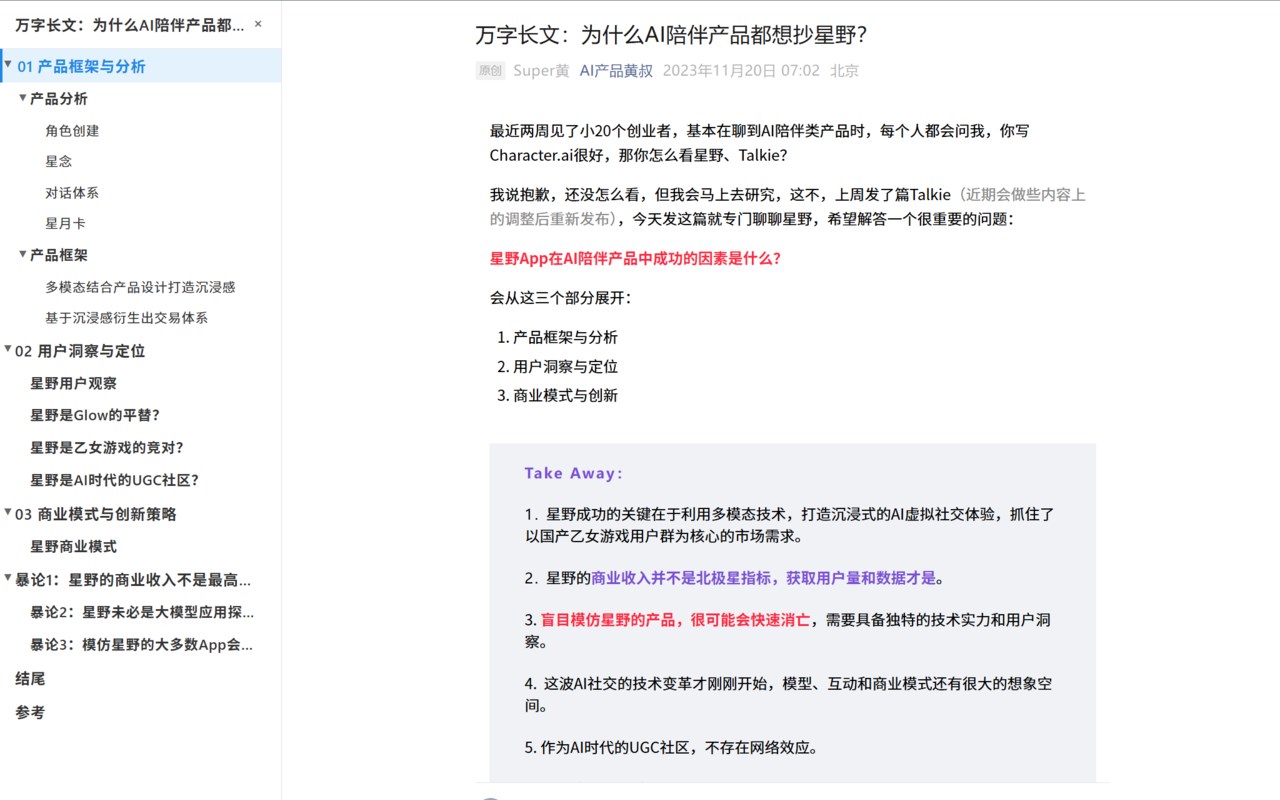
The WeChat Official Account Reading Enhancement Plugin is a Edge browser extension designed to improve the experience of reading WeChat Official Account articles on a computer. This plugin offers various functional enhancements to make the reading experience more comfortable and efficient.
Feature Details
Article Table of Contents Navigation
Automatic Structuring: Intelligently identifies heading levels in the article to generate a structured table of contents.
Quick Navigation: Click on a table of contents item to jump directly to the corresponding section with smooth scrolling.
Real-Time Tracking: Automatically highlights the corresponding table of contents item based on the current reading position.
Collapse and Expand: Supports collapsing and expanding multi-level directories for easy browsing of long article structures.
Interface Adaptation: Expandable/collapsible sidebar design that doesn’t take up reading space.
Image Viewing Enhancement
One-Click Zoom: Click on any image in the article to enlarge it for viewing.
High-Definition Display: Automatically retrieves the high-resolution version of the image for the best viewing experience.
Simple Controls: Minimalist interaction design; click outside the image or press the ESC key to close.
Automatic Adaptation: Adapts to various image formats and sizes in the article.
Common Issues
Q: Why is the table of contents not displayed for some articles?
A: The plugin relies on HTML heading tags to generate the table of contents. If the article does not use standard h1-h6 tags, the table of contents may not be generated correctly.
Q: What should I do if the image viewer doesn’t work?
A: Ensure you are clicking on images in the article’s main content. Advertisements or other special images may not support the viewing function.
Q: Does the plugin affect page loading speed?
A: The plugin is performance-optimized and has minimal impact on page loading speed. It only starts working after the page is fully loaded.