
LootOps: Epic & Steam Games
Extension Actions
Tactical HUD for free games. LootOps tracks every free loot drop from Epic Games and Steam.
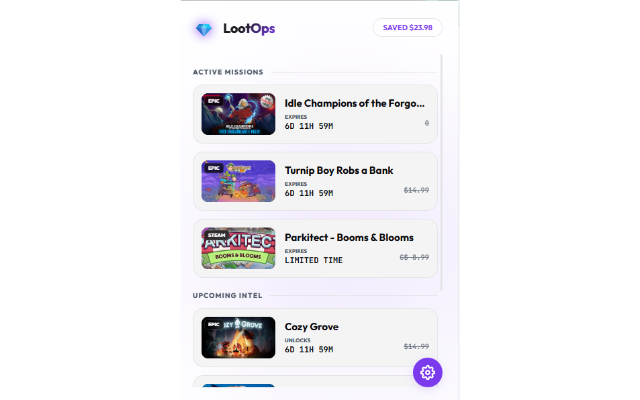
LootOps: Epic & Steam Games is an advanced browser extension designed for passionate gamers and deal seekers who want to maximize their free game acquisitions on two of the largest digital game platforms: Epic Games Store and Steam. By serving as a tactical HUD (Heads-Up Display), LootOps continuously scans these platforms to provide real-time intelligence on active and upcoming free game giveaways, helping you secure high-value game assets at zero cost without missing any opportunity.
The extension acts as a high-density digital scout with a sleek and modern interface known as the “Nebula HUD.” It stays unobtrusive and fast, activating only when valuable loot drops—free games or promotional offers—become available. It automatically tracks weekly free offers and supply drops from Epic Games, updating you promptly so that you never miss the weekly Thursday reset or any timed promotions. Simultaneously, it performs stealth scans on Steam for hidden promotions where paid games become free temporarily, allowing you to claim those limited-time offers before they expire.
LootOps displays all this critical information in a beautifully glass-morphic user interface that adapts visually between “Studio Obsidian” dark mode for night use and “Apple Snow” light mode for daytime comfort. This adaptive camouflage helps reduce eye strain while keeping you alert. The interface organizes giveaways into “Active Missions” (currently available free games) and “Upcoming Intel” (planned or soon-to-arrive offers), complete with smart visual countdown timers that use white, orange, and red to indicate the stability, urgency, or critical status of each deal.
Beyond real-time alerts that immediately notify you when a new supply drop goes free, LootOps gamifies the experience by calculating and displaying your total money saved from claimed games. This “SAVED $” counter not only motivates you but quantifies the real value of the freebies you accumulate over time. Customization options provide full control over system settings, allowing you to toggle notifications and badge indicators on or off, switch between light and dark modes, and manually sync the vault of tracked games for instant updates on the latest free offers.
The extension is built with a user-first philosophy: clean, clutter-free, and devoid of distracting ads or intrusive tracking. It performs all operations locally, storing your preferences on your device alone, with no personal data collection, ensuring your privacy is maintained at all times. LootOps also provides quick access to developer resources via website and GitHub links to promote transparency and community support.
Ideal for gamers who want a professional, tactical approach to free game hunting, LootOps ensures you remain armed with the freshest and most valuable free gaming content delivered elegantly and efficiently.
Key Features:
- Unified Free Game Tracker: Monitors entirely and aggregates free loot drops from both Epic Games and Steam stores in real-time, ensuring you never miss a giveaway or limited-time promotion.
- Savings Counter: Instantly calculates and displays your total monetary savings from claimed free games, turning your gaming library expansion into a rewarding financial achievement.
- Tactical HUD Interface: Features a stylish, glass-morphic popup with a distraction-free layout separating current and upcoming drops, enhanced with vivid “SAVED” badges and adaptive dark/light modes.
- Platform-Integrated Scanning: Automatically detects Steam’s 100% off “Keep Forever” deals and fetches Epic Games offers directly via backend API calls, surfacing full details such as game titles, images, and direct store links.
- Customizable Settings: Empowers users to switch visual themes, manage notification permissions and badge visibility, and manually sync the extension’s data vault to receive instant updates.
- Real-Time Alerts: Immediate “New Supply Drop Detected” notifications with accurate game names help you act swiftly on valuable free offerings.
- Privacy-Centric Design: Operates fully on the client side without collecting or transmitting personal browsing data; user settings remain local for utmost privacy and security.
How It Works:
1. Install LootOps: Epic & Steam Games from your browser’s extension store.
2. Click the LootOps icon in your toolbar to open the Tactical HUD popup.
3. Browse “Active Missions” for current free games you can claim and “Upcoming Intel” for future offerings.
4. Click any listed game to open its official store page on Epic Games or Steam, where you can safely claim or learn more about the promotion.
5. Monitor your “SAVED $” counter increase as you add free titles to your collection, witnessing your total value acquired grow over time.
6. Use the settings panel to toggle between light and dark modes, enable or disable notifications and taskbar badges, and manually sync your vault for immediate updates.
7. Stay notified with real-time alerts and badge indicators that ensure you never miss a new supply drop or an expiring offer.
Privacy: - No personal data collected. All operations are performed locally; the extension does not read, store, or transmit any personal browsing information.