
MarkView: Markdown Viewer with Mermaid Diagrams, Math & Export
Extension Actions
Markdown viewer with syntax highlighting, Mermaid diagrams, KaTeX math, TOC, DOCX/HTML export, folder browser & themes.
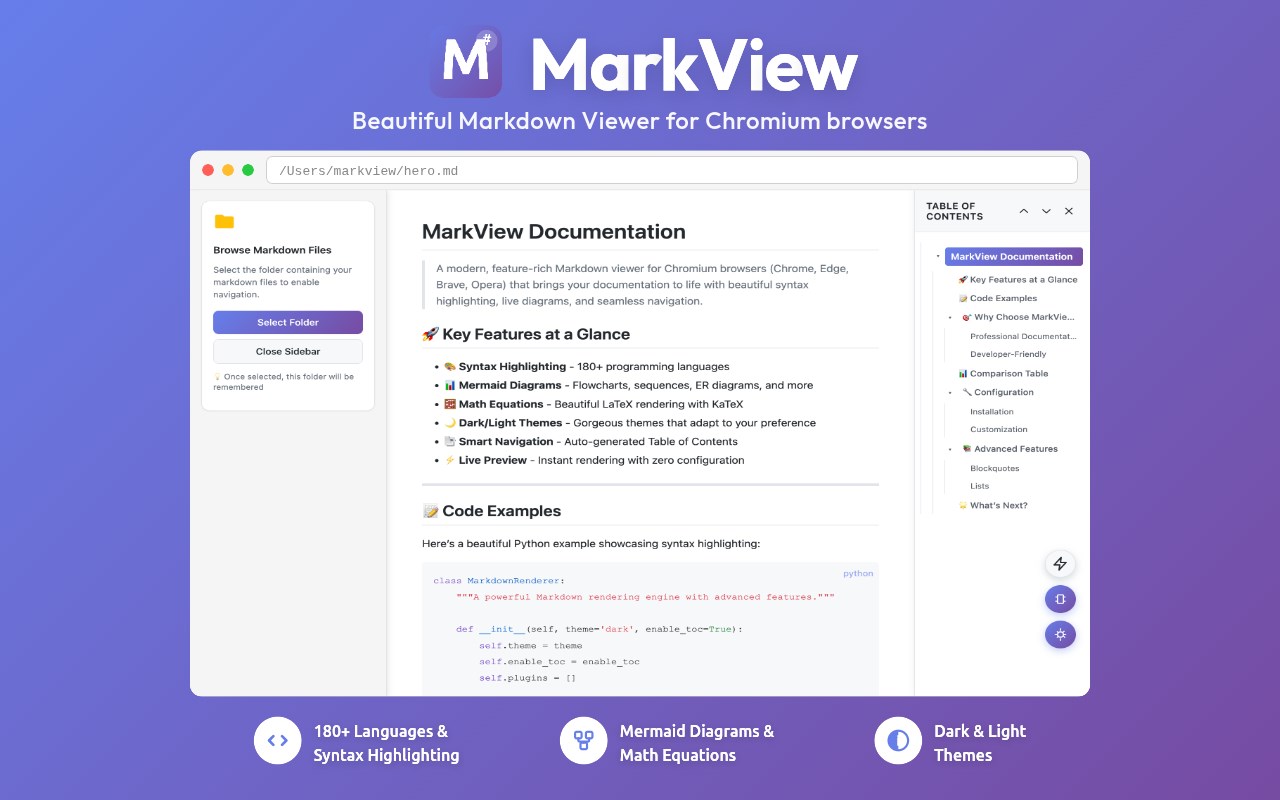
Navigate markdown files with folder browser and bookmarks. Export to Word or HTML. Print to PDF with optimized layouts. View with Mermaid diagrams, KaTeX math, syntax highlighting, and smart TOC - all with 100% privacy (zero data collection). Works with local files, GitHub repos, GitLab wikis, and documentation sites.
⚡ PRODUCTIVITY & UNIQUE FEATURES
- Export to DOCX and HTML with perfect formatting preservation
- Print to PDF - clean, optimized layout without UI chrome, via browser print
- Folder Browser - navigate your entire project structure without leaving the tab
- Folder Bookmarks - save and instantly access frequently used directories
- Live auto-refresh when files change - perfect for external editor + live preview workflows
- Recent Documents tracking - quickly reopen recently viewed files from the popup
- Word Count & Reading Time - live statistics as you read: words, characters, estimated time
- Reading Progress Bar - visual indicator showing your position in long documents
- Raw view toggle - instantly switch between rendered and source view
- Table of Contents (TOC) with smooth scrolling for long documents
- One-click copy button on all code blocks
- KaTeX math equations - inline and display mode with full support for complex mathematical notation
- Mermaid diagrams with interactive zoom & pan - download as SVG, PNG, or JPEG
- Professional image viewer - lightbox with gallery navigation, zoom, pan, and lazy loading
- External link indicators - visual previews and icons for outbound links
- Render .txt as Markdown - perfect for llms.txt, changelogs, notes, and AI-generated content
🌐 UNIVERSAL MARKDOWN READER - WORKS EVERYWHERE
- Local files (file:///) - enable "Allow access to file URLs" in Edge settings
- GitHub raw files (raw.githubusercontent.com)
- GitLab, Bitbucket, Gitea raw file URLs
- Any URL ending in .md, .markdown, .mkd, or .mdx served as plain text
- Plain .txt files rendered as markdown for convenience
⚠️ NOTE: MarkView renders RAW files only. It won't activate on sites that already render markdown (GitHub blob pages, ReadTheDocs, GitBook, etc.) - those have their own rendering.
👥 PERFECT FOR
- Developers previewing README, CHANGELOG, and API documentation
- Technical writers using MarkView alongside their editor for live preview
- Students and researchers reading notes with math equations and diagrams
- Data scientists reviewing Jupyter markdown cells
- AI developers reading llms.txt from repos and documentation sites
- Content creators and writers previewing blog posts, wikis, and documentation drafts
🔒 100% PRIVACY-FOCUSED
- Zero data collection - no personal information collected, ever
- No analytics, no tracking, no telemetry, no cloud services
- All processing happens locally in your browser
- Your files never leave your device
- Settings stored locally using Edge's storage API
- Built on trusted, audited open-source libraries: markdown-it, highlight.js, KaTeX, Mermaid
🚀 QUICK START
1. Install MarkView - click "Get"
2. Test instantly: visit https://raw.githubusercontent.com/microsoft/vscode/main/README.md
3. For local files: go to edge://extensions → MarkView → Details → check "Allow access to file URLs"
4. Open any .md file - drag & drop, File → Open, or click a link
📞 SUPPORT
- FAQ: https://getmarkview.com/support
- Email: [email protected]
- GitHub: https://github.com/markview-app/support
🔗 LINKS
- Website: https://getmarkview.com/
- Privacy Policy: https://getmarkview.com/privacy-policy
- Terms: https://getmarkview.com/terms
🔐 PERMISSIONS
- Storage: Save theme, font, and layout preferences locally
- ActiveTab: Read file content from the current tab for rendering
- Downloads: Export to HTML and DOCX files
- File URLs: Access local .md files (disabled by default)
- Host Permissions: Render files from GitHub, GitLab, and documentation sites
All processing is local. No data is ever sent to external servers.
Latest reviews
- Van
- This extension is very useful, runs very stably on Edge, and is definitely worth trying out
- Tung
- This extension is awesome, best markdown viewer for Edge extension 👍