
资源狗
Extension Actions
寻找网页资源的好狗狗!(检测图片、视频、音频等资源并提供预览和下载)
ResourceDog: Effortlessly Discover, Preview, and Download Webpage Media
ResourceDog is a powerful and intelligent browser extension designed to automatically detect, preview, and facilitate the download of all types of media and resource files encountered on any webpage you visit. Whether it’s images, videos, audio clips, scripts, or stylesheets, ResourceDog delivers instant access to the resources loaded in the active tab through a sleek side panel or a convenient popup interface integrated natively within your browser.
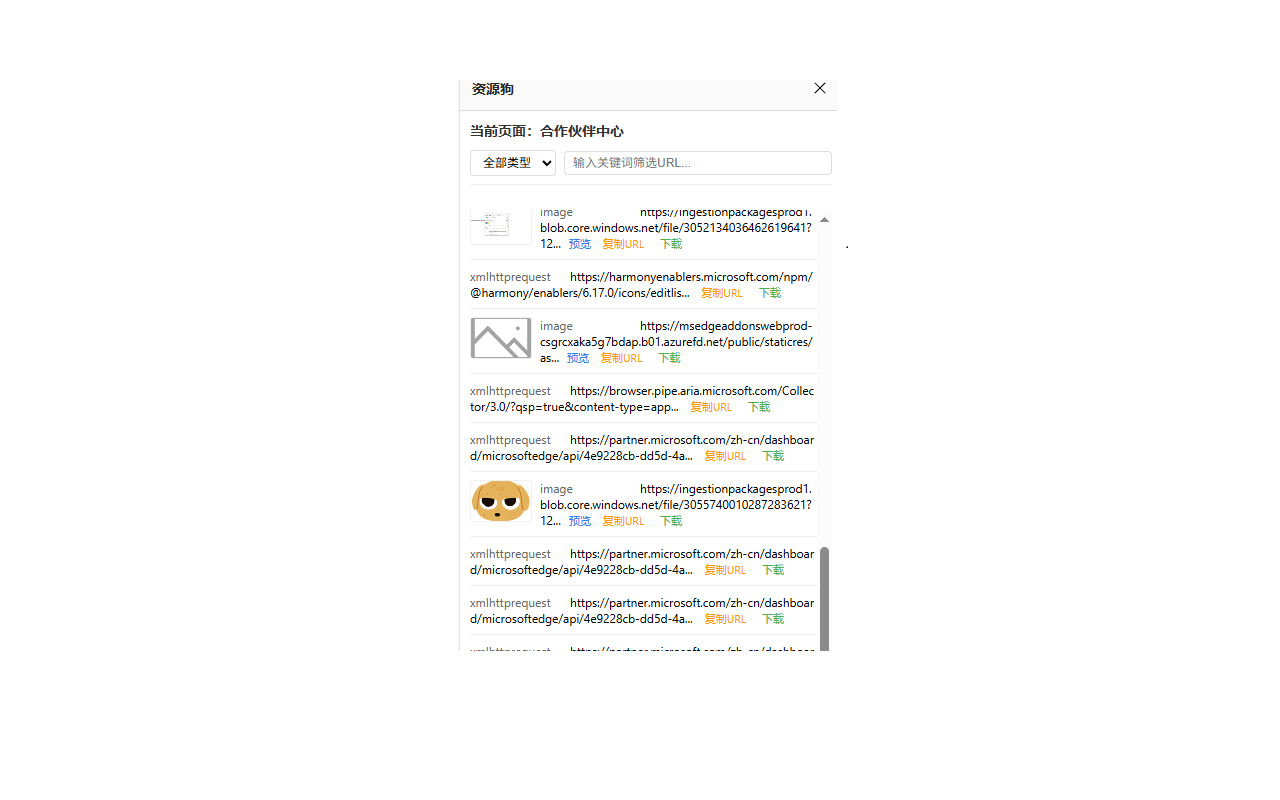
Once installed, ResourceDog continuously monitors the network activity of your browser tabs, capturing all resources in real-time without interrupting your browsing experience. The extension features a lightweight popup button for quick access and a dedicated side panel that lists categorized resources, allowing you to easily inspect, preview, and download specific files. Optimized for efficiency and smooth performance, ResourceDog updates its listings dynamically as new resources load, ensuring you always have the latest content at your fingertips.
This extension is particularly valuable for content creators, researchers, archivists, and everyday users who want to manage media effortlessly. With ResourceDog, you can search and filter resources by type — images, videos, audio files, scripts, and more — or by custom URL keywords, making it simple to pinpoint and select exactly the assets you need. Each resource is presented with comprehensive metadata such as URL, file type, HTTP status code, and timestamp, which helps you identify and organize files effectively.
ResourceDog leverages modern browser APIs including the sidePanel and webRequest APIs for seamless integration and a native feel. The side panel interface includes advanced features such as media previews for supported formats, granular filtering options, and one-click downloads, all designed to streamline your workflow and enhance productivity. You can inspect video or audio content directly in the panel without leaving the page, while the popup view offers a quick glance at resources when you’re on the move.
Installation is straightforward—grant necessary permissions, and ResourceDog begins monitoring web resources automatically. When browsing, just click the extension button to open the side panel or popup and explore all loaded media resources with minimal effort. Your browsing is never interrupted as data collection happens transparently in the background. Whether archiving photo galleries, extracting embedded multimedia, or simply satisfying your curiosity, ResourceDog puts full control over webpage resources right in your hands.
Please note:
- Some website configurations or settings pages may prevent ResourceDog from detecting resources properly.
- If ResourceDog does not show any content initially, refreshing the page usually resolves this.
Key Features:
- Comprehensive Resource Detection: Automatically captures images, videos, audio, scripts, stylesheets, and other media files from every webpage you visit.
- Real-Time Monitoring: Refreshes resource listings instantly as new media loads in active tabs, keeping data up to date without manual input.
- Dedicated Side-Panel Interface: A fixed side window for easy access to resource previews, sorting, filtering, and downloading—designed to fit naturally into your browsing workflow.
- Advanced Filtering: Filter by resource type (image, video, audio, script) or use custom text searches to locate specific URLs or filenames quickly.
- Instant Download: Save any detected resource directly to your device with a single click using the browser’s native download feature.
- Detailed Resource Metadata: View essential information like the resource URL, content type, HTTP response status, and timestamp, aiding informed resource selection.
- Lightweight Popup Access: A minimal popup window for quick resource overview and access without opening the entire side panel.
How It Works:
1. Install ResourceDog from the browser store and grant its requested permissions.
2. The extension begins monitoring all resources loaded in your active browsing tabs automatically.
3. Click the ResourceDog extension button to open the popup or side panel interface.
4. View detected media and resource files classified by type, appearing in real-time with the newest items on top.
5. Apply filters by type or use the search bar to find particular resources with ease.
6. Preview media directly inside the side panel for supported formats, enabling quick content review without leaving your page.
7. Download any selected resources instantly by clicking the download icon, saving files locally to your device.
8. As you navigate or reload tabs, ResourceDog continues to refresh its resource lists automatically in the background.
Privacy: - No personal data collected. ResourceDog monitors only browser resource requests locally to provide its functionality and does not transmit or store browsing history or webpage content externally.