
AI Studio 导出助手
Extension Actions
一键将 Google AI Studio 的对话导出为格式优美的 Markdown 或 PDF 文件。
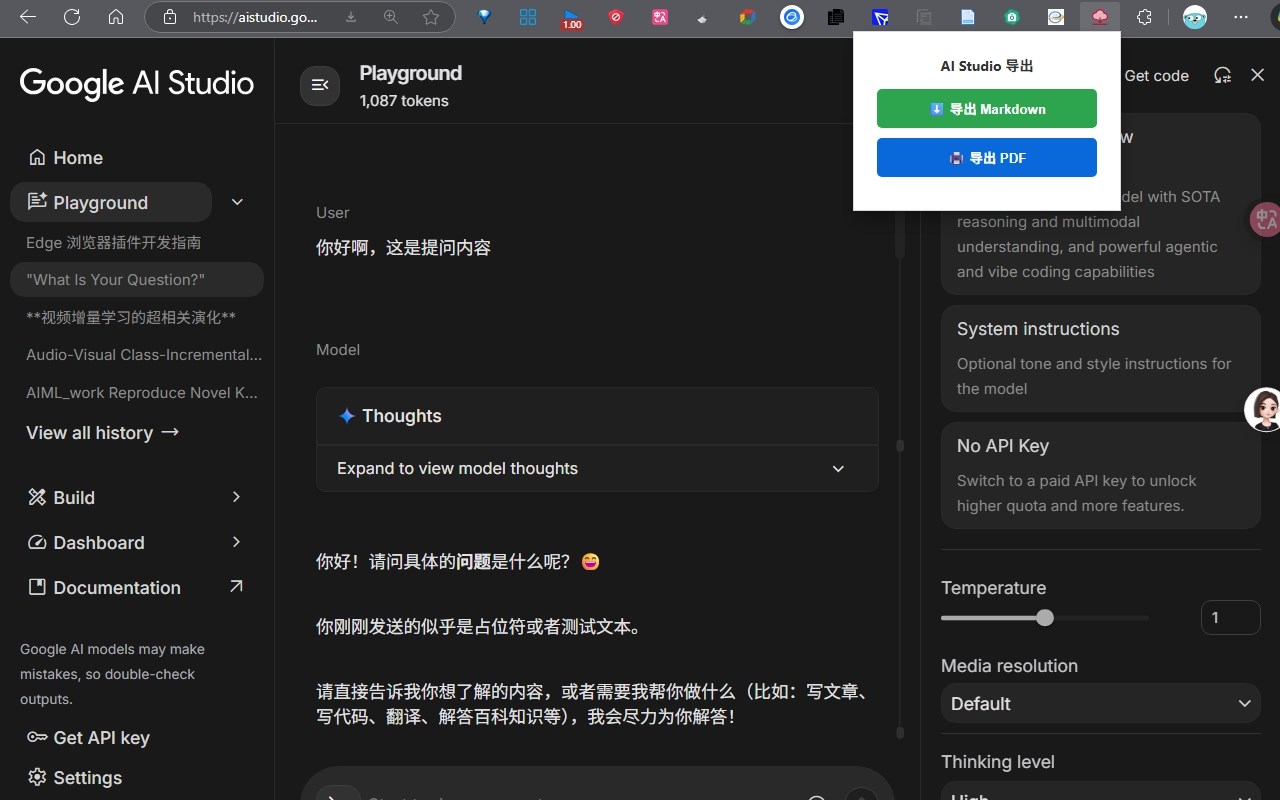
AI Studio Export Assistant is a user-friendly browser extension designed specifically for users of Google AI Studio who wish to effortlessly export their AI chat conversations into well-formatted Markdown or PDF files. This tool integrates smoothly into your existing workflow, enabling you to save entire dialogs between you and the AI with just one click, preserving the conversation's structure, context, and original formatting. Whether you are a developer, researcher, educator, or an everyday user who creates meaningful content or insights through Google AI Studio, this extension makes it simple to save, share, collaborate on, and review your interactions without any cumbersome manual copying or formatting loss.
Google AI Studio users often face difficulties when trying to save or export their chat sessions since the platform does not currently provide a native feature to export threaded conversations that may contain multiple rounds of dialogue, code snippets, or detailed explanations. AI Studio Export Assistant addresses this gap by offering a compact, easy-to-access popup toolbar that presents straightforward export choices—either Markdown for editable text documentation or PDF for polished, shareable, print-ready files. The extension intelligently scans the entire visible conversation from the page, accurately recognizes all message turns, and organizes content by participant roles (user and AI), ensuring that the exported file reflects the conversation in a clear and logical format.
Built with intelligent DOM traversal techniques, the extension reliably captures all visible chat messages regardless of the conversation’s length or input type. Its PDF export leverages a powerful in-browser rendering engine that faithfully reproduces the content as seen on the screen, preserving text styles, code layout, and overall formatting. The minimalist design focuses on efficiency and user privacy: no external accounts, no web requests, no unnecessary permissions, and crucially, no collection or transmission of any personal or chat data. All exports are generated client-side directly within your browser, maximizing privacy and giving you complete control over your data.
Key Features:
- One-Click Export: Quickly convert Google AI Studio chat sessions into Markdown or PDF with intuitive buttons in the extension toolbar.
- Rich Formatting: Maintains original chat layout, role identification (user or AI), code blocks, and message separation for readability and context preservation.
- PDF Generation: Uses a robust browser-based engine to generate high-quality PDFs that accurately mirror the chat interface.
- Markdown Output: Produces well-structured Markdown files suitable for integration into notebooks, technical documentation, or knowledge management systems.
- Native UI Integration: Features a clean, responsive popup interface accessible anytime you are on a Google AI Studio page.
- No Data Collection: Operates entirely offline within your browser environment with zero data sent externally or stored remotely.
- Easy Installation: Lightweight, quick to install, requiring no complex setup beyond enabling the extension and using the export options.
How It Works:
1. Install the AI Studio Export Assistant from your browser’s extension store.
2. Navigate to https://aistudio.google.com and open or start a chat conversation.
3. Click the extension icon in your browser toolbar to open the export popup.
4. Select “Export Markdown” or “Export PDF” depending on your needs.
5. The extension scans the conversation thread directly on the page, collecting all chat messages and labels.
6. After processing, the corresponding Markdown or PDF file is generated and downloaded automatically.
7. Use the saved file for documentation, collaboration, research, sharing, or archiving—no further setup required.
8. Code is available at https://github.com/MyJackCat/AIChatExporter
Privacy: - No personal data collected. This extension is designed to function entirely offline. It processes only the chat content visible in your Google AI Studio session locally on your device, without sending any information externally. No accounts, authentication, or external services are needed, ensuring your conversations remain private and under your complete control. Enjoy a secure, seamless experience exporting your valuable AI chat sessions with confidence.