
MCP Quick Reference - Config Snippets for Cursor, VS Code and Claude Code
Extension Actions
Instant MCP config snippets for Claude Desktop, Cursor, VS Code & Claude Code. 30+ servers, 1-click copy, By explainmcp.com
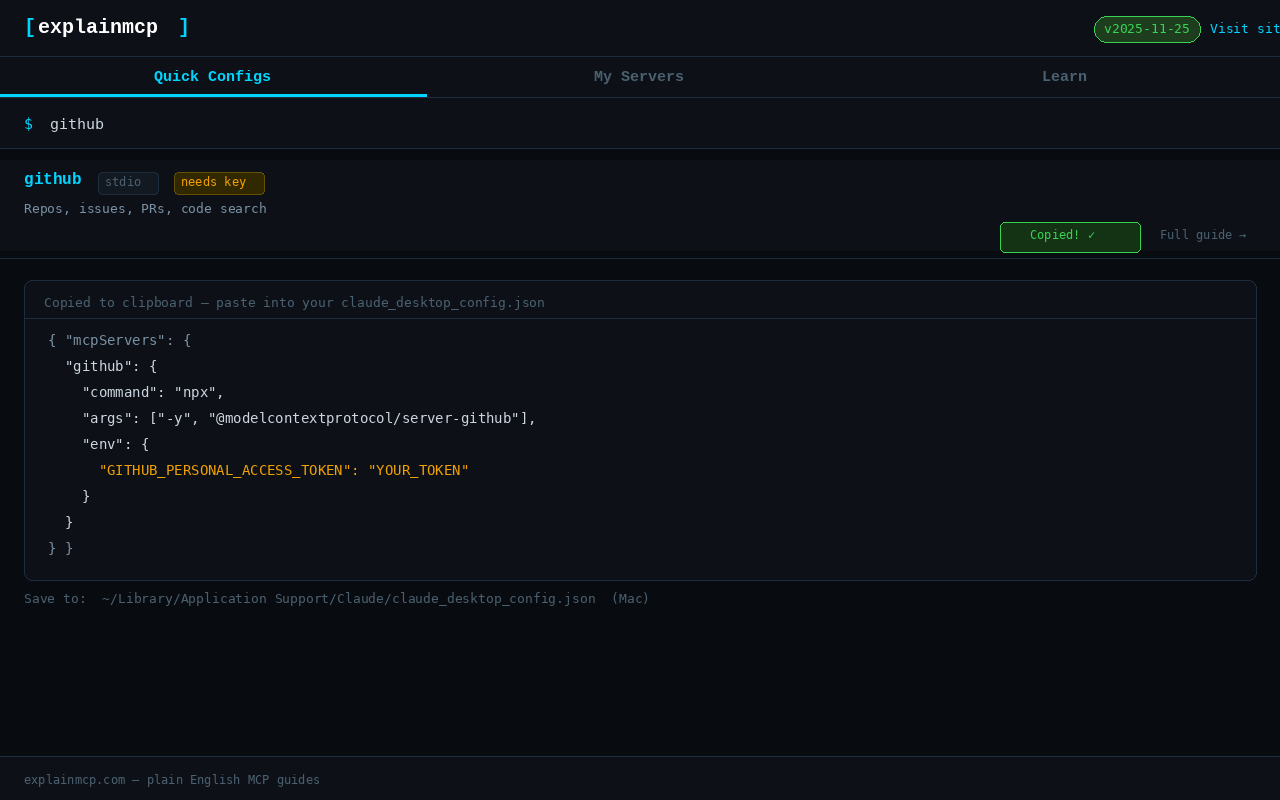
MCP Quick Reference is an essential browser extension tailored specifically for developers and technology professionals who work with AI coding assistants and tools such as Claude Desktop, Cursor, VS Code, and Claude Code. It simplifies and accelerates the process of setting up and managing Model Context Protocol (MCP) servers by providing instant access to over 30 ready-to-use configuration snippets. These snippets cover a vast range of server types including filesystems, GitHub, Slack, Google Drive, Postgres, , and many more, allowing users to integrate powerful services directly into their preferred development environments quickly and reliably.
Designed to replace the cumbersome and error-prone task of manually copying MCP config JSON from GitHub READMEs, which often leads to broken configurations, MCP Quick Reference offers a clean, modern popup interface where users can swiftly browse, search, filter, and copy precisely crafted configuration JSON blocks optimized for multiple MCP-compatible clients. Whether you are a seasoned AI tool integrator or just onboarding new AI workflows, this extension streamlines the entire setup process by putting the essential configurations and related documentation just one click away in your browser toolbar, saving time and reducing frustration.
The extension’s user-friendly interface is split into multiple tabs to enhance usability. The “Quick Configs” tab lets users search for any supported MCP server by name, filter by features such as free usage or API key requirements, and instantly copy the corresponding JSON snippet for environments like Claude Desktop, Cursor, VS Code, and Claude Code. The “My Servers” tab allows you to paste your existing configuration file, automatically parse it, and clearly list all configured MCP servers, enabling seamless review and management of your integrations. If any JSON syntax errors are detected, the extension provides a one-click link to an MCP JSON Validator for fast troubleshooting. To further assist users, the “Learn” tab offers access to up-to-date protocol guides, best practices, and troubleshooting articles from explainmcp.com, as well as links to six free MCP tools including Config Generator, JSON Validator, Spec Diff Viewer, Server Finder, ROI Calculator, and Prompt Library.
MCP Quick Reference supports all major MCP clients, not just Claude Desktop but also Cursor, VS Code, Claude Code, Windsurf, Zed, Cline, and any other MCP-compatible tools. This wide compatibility makes it an indispensable utility for anyone looking to unlock the advanced capabilities of AI-driven coding and collaboration tools efficiently. Its comprehensive server coverage, intuitive search and filter options, editable inline config fields, and instant copy functionality contribute to a fluid workflow requiring minimal context switching or manual editing.
Whether you are establishing MCP servers for the first time, verifying configuration syntax, determining which servers are free versus those requiring API keys, or sharing configuration snippets with teammates, MCP Quick Reference is designed to reduce setup time and simplify ongoing management. Installation is straightforward, and once installed, users simply click the extension icon, search or browse servers, copy the desired config, and paste it into their claude_desktop_config.json file (or equivalent), then reload their MCP client to start using the new server immediately.
Privacy is a top priority with this extension. It collects zero analytics or personal data and requires no user accounts. All configuration files are stored locally in your browser’s storage and never leave your device, ensuring your settings and data remain fully private and secure.
Key Features:
- Instant access to configuration snippets for over 30 MCP server types, including popular services like Filesystem MCP, GitHub MCP, Search MCP, Google Drive MCP, Slack MCP, PostgreSQL MCP, Stripe MCP, Figma MCP, MongoDB MCP, and many more.
- One-click copying of complete, ready-to-use JSON config blocks tailored for Claude Desktop, Cursor, VS Code, Claude Code, and other MCP-compatible clients.
- Multi-tabbed user interface with quick discovery of server configs, parsing and viewing of your own config JSON, and direct links to comprehensive setup and troubleshooting guides.
- Powerful search and filtering options to locate servers by name, features, free access, or API key requirements swiftly.
- Editable inline fields and dynamic parsing to customize and personalize your MCP server configurations within the extension popup.
- Direct connections to full plain-English setup guides on explainmcp.com, providing step-by-step instructions and practical tips for each server type.
- Privacy-first design with no data collection, no external requests, and local-only storage ensuring complete security of your configuration data.
How It Works:
1. Install the MCP Quick Reference extension from your browser’s extension store.
2. Click the MCP Quick Reference icon in your browser toolbar to open the popup interface.
3. Navigate the “Quick Configs” tab to browse or search across supported MCP servers by name or feature.
4. Apply filters to quickly find free servers or those requiring API keys.
5. Click on the desired server to instantly copy the recommended JSON config snippet optimized for your MCP client.
6. Paste the copied JSON into your claude_desktop_config.json or equivalent configuration file and restart or reload your MCP client to activate the server.
7. Use the “My Servers” tab to paste and analyze your existing configuration JSON files, review configured servers clearly, and validate JSON syntax errors with a one-click link to an online validator.
8. Explore the “Learn” tab for detailed guides, protocol documentation, troubleshooting articles, and easy access to helpful MCP tools to deepen your understanding and streamline your workflows.
Privacy: - No personal data collected.