Guide Recorder - User Guide Generator
Extension Actions
Record user actions and automatically generate annotated user guides with screenshots
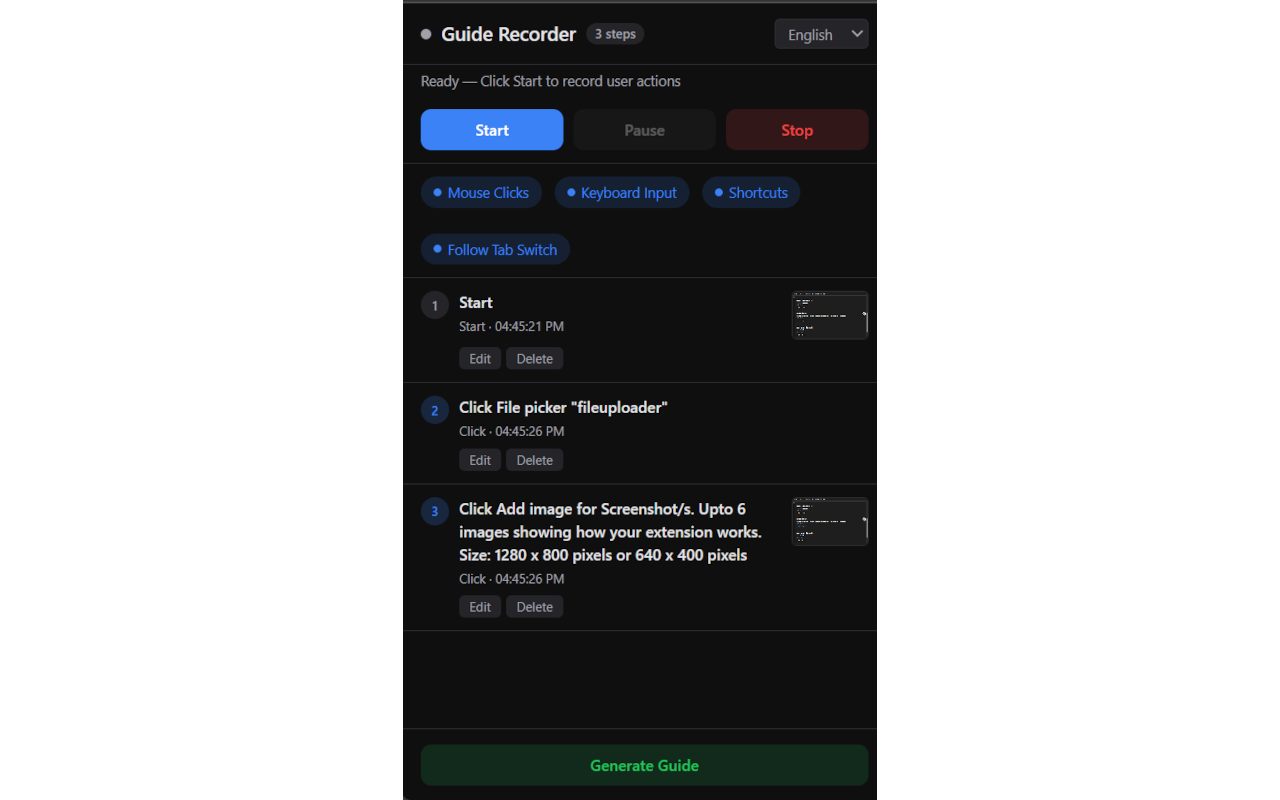
Guide Recorder is a powerful browser extension designed to simplify the creation of detailed, step-by-step tutorials with visual annotations. It enables users to effortlessly capture and document processes directly from their web browser, making it ideal for onboarding new team members, delivering customer support, crafting product walkthroughs, or explaining complex web-based tasks. By recording your interactions on a webpage—including clicks, typing, keyboard shortcuts, and navigation—Guide Recorder creates a clear visual record of each action, enhanced by annotated screenshots and rich text notes for comprehensive guides.
The extension runs from a convenient side panel in your browser, allowing you to initiate recording sessions that automatically capture every step in real-time. Screenshots are taken at each point, visually documenting what happens on the page. You can then use powerful editing tools to crop images, add highlights, annotations, or blur sensitive information to ensure clarity and privacy. The combined use of visual captures and textual explanations transforms complex procedures into easy-to-understand guides that can be shared, imported, exported, or updated at any time.
Guide Recorder supports multiple languages, making it accessible for global teams and audiences. It prioritizes user privacy by excluding passwords and other sensitive data from recordings, and all data is securely stored locally on your device. This on-device storage, combined with straightforward export options, allows you to maintain full control over your guides and protect your information without relying on cloud services.
Ideal for educators, trainers, product development teams, and anyone who needs to communicate digital workflows clearly, Guide Recorder enhances productivity by blending automated capturing, detailed annotation, and flexible editing into a cohesive experience. Its sleek, intuitive interface ensures that creating professional, visually rich tutorials is accessible to users of all skill levels.
Key Features:
- Real-time step recording: Automatically captures user interactions such as clicks, keystrokes, navigation, and shortcuts while you work on web pages.
- Visual annotation tools: Capture screenshots at every step that can be cropped, highlighted, annotated, or blurred to emphasize important elements or protect sensitive data.
- Rich text guide editor: Add detailed textual descriptions, format content, and organize steps to produce comprehensive, easy-to-follow tutorials.
- Import and export functionality: Save guides as files to share across teams or import existing guides for editing, collaboration, and workflow updates.
- User-friendly side panel interface: Manage recording sessions, view captured steps, and access editing tools from a modern, integrated browser sidebar.
- Multilingual support: Built-in localization enables guide creation and viewing in various languages for international accessibility.
- Strong privacy controls: Automatically omits password fields and sensitive information, with all data stored securely on the user’s device.
How It Works:
1. Install Guide Recorder and open the side panel in your browser.
2. Begin a new recording session; your interactions on the webpage—clicks, typing, navigation—are captured in real-time with screenshots.
3. Pause or stop the recording anytime; the extension will list all captured steps with their corresponding images.
4. Use the built-in editing tools to rearrange steps, crop and annotate screenshots, and add detailed explanations or references for clarity.
5. Export your completed guide as a file for sharing, collaboration, or safekeeping; alternatively, import existing guides to update or merge them.
6. Utilize annotation features to highlight important areas, add callouts, or blur sensitive information in screenshots.
7. Access the editor anytime via the side panel or popup to preview, manage, and finalize your step-by-step tutorials.
Privacy: - No personal data collected.