
AQW WIKI IMAGE
Extension Actions
Wiki Image is a browser extension designed to make browsing the wiki faster, clearer, and more efficient.
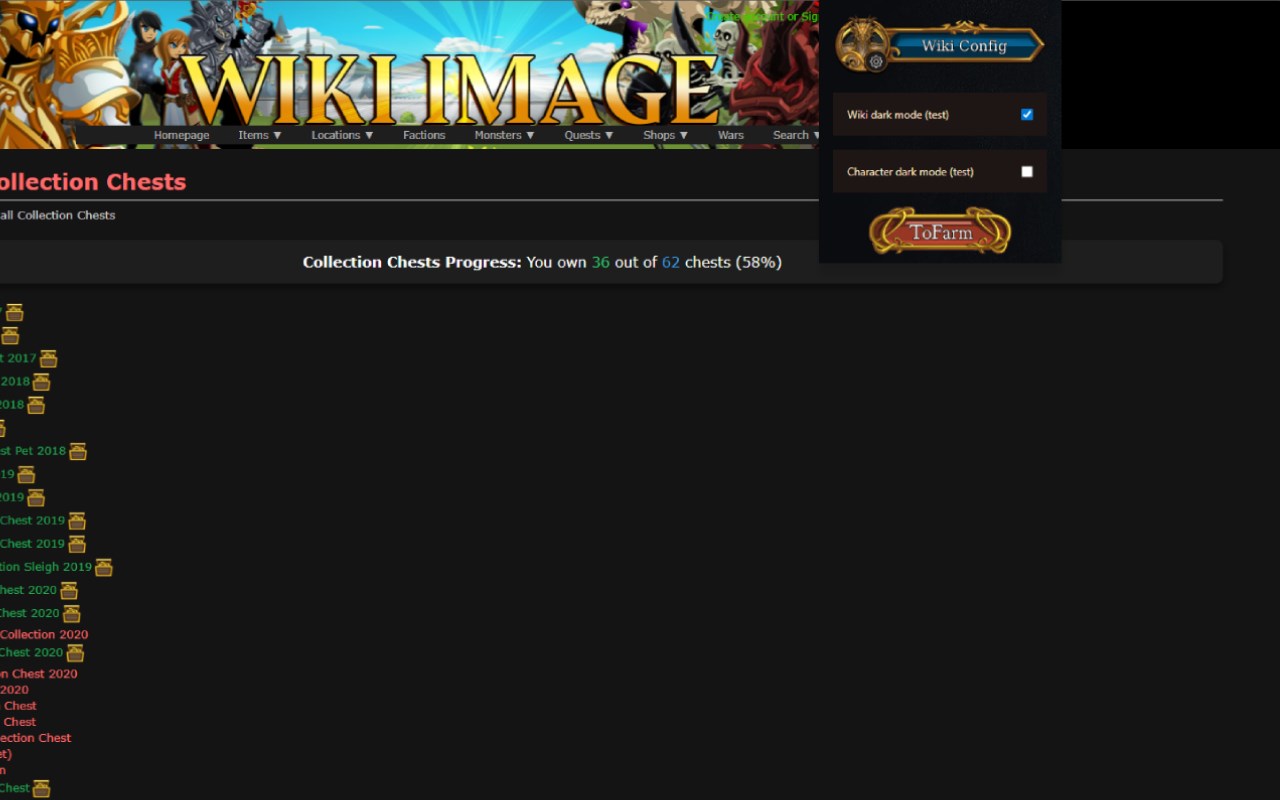
AQW WIKI IMAGE is an advanced browser extension specifically crafted for players of AdventureQuest Worlds (AQW) who want to elevate their gaming experience by making the official AQW Wiki and account management pages faster, clearer, and more efficient. Designed to save you valuable time and effort, this extension integrates deeply with the AQW Wiki and your game account to deliver instant access to crucial item details, quest requirements, and inventory tracking—all through a streamlined, user-friendly interface.
With AQW WIKI IMAGE, item images are displayed directly on wiki pages and account screens, allowing you to visually identify armor, weapons, classes, and farming materials immediately without switching tabs or conducting separate searches. The extension smartly calculates the requirements for quests and hard farming classes, identifying the necessary items and materials you need to collect. This feature is especially beneficial for players who focus on maximizing their farming efficiency or progressing through challenging content, providing quick, actionable insights to guide their gameplay.
One of the core strengths of AQW WIKI IMAGE lies in its seamless integration with your AQW account management page. By connecting to your inventory and bank, it tracks your owned items and cross-references them with the wiki's comprehensive database. This synchronized view helps you monitor what you have, what you need, and what farming targets to prioritize, minimizing redundant farming time and boosting your overall efficiency. Built-in tools also streamline access to hard farm guides and class information, empowering you to make informed decisions about your character build and progression strategy.
The extension enhances the visual clarity of wiki pages by injecting custom banners and icons, making information easier to spot and process at a glance. These visual improvements, combined with intelligent caching technologies, ensure a smooth, responsive browsing experience even during peak usage or with extensive inventories. AQW WIKI IMAGE supports toggling between light and dark modes, reducing eye strain during long gaming sessions, and all preferences along with inventory data are securely stored locally for privacy and fast retrieval.
Whether you're a casual player seeking to save time or a hardcore farmer aiming to optimize every step, AQW WIKI IMAGE transforms how you interact with AQW’s vast informational landscape. Regular updates and a user-centric design philosophy keep the extension current and tightly aligned with player needs, making it an essential companion for any dedicated AQW adventurer.
Key Features:
- Direct Item Image Display: View detailed item pictures on wiki and account pages instantly for quick identification.
- Quest and Hard Farm Calculations: Automatically determine quest requirements and the materials needed for hard farming classes.
- Inventory and Bank Integration: Synchronize your game inventory and bank with the wiki data to track possessions and farming progress.
- Custom Banner and Icon Injection: Enhances page clarity with visually appealing banners, enabling rapid spotting of key items.
- Fast Search and Smart Caching: Efficient caching ensures fast loading times and offline access to recently viewed data.
- Dark Mode Support: Switch between light and dark themes to suit your visual preference and reduce eye fatigue.
- Secure Local Storage: All data and settings are stored locally, ensuring user privacy and swift access without external tracking.
How It Works:
1. Install AQW WIKI IMAGE and grant permissions for AQW Wiki and account pages.
2. Navigate to AQW Wiki or your account management pages; the extension will automatically add item images and banners.
3. Access your Inventory page to synchronize your owned items with the wiki database.
4. View detailed quest requirements and farming materials overlaid on relevant wiki pages.
5. Use the popup interface to toggle dark mode and access quick inventory summaries.
6. Hover over item links anywhere on supported pages to see instant previews and farming advice.
7. Utilize integrated hard farm and class guide shortcuts to plan your gameplay more effectively.
Privacy: - No personal data collected. All inventory synchronization and preferences are stored locally for user privacy and performance.