Custom Chrome Home
Extension Actions
A custom Chrome start page with your background image and useful shortcuts.
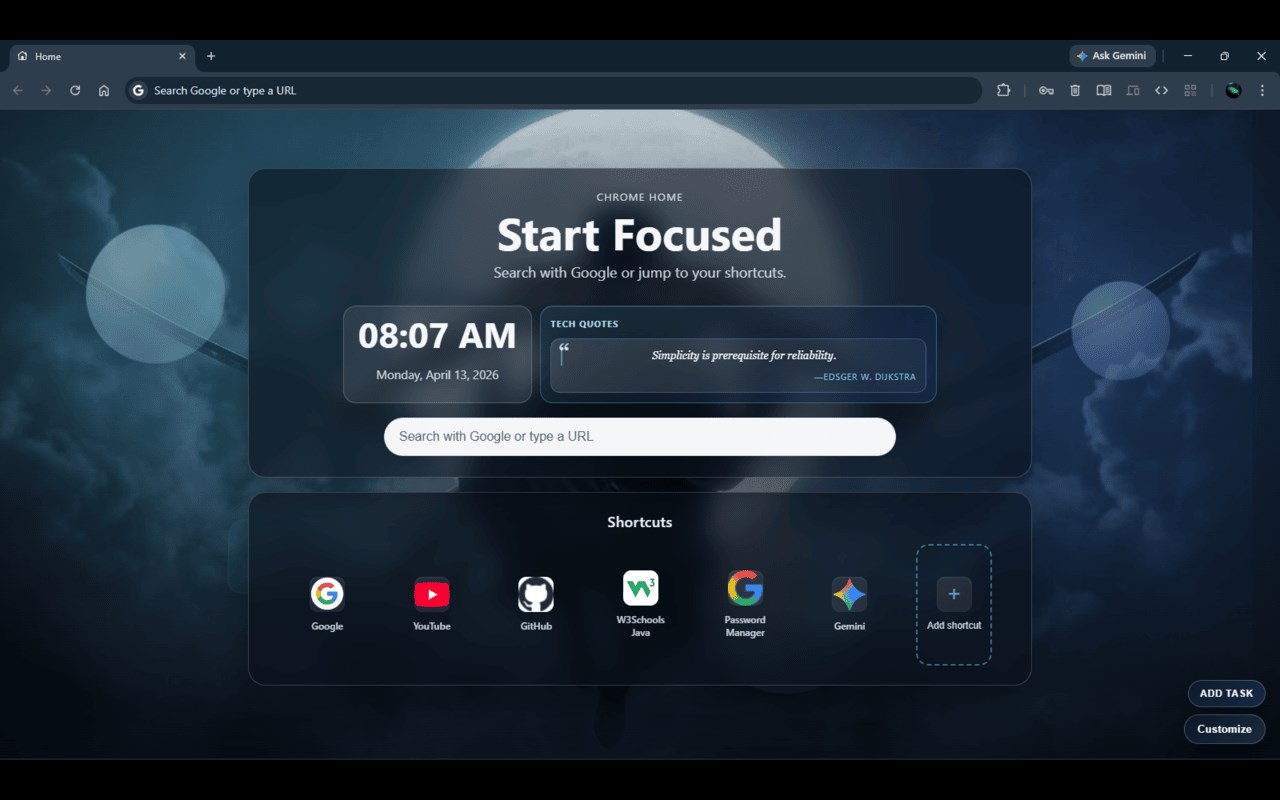
Custom Chrome Home is an innovative browser extension crafted to revitalize your new tab experience by turning it into a personalized center of productivity and visual appeal. Unlike the standard Chrome start page, this extension offers a fully customizable interface that merges stunning backgrounds, a powerful search engine, and quick access to your favorite tools and websites. It transforms your browser’s default new tab into an engaging and functional space tailored to suit your day-to-day needs and personal style.
Once installed, Custom Chrome Home replaces the default new tab page with a sophisticated HTML-based layout that features a selection of thoughtfully designed components. Central to the interface is a customizable background image, allowing you to set a visual tone that inspires or relaxes you each time you open a new tab. Complementing this aesthetic touch is a live clock and date display, providing an at-a-glance reference to keep you on track throughout the day. The heart of productivity is maintained by the Google-powered search bar with instant suggestions, delivering quick and relevant search results as you type.
This extension also introduces a convenient grid for shortcuts, giving you the ability to organize and access your most frequented websites efficiently. You can easily add, remove, or rearrange these links, tailoring the navigation panel to best fit your browsing habits. Additionally, the built-in task manager embeds a simple yet effective to-do list system right on the new tab page, enabling you to jot down tasks, keep track of progress, and check off completed items without the need for external apps or cluttered tabs.
The interface is designed with modern aesthetics in mind, incorporating elegant 3D elements such as animated orbs and tilt-effect cards that elevate the visual experience without compromising functionality. The layout remains clean and responsive, ensuring smooth performance across various desktop and laptop resolutions. Every interactive feature operates client-side, enhancing privacy while optimizing resource use, so your browsing remains fast and safe.
Custom Chrome Home caters to users who seek a balance between productivity and personalization. Whether you are managing your daily schedule, quickly navigating to your favorite websites, or simply looking for a beautiful start to your browsing sessions, this extension adapts effortlessly to your workflow, making each new tab an opportunity to stay organized and inspired.
Key Features:
- Customizable background image for your new tab, enabling a personalized and visually pleasant browsing environment.
- Real-time clock and date display always visible, providing instant time and scheduling information.
- Integrated Google search bar with live suggestions for fast and precise search capabilities.
- Editable shortcuts grid for easy and quick access to your favorite or frequently visited websites, with full customization options.
- Built-in task manager allowing task creation, tracking, and completion directly on the new tab page for streamlined productivity.
- Stylish design elements including 3D animated orbs and tilt-effect cards that offer a modern and appealing user interface.
- Responsive and clean layout optimized for both desktop and laptop use, ensuring consistent usability and appearance.
How It Works:
1. Install Custom Chrome Home from the extension store.
2. Open a new tab to see the custom interface automatically replacing Chrome’s default start page.
3. Personalize your new tab by uploading and selecting a background image that suits your preferences.
4. Use the central search bar to type your queries and receive instant Google suggestions for efficient browsing.
5. Manage your favorite websites by adding, removing, or rearranging shortcuts within the customizable grid.
6. Create and manage daily tasks with the built-in task manager, checking them off as you complete each item.
7. Refer to the live clock and date display for quick time management and scheduling while working.
Privacy: - No personal data collected.