
15学习导航
Extension Actions
简洁大方的网址导航插件,支持分类管理、管理员预置和个人收藏(支持本地文件链接)
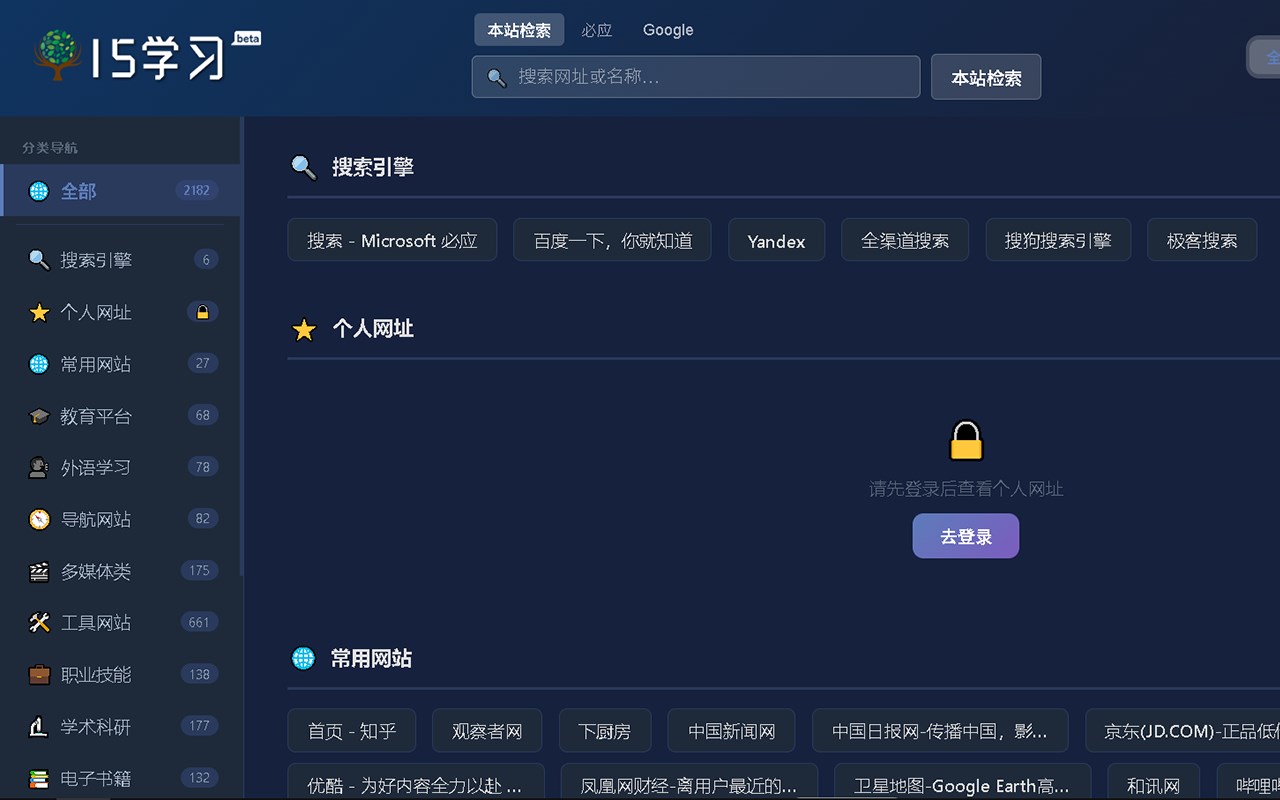
1,清爽简洁干净的网址导航扩展,已包含2000多网址;
2,没有弹窗广告、插入广告、统计功能等不良代码;
3,没有功能限制、会员注册、会员费、赞助费等收费情况;
4,用户可通过后台管理全部网址,包括隐藏、编辑、删除、添加、调整顺序等;
5,用户可以自行录入网址(请录入至“个人网址”分类中),并可以切换至仅展示“个人网址”;
6,用户可创建简单的用户名用于在“个人网址”分类中仅显示自己添加的网址,方便同一台电脑的不同用户使用;
7,无任何远程功能,用户无须担心隐私泄露;
15学 习 导 航 — Streamlined Website Navigation and Personal Collection Extension
15学习导航 is an elegantly designed browser extension tailored to enhance your browsing efficiency by offering a clean, straightforward interface for managing and navigating your preferred websites. With over 2,000 preset links organized across 17 relevant categories, this extension provides fast, intuitive access to a broad spectrum of resources—from search engines and commonly visited websites to educational portals and personalized bookmarks including local file links. It is perfect for users who value simplicity, speed, and comprehensive organization without unnecessary clutter or distracting ads.
This extension deliberately avoids pop-up advertisements, banner ads, or any form of tracking and telemetry, ensuring a clean browsing experience free from intrusive or harmful code. No user registration, membership fees, or donations are required, emphasizing full user autonomy and privacy. All bookmarks, categories, and user preferences are securely stored locally within the browser, removing the need for cloud synchronization or remote data storage and eliminating concerns about privacy leaks.
Users have full control over their navigation environment. Through an intuitive admin panel, they can create, edit, hide, delete, and reorder links in both preset collections and personalized categories. Importantly, users can add their own website URLs manually to any category, including a special “Personal URLs” folder, which can be toggled to show only personal bookmarks. This allows different users on the same computer to maintain separate, private bookmark lists without interference.
The extension’s design prioritizes minimalism and efficiency. Upon clicking the extension icon, a small responsive popup appears displaying categories and corresponding links, each with recognizable icons and concise descriptions for swift identification. Search and filtering capabilities further speed navigation, while favorites and quick-access functions enhance productivity. Additionally, the extension supports linking directly to local files, seamlessly integrating online and offline resources in one place.
15学习导航 is compatible across multiple browsers, adapting fluidly to different environments while maintaining a consistent user experience. It is a minimalist yet powerful utility that empowers users to fully customize and streamline their web navigation without compromising privacy or loading their browsing with unwanted code.
Key Features:
- Category-based navigation: Organize and browse over 2,000 preset website links sorted into 17 intuitive categories, including search engines, utilities, education, and more.
- Clean and ad-free: No pop-up ads, injected advertisements, or tracking; pure browsing enhancement without distractions.
- Full bookmark management: Easily add, edit, hide, delete, and reorder website links via the admin panel or popup interface.
- Personal URLs support: Create and manage your own bookmarks in a dedicated category which can be toggled to display only personal links.
- Local file integration: Add local file URLs to your navigation list for seamless access to offline documents alongside web resources.
- Local storage privacy: All data is stored locally in your browser; no external servers or accounts are necessary, ensuring user data remains private and secure.
- Simple, responsive popup interface: Quickly access organized categories, search and filter links, and mark favorites from a compact popup window.
How It Works:
1. Install the extension and click its icon to open the navigation popup with preset categories and links.
2. Browse through categories or use the search bar to quickly locate websites.
3. Add new bookmarks or local file links directly from the popup or through the admin panel, assigning them to the appropriate category or the personal URLs folder.
4. Use the admin panel to organize your links — hide, edit, reorder, or delete entries to customize your browsing experience fully.
5. Toggle the personal URLs category display to view only user-added links, facilitating separate, private bookmark collections for different users on the same machine.
6. Access your favorite and frequently used sites instantly with clear icons and descriptions, maximizing navigation speed.
7. All modifications are saved instantly and locally within the browser, without any remote syncing or data transmission, guaranteeing your privacy.
Privacy: - No personal data collected. All bookmarks, categories, and settings are stored locally within your browser.