
Bookmarks
Extension Actions
Access bookmarks from the plugin window.
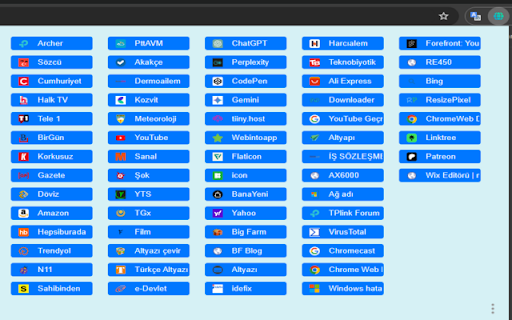
- You can view the bookmarks saved in your browser in a single plug-in window.
- When you click on the bookmark shortcut in the plug-in window, the url is opened in the currently open tab.
- Bookmarks in the add-on window appear according to the order in your browser. If you change the bookmark name or order in the browser, its name and location on the plug-in screen will also change.
- You cannot delete or move bookmarks from the add-on screen. The plug-in does not interfere with any of your bookmarks settings in your browser. It only displays bookmarks.
- Your evaluations are very important to me.
- Tarayıcınızda kayıtlı yer imlerini tek bir eklenti penceresinde görüntüleyebilirsiniz.
- Eklenti penceresindeki yer imi kısayoluna tıkladığınızda, URL o anda açık olan sekmede açılır.
- Eklenti penceresindeki yer imleri tarayıcınızdaki sıraya göre görünür. Yer imi adını veya tarayıcıdaki sırasını değiştirirseniz eklenti ekranındaki adı ve konumu da değişir.
- Yer imlerini eklenti ekranından silemez veya taşıyamazsınız. Eklenti, tarayıcınızdaki yer imi ayarlarınıza müdahale etmez. Yalnızca yer imlerini görüntüler.
- Değerlendirmeleriniz benim için çok önemli.