
CRX id
acnicpmofmkaaamjbdefggibkgkohnbi
acnicpmofmkaaamjbdefggibkgkohnbi
Description from extension meta
Learn Japanese by browsing the web and watching Netflix!
Image from store
Description from store
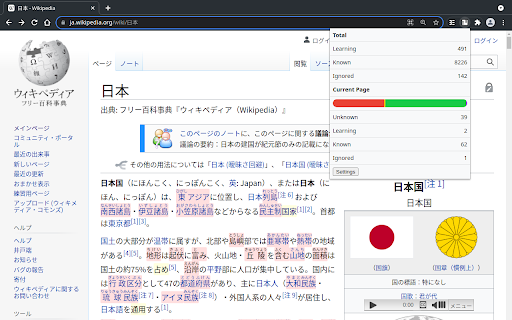
Kioku keeps track of your known words and assists you when reading regular websites and watching Netflix. It highlights words you are still learning or don't know yet and displays Furigana over unknown ones. For every website you can view known and unknown word counts. Your learning progress can be imported from Anki.
To analyze a specific text on any website simply highlight it, right click and press "Kioku" in the context menu. Press the 1, 2, 3, 4 keys when hovering over analyzed words to change their learning status. Press the extension icon at the top right (you might want to pin it) to view statistics about the current page.
On Netflix press B to toggle the subtitle sidebar. Press W to toggle the subtitle display. Press A, S, D to go to the last, current or next subtitle.