
ChatGPT to Evernote
Extension Actions
- Extension status: In-App Purchases
one-click save ChatGPT conversations to Evernote, easily search ChatGPT history. Try Save ChatGPT History to Evernote now!
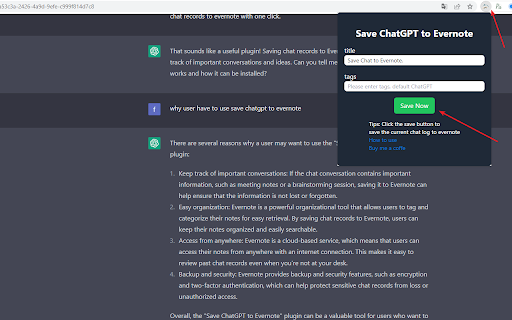
🚀 ChatGPT Backup, Export, Download & Sync — Save All Conversations to Evernote
ChatGPT Chat History Saver to Evernote is the ultimate tool to backup ChatGPT conversations, export ChatGPT history, download ChatGPT chats, and sync ChatGPT to Evernote — all in just a few clicks.
Whether you want to save a single ChatGPT conversation or bulk export all ChatGPT chats for a full backup, this extension keeps your AI-generated content safe, searchable, and accessible anytime.
🚀 Key Features (Export • Sync • Backup)
• One‑click export — Instantly save any ChatGPT conversation to your Evernote notebook
• Batch sync & backup — Build a durable archive by syncing multiple chats at once
• Pages sync options — "Latest 28" or "All Conversations" for quick full/partial exports
• Project sync (Gizmos) — Export entire ChatGPT projects; project name auto‑added as an Evernote tag
• Team & personal support — Works with personal and team ChatGPT accounts
• TextDocs tools integration — Append tool outputs and related TextDocs content to notes for full context
• Sync history panel — Per‑batch stats, JSON/TXT export, and one‑click retry of failed items
• Smart retry — Concurrent, rate‑aware retry with progress feedback
• Rate‑limit handling — Detects Evernote API limits and shows a countdown before next run
• Token auto‑refresh — Content script refreshes ChatGPT session token to reduce auth issues
• Custom tags & notebooks — Organize your archive with your own Evernote structure
• Smart titles — Auto‑generate descriptive titles for saved notes
• Original link retention — Keep original ChatGPT conversation URLs for reference
• Local download option — Export conversations as files for offline storage
• Evernote search integration — Quickly search your saved ChatGPT backups
⚙️ How It Works
1.Install the ChatGPT Saver Extension → Sign in to Evernote via secure OAuth.
2.Save Single Conversations → From the popup page, save one ChatGPT chat instantly.
3.Save All ChatGPT Conversations in Bulk → From the batch export page, backup and sync your entire chat history.
4.Organize Your ChatGPT Backups → Add tags, choose notebooks, and edit titles for better management.
5.Search Your ChatGPT Archive in Evernote → Instantly find any conversation you’ve backed up.
💡 Why Backup & Sync ChatGPT to Evernote?
ChatGPT conversations often include valuable insights, research data, code snippets, and creative ideas. Without a reliable backup, these chats may be lost forever.
By exporting ChatGPT history and syncing it to Evernote, you can:
• Maintain a permanent ChatGPT archive
• Export & download ChatGPT conversations anytime
• Search and organize ChatGPT backups with Evernote’s tools
• Access your ChatGPT chat history from any device
🎯 Perfect For
• Researchers — Backup and search AI insights
• Developers — Save code solutions and technical discussions
• Writers — Export and store creative drafts
• Students — Download study notes and Q&A for revision
• Professionals — Maintain a searchable ChatGPT knowledge base
🔒 Privacy & Security
• Secure Evernote OAuth authentication
• No ChatGPT data stored on third-party servers
• All ChatGPT export & backup operations happen locally in your browser
📧 Support: [email protected]
🎥 Video tutorials & FAQs included
👉 Download ChatGPT Chat History Saver to Evernote now — and start backing up, exporting, downloading, and syncing all your ChatGPT conversations to Evernote today!
🔄 Changelog
2025-12
• Added support for note/comments content when exporting individually,
2025-11-04
• Added Project (Gizmos) sync to Evernote, with project name auto‑tagging
• Added TextDocs tools integration: append tool outputs and TextDocs content to notes
• Added Sync History panel: per‑batch stats, JSON/TXT export, and retry failed items
• Added concurrent retry with basic rate‑aware pacing
• Updated Pages sync UX: "Latest 28" and "All Conversations" radio options
• Added auto token refresh in content script to improve reliability
• Minor UI/UX polish and stability improvements
Latest reviews
- kfxo snud
- Nice tool. I can backup my ChatGPT chats to my Evernote notebook.
- Anonymous
- This extension helps me export my ChatGPT history to my notebook. Cool! If you use ChatGPT and Evernote, have a try.
- jack aluo
- This is a super useful plugin that can easily save my chat history on ChatGPT to my Evernote notebook, making it convenient for me to maintain notes in Evernote and reuse this management method.
- Sean Powers
- Charges a subscription fee to exceed two manual saves to Evernote per day. Two saves a day is laughable. Worthless extension unless you pay. Garbage.
- aluojack
- Fantastic extension. One click and my ChatGPT chats land in Evernote with titles, tags, and original links. Bulk export + “Latest 28” make backups painless, and the sync history with smart retries handles rate limits for me. Simple, fast, reliable.
- RiKi AI
- Works exactly as promised. One click to save ChatGPT threads to Evernote
- Munadroh Munadroh
- Beautiful tool. I like it. It's an easy way to export and backup all my ChatGPT conversations to my Evernote notebook.
- Brandon Early
- Solid extension, does what it says. $40 is a lot for what it does, I do not see me renewing after this year. (would love to see a lifetime price or for this extension to be free or have a free version).
- Ministry & Money
- I rely heavily on this app to upload ChatGPT chats to Evernote. It has been a real time saver. As with various platforms, changes happen and require an app like this one to catch-up. I imagine this is especially problematic when working between platforms. However, recently when an issue came up, I notified support, received prompt, courteous email replies, and the issue was resolved so the app is working great again.
- Jason Plews
- Just subscribed, there was a very initial teething problem, but the support to get up running was prompt, courteous and it's working like a dream.
- Fabien Boythias
- Doesn't work for me. I bought the basic subscription and I get this error: Cannot GET /evernote/gettttt/1a36c892-ceca-4252-90a5-3e43cb9fe3f3/chatgpt2evernote I don't see any guide on how to link my Evernote account.
- Jeremy Simpson
- I'd recommend ReplyPal to anyone looking for a reliable extension. It's a better choice than and it's free.
- William Pena
- This was really easy and saved me a lot of time copying and pasting from ChatGPT to Evernote. Way to go!
- William Pena
- This was really easy and saved me a lot of time copying and pasting from ChatGPT to Evernote. Way to go!
- yongtao he
- nice!
- yongtao he
- nice!