
Connection Forwarder
Extension Actions
CRX ID
ahaijnonphgkgnkbklchdhclailflinn
Status
- Live on Store
Description from extension meta
Open source Chromebook app for forwarding connections from/to different ports and interfaces (or to internal android IP)…
Image from store
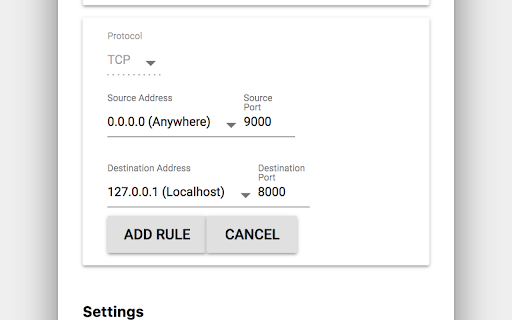
Description from store
Open source Chromebook app for forwarding connections from/to different ports and interfaces (or to internal android IP)
https://github.com/kzahel/connection-forwarder
Release History
2017-11-08 - Initial Release
Latest reviews
- Gaming Gamer521
- I love this app. I need it to access my websocket I wrote in javascript in the linux environment. Google is unfortunately ending support for chrome apps, Which means once that happens, I can't use this, and I won't be able to access my websocket anymore.
- Peter Wurm
- Couldn't connect from local network to my server on chrome os. Now I am able to :)
- Anton Bryntesson
- The App itself is good, but every time I shut down my computer, it's impossible to open the app (and it doesnt work in the background, even if I choose that as an option). To make it work I have to uninstall and install it again, and set the rules once agian, every time I want to use it.
- Daniel hickey
- I have been using for a while, works well. However lately when I shut down my chromebook and reboot, the app will not open. When i click the icon, the chromebook menu disappears but nothing happens. Uninstalling and reinstalling fixes the problem.
- siam bet
- good
- Roland Marcus Rutschmann
- Worked great but now I have to remove and reinstall the app after every OS-update.
- Nazmul I
- Excellent app for enabling ssh in crostini! Use `hostname -I` to get the target IP address for the crostini container when creating the port forwarding rule for ssh.
- Andrew Womersley
- Awesome for port forwarding web development testing from external devices. Also, makes 'localhost' point to linux container. A
- Jeroen Kenters
- Works great. Used it to forward the Folding At Home client port on the Chromebook so that I can control/monitor it from my PC. Definitely going to use this for other purposes that require services to run on the Linux container.
- Garth Johnson
- Oh, wow. Thank you for this! This is a totally required functionality for developers on ChromeOS! I was attempting to develop a Django application locally on my Pixel Slate and could _not_ for the life of me get to the site from anything but the local system until I loaded and used this app. That said, since I am developing in the Crostini environment on the Slate, the address is NOT the same as the Android one and for some reason was not in the drop-down options during configuration - I had to manually add it. I hope this will be an automatic option at some point in the future - manual or not, you are still my hero - thank you. :)
- Daniel Gomez
- good info
- Ago Yakus
- 5 stars no less
- Randy Barrett
- Amazing app - thanks for your efforts. Since you asked for feedback: I agree with one of the other reviewers that the ability to turn on/off logs to see what's going on would be great.
- Jason Grima
- Made local dev on my pixelbook so much more practical!
- Andy Collcott
- Finally a way to access chromeos containers easily! Amazing.
- Shared Williamson
- This app saved me a lot of time and effort. Thanks
- Oskar Vihriälä
- works perfectly. exactly what i need for node.js developement in the linux container.
- Nick McAvoy
- This is exactly what i needed! Works as expected! This really saved my day, thanks developer dude!
- Yuchen Ying
- Reliable and helpful. Thanks for the work!
- Tambe Barsbay
- Works exactly as advertised. A must for developing on a Chromebook.
- Sriram “sriramvenkataramani1” Venkataramani
- 0 is designator for switch position in phonograph-3positions 01 is standby,02 is on,03 is radio on.
- Carlos Filho
- Perfect !! Very very simple...
- Christopher Frazier
- Perfect tool for working with servers in Crostini containers.
- Bradley Taniguchi
- Worked for me and saved me tons of time :D
- Dean Chouinard
- Works great. Used it to set up communication between distributed Elixir nodes.
- David Jansen
- Very handy for accessing services running under Debian in the lxc container on Pixelbook !
- Clive Haworth
- No idea why Android on ChromeOS needs its own network interface... ...but this Chrome App can forward connections from localhost in ChromeOS to the Android network interface. Really useful. As a suggestion it might be good to log what's going on or show some indication packets are being forwarded. Many thanks for your efforts!
- Anonymous
- Works as expected. Saved the day to develop on my Pixelbook for OAuth2 apps using localhost redirects while running the apps in crostini. +1
- Anonymous
- Simple to use. Makes linux host easier to access.
- Alex
- Great and very useful app! Addition thanks for making it Open Source!
- Kyle Graehl
- Just released the app today. Please send me any feedback or bug reports! You might find this useful for forwarding ports to crostini container IP or android container IP addresses.