
iLaunch: Manage Bookmark,History,Tab and More
Extension Actions
- Extension status: Featured
Manage bookmark, history, tab, extension & Quick command launch tool
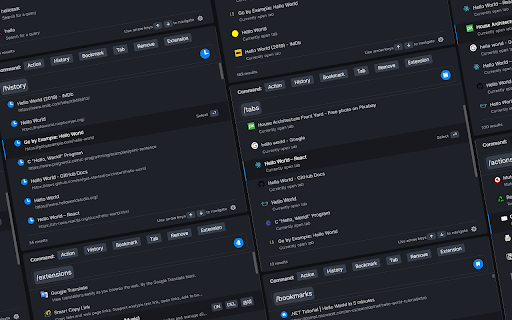
With commands, you can use browser like a pro.
Using iLaunch, you can use browser like a professional, with shortcut commands, quickly start and manage open tabs, bookmarks, browsing history, efficiently manage your extensions, you can also perform all sorts of actions and more, it is your efficiency multiplier tool.
Quick start hotkey by default
Windows: alt+Q
Mac: control+Q
You can also visit "chrome://extensions/shortcuts" management interface to set it by yourself
●Shortcut command
"/action" - enter "/a" quick start.
Integrate more than 50 actions to improve efficiency, such as mute tabs, create various documents, full screen, clear cache, etc.
"/bookmarks" - enter the "/b" quick start.
With this command you can quickly search and browse your bookmarks.
"/extensions" - enter the "/e" quick start.
With this command, you can quickly manage your extensions.
"/history" - enter the "/h" quick start.
With this command, you can quickly search your history.
"/tabs" - enter the "/t" quick start.
With this command, you can quickly switch, open, search tabs.
"/remove" - enter the "/r" quick start.
With this command, you can quickly search and close open tabs and delete useless bookmarks.
More shortcut commands are under development.
●Associative search
Support search engine customization, and it can intelligently associative search to quickly find what you need.
●Multiple themes
It contains multiple themes, light mode, dark mode..., you can use different color schemes according to your own preferences.
●Minimalist mode
Hide shortcut command buttons to let you use browser like a pro.
iLaunch lets you use browser more efficiently.
Latest reviews
- ERIC gong
- Press Alt + Q in a new tab in Chrome, it will open a page chrome-extension://akidhgondomkboblkncnijoiofggpgfo/search/search.html, but not start the launcher.
- Anthony Raimondo
- The best Search Bar I've used, the option to searching extensions blew me away 10/10.
- 548 Leiyi
- 希望能够将这些搜索区分开,然后可以通过更多的快捷键来调用。
- w sine
- nice~
- w sine
- nice~
- Jill
- 快捷且强大,这就是我想要的,love it!!!