
音声合成拡張機能 - Panopreter.com
Extension Actions
- Extension status: Featured
- Live on Store
自然な声でウェブページのテキストを読み上げます。
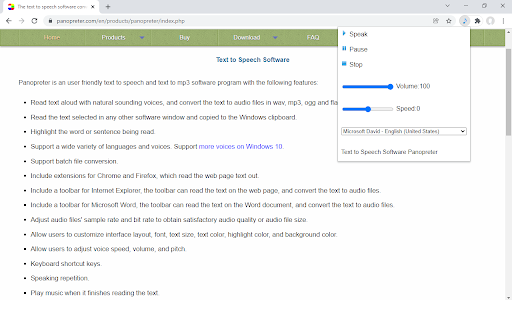
This text-to-speech extension reads text on any web page out with natural voices. People can listen to the text content on the go while doing other things, no need to stare at the screen or page.
The text-to-speech extension by Panopreter is an easy-to-use tool to read the web page content out. Just click on the pop up menu, the selected text or all the text on the web page will be read out with natural sounding voices. The speech synthesis occurs locally on your computer and the text will never be sent to the internet. Users can pause or resume the speech, adjust the volume and speed of the speech.
Here is the detail for installing the text to speech add-on for Chrome web browser: https://www.panopreter.com/en/products/panopreter/browseraddon.php
Be sure to visit this page to download and install the additional required native app, otherwise the extension will not work as you expect.
Latest reviews
- Jack Hamilton
- It works for me in Chrome and Brave browser. You must have purchased the Panopreter.com application which is the Windows application version (where you can copy/paste text to read) but is required for the extension to work. Then just install the extension and pin it (the music note icon for Text to Speech Extension) to the browser bar to get the menu to "Speak", "Pause", and "Stop" reading the entire page as desired. You can also highlight just the text you want read and press "Speak" (you don't have to keep highlighting--you can click away) and it will speak the page content. This app is a relief to read tedious volumes of text for class assignments or just to hear the news. Definitely happy with my purchase, especially since it included this browser extension.
- Zoran M
- Not working. If it were, the voices shown are MS.