
Bookmark's Favicon Changer
Extension Actions
CRX ID
apknepgjdiogjeipheldjlimmjeaomhp
Description from extension meta
An easilier way to change your EDGE bookmark favicon
Image from store
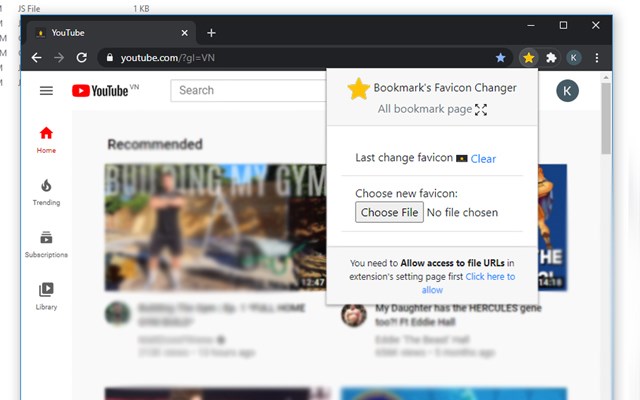
Description from store
Change the favicon for the websites you bookmark. Make your bookmarks unique and stand out.
Important! - You can change the favicon of bookmark URLs only if you enable the option "allow access to file URLs" on the browser extensions page (see screenshot).
You need Bookmark Favicon Changer to be active to continue using your custom favicon. It is not possible to change the favicon and uninstall the extension; your custom favicon will be removed.
Latest reviews
- Jared
- Love the concept, but the favicons keep reverting and only hold in memory for active pages, and only for so long after closing them. To be a useful extension at all, the icons must be persistent.
- Daniel
- Utter waste of time! Does absolutely nothing.
- Mike
- Funktioniert immer noch nicht mit Edge
- Mike
- Funktioniert nicht mit Edge
- 长宏
- 好像不起作用,看不到更改的地方
- Rainer
- Funktioniert, aber etwas fummelig.
- Stefan
- Funktioniert mit Edge nicht
- Flavio
- Ótimo
- Ed
- It does add icons to Favorites but it also displays a webpage with ads when starting Edge in addition to the Home page.
- Steven
- After changing icon, I have to select the extension in the task bar to get it to change...which will only last until the page refreshes. Kinda worthless since the page refreshes every 5 minutes.
- Jake
- It technically works for static URLs, it does not apply if you have a base URL with variables at the end. In my example I tried to change the icon for Facebook Messenger but it would not work as it said I didn't have the page bookmarked yet due to the individual message variables in the URL
- Rod
- My real mission in life is to be able to change the favorite's folder from a plain folder icon to something representative of links in the favorites folder.
- Kimberly
- Just test this out by adding the missing favicon next to my Dollar Tree link. Found a Dollar Tree logo with a quick google search. Saved the image to my downloads folder. Opened it in Paint to remove/cut out some un-needed text. Saved it as a PNG. Then clicked the Favicon Changer icon on my browser toolbar, searched for the image on my computer, and clicked "change." It worked! The lack of favicons for some of my most visited websites was driving me crazy. Thankfully, this worked. The only downside is that it doesn't seem to want to let me replace some of my folder icons. I can only add a picture next to a generic folder :(
- Chris
- Doesn't change the icon and says I need to All access to file URLs even though that option is already enabled.
- SLOBODAN
- The extension does what is says it does just for the first time, when you set it up for a specific page. When page refreshes, favicon is being turned back to default, ignoring what the user set up. When user goes to any other subpage, favicon is being changed to default. Still not the fully functional extension that it needs to be for end user.