
World Clock - Time Zone Digital Clock
Extension Actions
Add world clocks, toggle 12/24, reorder by drag & drop. Glassmorphism popup.
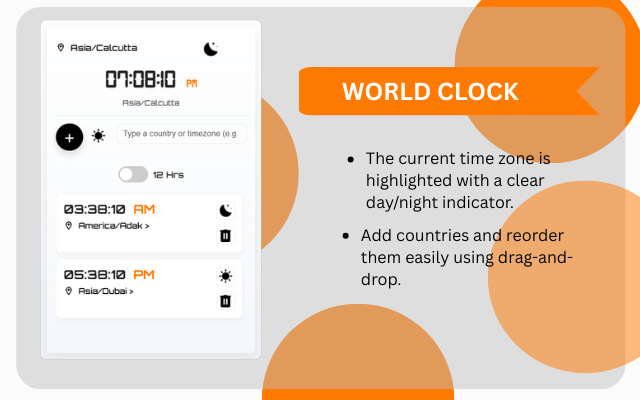
World Clock – Time Zone Digital Clock is a modern and lightweight Microsoft Edge extension that helps you track multiple time zones around the world.
Features:
• Digital 7-segment clock display
• Add the country's time zone you want
• Real-time time zone updates
• Day and night indicator for each city
• Works offline
• No ads, no tracking, no data collection
Perfect for developers, freelancers with client across the globe, travelers, remote workers and global teams who need an accurate world clock and time zone tracker inside their browser.
How It Works:
1. Click the World Clock button on your browser toolbar to open the extension popup.
2. Instantly see your local time displayed prominently at the top with clear digits and a day/night icon.
3. Add new clocks by typing city names or time zone identifiers into the search field; select from suggested results to add the clock.
4. Use drag-and-drop gestures within the popup to reorder clocks according to your priorities or workflow needs.
5. Toggle between 12-hour and 24-hour time formats via a single click to customize viewing preferences.
6. Switch between dark and light themes directly in the popup for optimal visibility depending on ambient lighting.
7. Remove any clock quickly by clicking the delete (trash) icon beside each entry.
8. All your settings, clock configurations, and themes are saved automatically for your next session.
Privacy: - No personal data collected.
If you found any bugs or want extra features to add please free to reach out us
Latest reviews
- Jeyachandran
- very useful extension
- SATHISHKUMAR
- It incredibly useful and easy to use. It helps me keep track of multiple time zones effortlessly, which is perfect for work and connecting with people globally. The interface is clean, intuitive, and customizable. Highly recommended for anyone who needs accurate time zone management!
- praveen
- As a frequent world traveler, this clock extension is a game‑changer. I can see all time zones at once, which makes coordinating flights, calls, and meetups across continents effortless. No more mental math—just instant clarity.
- Naveen
- As a freelancer working with clients across multiple time zones, this extension has been a game‑changer. The minimal and clean design makes it effortless to glance at different clocks without any clutter. I love how intuitive the interface is—adding and reordering cities is smooth, and the day/night indicator is a subtle but very useful touch. Unlike other tools that feel bloated, this one keeps things simple and professional, which fits perfectly into my workflow. The ability to switch between light and dark themes adds to the polished feel, and the fact that it works offline is a huge plus when I’m traveling. Overall, it’s exactly what I needed: a lightweight, distraction‑free way to manage global time zones. Highly recommended for freelancers and remote workers who value clarity and simplicity in their tools.
- VINOTHKUMAR
- Being a freelancer, I work with people from different time zones. This world clock extension lets me see all time zones at one stretch, which is super convenient and saves me from constant conversions.