
Rewords — Text Replacer
Extension Actions
- Extension status: Featured
- Extension status: In-App Purchases
Replace words with words as you browse
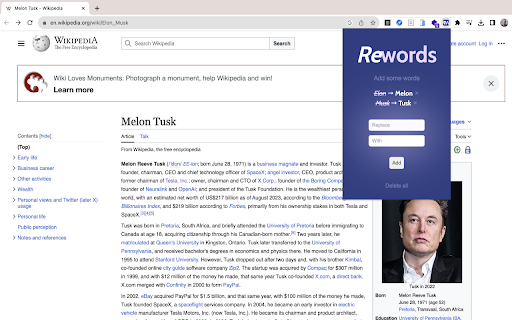
Rewords instantly replaces any words or phrases on web pages as you browse. Clean, fast, and seamless.
— Click the Rewords icon in your Chrome toolbar to open the popup. Your Library shows all your current word pairs.
— Free version gives you 3 slots. Upgrade for unlimited.
— Add a pair: type the word to replace, type the new word (max 30 characters), then hit Add.
— Smart validation prevents duplicates, empty fields, or overly long replacements.
— Your pairs appear with the original struck through and the replacement in bold. Tap × to remove any.
— Clear everything with Delete all (with confirmation).
As you browse, replacements happen live in real-time with zero slowdown.
Your words. Your rules. No surprises.
Latest reviews
- Sasha Belanovsky
- Works just fine!
- Andrea Bassick
- A simple but surprisingly powerful way to take control of what you see online. This extension lets you seamlessly replace words across websites, making content feel more natural, comfortable, and tailored to you. A good everyday example is with recipes when you’re browsing international sites. If a recipe uses unfamiliar terms or ingredients from another country, you can instantly swap them for the words you actually use, making everything easier to follow without breaking your flow. Clean, intuitive, and genuinely practical. This is one of those tools you don’t realise you need until you have it.
- Oleg Rosenfeld
- The perfect extension for curating your web experience. Easily swap out unwanted names or anxiety-inducing words with softer, more positive alternatives.
- Dragana Vucic
- Works as expected!
- Kinggizzerd
- if you use it to change text and switch to another paragraph it will grab the old one and replace the new one destroying weeks of work. probably coded with AI
- Justin Meier
- this is not a text replacer
- Elizabeth Fox
- It works pretty well but doesn't recognize leading or trailing spaces if you try to enter a word that way, so it sometimes makes replacements that don't make sense.
- Mike Herman
- Randomly works. Needed it to change from japanese punctuation marks to english punctuation marks. Set it up to replace "。" with ". " on the whole page... It replace them all with "." (no trailing space) instead. Next I set up to replace "、" with ", " on the page... Again no trailing space... but also if there was more than one comma on a line, it would only do the FIRST comma. All the rest were ignored. Tried to replace "?" with "? ".... not a single one got changed across the whole page.
- Андрей Романов
- I love it! Fixed all the mistakes in his name.
- Андрей Романов
- I love it! Fixed all the mistakes in his name.
- Kotoko Okumura
- Love this app! "Rewords" has made my web browsing experience more enjoyable(^▽^) For instance, I can replace 'Monday' with 'Funday' on news websites, making my weekdays feel less gloomy.
- Kotoko Okumura
- Love this app! "Rewords" has made my web browsing experience more enjoyable(^▽^) For instance, I can replace 'Monday' with 'Funday' on news websites, making my weekdays feel less gloomy.
- Alexander Kiryushkin
- Works!
- Alexander Kiryushkin
- Works!