
Simple Image Resizer
Extension Actions
CRX ID
bficingcnodlbbildpbnjdgcmbipgnbi
Status
- Live on Store
Description from extension meta
調整圖像和照片的大小不失去質量。在一個簡單的方法調整大小
Image from store
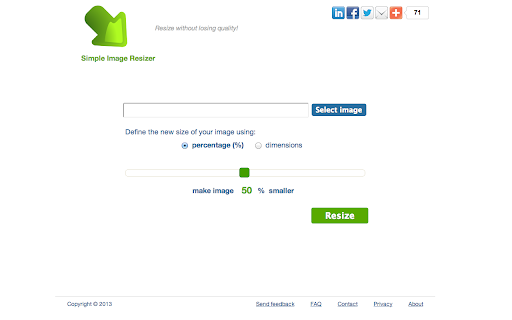
Description from store
調整圖像和照片的大小不失去質量。在一個簡單的方法調整大小。
Latest reviews
- Timothy Magee
- Image is just resized, still blurry, doesn't enhance at all.
- Georgie Matthews
- how do i removed this from my chrome add-ons? Won't show any removal option, just a link to get to the website, no way to remove. Very annoying
- silverpixie6434
- Wonderfully useful. For those of you who don't know, when you click download it's going to open the resized image in a new tab. You have to RIGHT CLICK on the picture and click SAVE IMAGE AS and then you can save it to any file. And pay attention to names. This is NOT a file resizer, it's an image resizer. very different.
- Kiam Oey
- Don't know where the resized pic went !. I think it is a joke.
- Lawrence Edwards
- Uploaded but didn't download modified image.
- Kat
- Seems those who rated it low do not know how it works. Works perfectly for what I need - upload, resize by percentage, then download again. Suggestion: show sizes of files on the screen, so I can get it to the MB I need it to be before downloading. Thanks, absolutely great app!
- Chenning
- it doesn't use the right measurements
- Te Iwi Ngaro Rameka
- Love It :-). Seems alot DO NOT seem to know how it actually works, maybe if they knew what they were doing ?...
- toya amechi
- absolutely love it.
- Anonymous
- It seemed to work fine. I was trying to enlarge photo sizes for something I have been working on. But, I ran into the problem also, that the thing didn't ask where to download the new image. I complained on their site, and this was the response: Grzegorz Farynowski <[email protected]> Mar 19 (5 days ago) to me Hi, Thanks for your e-mail! Resized photos are in "SD Card"/Pictures/PhotoResizer folder. To get resized pictures you can use gallery app or any other file manager like astro - https://play.google.com/store/apps/details?id=com.metago.astro. So, as I understood this, you need a file manager app also, that is compatible with this Image Resizer. It would have been nice to know this before I downloaded it.
- J Phillips
- doesn't resize just reduces size, not any good for me
- Sarkis Davidian III
- wack
- Andrew Ceyton
- When I "download" resized image, it opens up another tab with the resized image. Does not "download" anything to my Drive. Useless.
- Toufik Liverpool
- I want an app not a link to a website
- Marek Tomasik
- in order to resize, it uploads to webpage...little pointless if the point to use this app was to obtain smaller file for uploading ;)
- Bjørn Hjellestad
- No use of this for resizing groups of images, no option to reduce file size, all it does is reduce the image size
- Lu Dux
- It's a link to a web page. Garbage.
- Pierre Jordaan
- no option to reduce file size, all it does is reduce the image size - another chrome waste of time
- Josh Yates
- Does exactly what I want and very quickly, easily, and effectively.
- Glad to Serve You
- does not work. does not identify what folder contains resized file. Does something just do not know what.
- Jorge Rodríguez
- Easy!
- Laurie Dacy
- Crashed Chromebook on 1st use. Lacked a 'resize folder' function anyway. Back to Windows!
- Jade Bisson
- Perfect for Google+!
- Johnny Chiesa
- DOES NOT WORK AT ALL WASTE OF TIME I TRIED TO USE IT AND IT CRASHED LIKE 10 MINS AFTER I HIT "RESIZE" DO NOT DOWNLOAD EVER!!!!!!
- Jeizl Cabaneros
- i love it
- Jessica Plastino
- did not work for chromebook
- Todd Fogleman
- perfect and easy
- Mariya Stoyanova
- Useless
- Garrett Van Tassel
- looks like it could be good but not working on chromebook uploads photo. download converted photo just get a blank screen
- Sep Keuchenius
- finally an app that just does this the right way
- Lateefah Lack
- A great thing! It works great and resizes the picture at the exact size I need it. Thank you!
- V Vasudevan
- Believe me, I tried about 7 other apps before I found this. This is better than all the others. Only thing I noticed is that it takes longer to upload and resize. But 4 stars from me. Thank you.
- Vonda Hartsock-Oneil
- It does not enlarge many pics without stretching them, some it works just fine. This isn't an app either GOOGLE CHROME, quit putting links in the app section geez!
- jeff cummings
- most want to make image larger not smaller.no use to me.
- Sumana Chakraborty
- easy to use and simple interface
- Kyle Brownfield
- Did A bad job of "re sizing" It just stretches it
- Himanshu Deshmukh
- not worth
- Abrie Burger
- What an excellent tool. Only used it once, but so far very impressed.
- Larry Rojas-Valdivia
- Truly works so I can download my wallpapers to fit my desktop or PDA (Phone). Thanks for the app.
- J-P Bosque (JpBosque)
- Doesn't work. Waste of time.
- Juan C
- Just what I needed, resize a PNG image with transparent background.
- George Andrews
- Didn't work at all!
- Andrew Gill
- Excellent! If you want to compress the size of MB heavy images then this tool is brilliant. Simple to use. Very quick. High resolution images still look great. Very pleased.
- Adam Mac
- PERFECT!
- Rob Russell
- Cannot choose dimension units (inches, cm or pixels) and doesn't even tell you what units it uses.
- Ben
- Unless I am missing something major, this is simply a bookmark to a website.... I really need something I could use offline.
- Jettison
- It still loses quality. Avoid.
- Anonymous
- I can only make images smaller, if it does make things larger it is not user friendly to me.
- April Jessica
- OMG! THANK YOU! I have needed one for forever! Thank you! This works GREAT!
- Christine Bavassa
- At last found it!!!!!